Shopify Order Management 2026: The Plus Operator's Architecture and Tooling Playbook

Shopify order management 2026 — what Plus operators need to know in 15 seconds
The admin is not an OMS. At 1,000+ orders a day, native Shopify is the system of record, not the system of action.
Multi-location got smarter in March. Pickup-in-store now fulfills from multiple locations via auto-transfers; Flow has new inventory transfer triggers (Apr 30, 2026).
B2B order management changed April 2, 2026. Native B2B is on Basic, Grow, and Advanced — agency and multi-store workflows need to assume non-Plus stores too.
The build-vs-buy decision is real. Most merchants adopt a dedicated OMS around 5,000-10,000 orders/month — earlier if multi-channel or multi-store.
Self-service order editing is the biggest missing piece. Stores that add it report ticket volume on order changes drops to single digits.
Shopify order management at Plus scale is not a tooling problem — it's an architecture problem. At 100 orders a day, the admin handles operations. At 1,000 orders a day, it becomes a bottleneck and you start adding apps. At 10,000 orders a day, the difference between stores that scale cleanly and ones that grind to a halt isn't the apps they buy — it's where they draw the line between Shopify and the rest of their stack.
This guide is for the people owning that decision: Plus operators running high-volume DTC and B2B, agency tech leads onboarding clients, and architects deciding whether to extend Shopify Flow, integrate a dedicated OMS, or build custom tooling.
The Order Management Architecture That Actually Scales
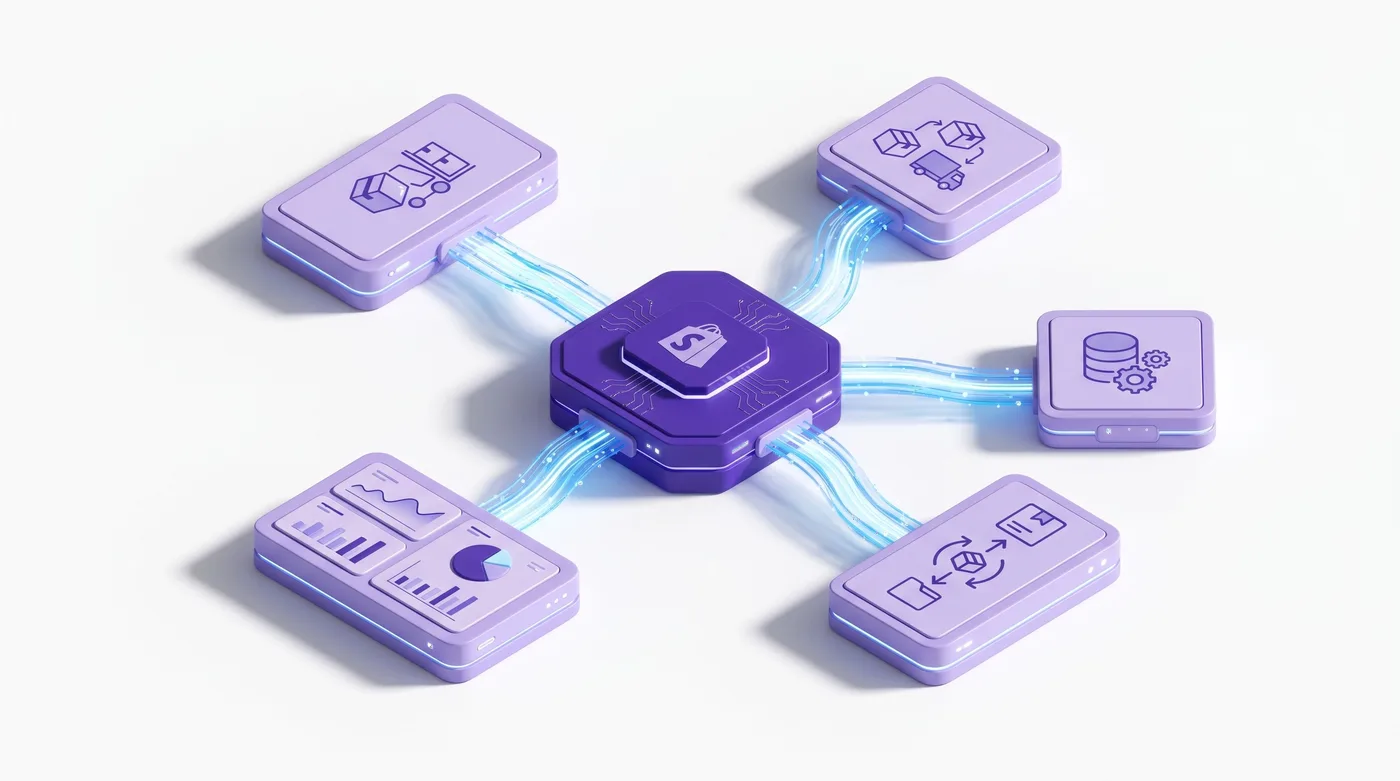
At Plus scale, Shopify order management is a five-layer architecture: data plane (Shopify), routing (multi-location + Flow), fulfillment (3PL/WMS integrations), customer-facing self-service, and reporting/reconciliation. Treating it as a single thing is the most common mistake teams make in the first 6 months after crossing 1,000 orders/day.
The data plane is Shopify itself — the canonical record of orders, line items, payment status, and fulfillment state. Everything else reads from this layer or writes back through the Admin API and webhooks.
The routing layer decides which fulfillment location handles which order. Native Shopify routing is rule-based (priority, proximity, stock), but it's order-by-order. For split shipments, backorder logic, or SLA tiers, you extend with Flow or push logic to a dedicated OMS.
The fulfillment layer is where most Plus stores add third-party glue: Shopify Fulfillment Network, 3PLs (ShipBob, ShipMonk), in-house WMS, and dropshipping integrations. Each speaks back to Shopify via fulfillment API but with different latency, error semantics, and edit-handling behavior.
The customer-facing self-service layer is what merchants forget. Customer accounts show order status but don't allow buyers to modify their orders post-checkout. This gap is where the highest-impact tooling lives.
The reporting layer reconciles everything for finance, BI, and operations dashboards. The April 2026 payout export updates (Bank Reference, Payout ID columns) made this materially cleaner for finance teams running monthly close.

Multi-Location Inventory Allocation and Order Routing
The March 10, 2026 update to Pickup-in-Store changed the routing math for multi-location Plus stores: orders now fulfill from multiple source locations via auto-generated inventory transfers when no single location has full stock. Before this change, multi-item BOPIS orders that couldn't be filled from the customer's chosen store were canceled or required manual intervention.
If you're using assignedLocation rules in Flow or your Admin API integration, audit them — some 18-month-old routing decisions are now suboptimal because the platform handles cases that previously required manual workarounds.
Three additional 2026 changes affect routing at scale:
Flow inventory transfer triggers (April 30, 2026) — new
Inventory transfer ready to shipandInventory transfer completedtriggers fire on transfer state changes. Use cases: alert receiving locations when a transfer dispatches, auto-tag transferred orders for separate fulfillment queues, write transfer metafields back to originating orders.Pickup orders in POS v11.3 (March 30, 2026) — retail staff can create orders for future pickup with the same multi-location transfer logic. Important for made-to-order, customized goods, and in-store special orders.
Payment requests per fulfillment (February 6, 2026) — collect payment as fulfillments complete rather than upfront. Critical for pre-orders, custom products, and B2B orders with backordered SKUs. The buyer pays through Customer Accounts as each fulfillment ships.
For agencies, these three changes mean 2024-era routing setups need a re-audit.
The Fulfillment Layer: 3PL Integration Without Custom Glue Code
The 3PL question for Plus stores in 2026 is no longer "should we use a 3PL" — it's "which integration tier are we on, and is it costing us order edit flexibility?" The most expensive mistake here is choosing a 3PL whose Shopify integration doesn't support post-sync order edits, then discovering it the first time a high-value B2B buyer requests a quantity change.
Three integration tiers in practice:
Tier 1 — Shopify Fulfillment Network or Shopify-built integrations. Lowest friction, full edit support, fastest webhook propagation. Trade-off: limited to specific carriers and warehouses.
Tier 2 — Major 3PL with Shopify-certified app (ShipBob, ShipMonk, Deliverr). Good edit support, decent webhook reliability. Verify before signing: post-sync edit support, handling of canceled-then-reopened orders.
Tier 3 — Custom 3PL or in-house WMS via private app. Maximum control, maximum responsibility. Build idempotent webhook handlers from day one — Shopify retries delivery with exponential backoff, so your WMS must tolerate duplicate
orders/updatedevents without creating duplicate fulfillments.
For agencies, the tier decision affects everything downstream. A Tier 3 client needs a different OMS posture than a Tier 1 client.
Order Editing at Scale: Native Limits, App Layer, and Self-Service
Native Shopify order editing handles the structural side of pre-fulfillment changes — adding or removing line items, adjusting quantities, updating shipping addresses — but stops short of the calculation layer that makes those edits operationally clean. It's effectively raw editing: the admin lets you change the order, but the platform doesn't recalculate around the change the way a complete OMS would.
The gaps merchants actually feel in production:
Discount logic is manual. You can apply a line-item discount when adding an item, but native editing doesn't reapply order-level codes when items change, doesn't recalculate proportional discounts on quantity adjustments, and can't modify discounts already applied. Order-level discounts still need draft orders or partial refunds as workarounds.
No buyer-facing self-service edit flow. Customer accounts show orders but can't modify them; every address-change email is a manual support touch.
No edit-window enforcement. No native rule for "buyer can edit within 3 hours of placement" — you build it in Flow or an app.
No automated re-validation. Native Shopify doesn't tag edited orders or pause them in the warehouse queue, so fulfillment teams re-pick manually.
The math for Plus stores at 500+ orders/day: at 5% generating change requests at 8 minutes each, that's 200 hours of monthly manual work for changes a buyer-facing tool resolves in seconds.
Since this is the Revize blog: Revize provides buyer-facing order editing with rules-based windowing, address swaps, variant changes, and quantity adjustments — including the recalculation logic native order editing skips. For the mechanics of order editing on Shopify, see our Shopify Edit Order Guide.

B2B Order Management After the April 2, 2026 Rollout
The April 2, 2026 expansion of native B2B to Basic, Grow, and Advanced plans changed the B2B order management conversation for everyone — agencies onboarding non-Plus clients now need order management thinking they didn't 6 months ago. Non-Plus B2B includes company profiles, payment terms, volume pricing, vaulted cards, ACH (US), and up to 3 catalogs.
Operationally:
The same architectural pattern applies on every paid plan. Company → Location → Buyer hierarchy, payment terms separate from fulfillment status, draft orders for negotiated pricing.
Plus still differentiates on scale. Unlimited catalogs, direct catalog-to-company/location assignment, partial payments, and deposits stay Plus-exclusive — the features that matter when running 500+ wholesale customers with per-account pricing.
The B2B edit gap persists. Buyers regularly update line items post-PO, adjust quantities, change PO numbers — none of which native Shopify surfaces as self-service.
For deeper B2B architecture see our Shopify B2B 2026 Complete Guide.
Shopify Flow as the Order Operations Backbone
Shopify Flow is the most underused tool in the Plus order management stack — December 2025 added test runs and April 2026 added inventory transfer triggers, turning it into a production-grade automation layer for order ops. Most teams use Flow for VIP tagging and abandoned cart emails. The order ops potential is much larger.
Plus-relevant Flow patterns for 2026:
Auto-pause fulfillment on flagged addresses. Trigger:
Order created. Condition: address validation flag. Action: addhold-for-reviewtag, prevent auto-fulfillment, Slack the ops team.B2B order routing to a separate queue. Trigger:
Order created. Condition: B2B company assigned. Action: tag withb2b-queue, write payment terms metafield, assign to dedicated fulfillment location.Inventory transfer alerts. Trigger (April 30, 2026):
Inventory transfer ready to ship. Action: notify receiving location ops with expected arrival window.Order edit re-validation. Trigger:
Order updated. Condition: line items changed AND fulfillable. Action: tagedited-needs-repick, alert warehouse, write timestamp metafield.Test runs before activation (Dec 11, 2025). Every Flow change in production should go through a test run — preview the exact path through branches and loops, inspect variable state, catch issues before activation.
The combination of test runs and new triggers means agencies can now ship Flow workflows with the same review confidence as code deploys.
The OMS Build vs. Buy Decision
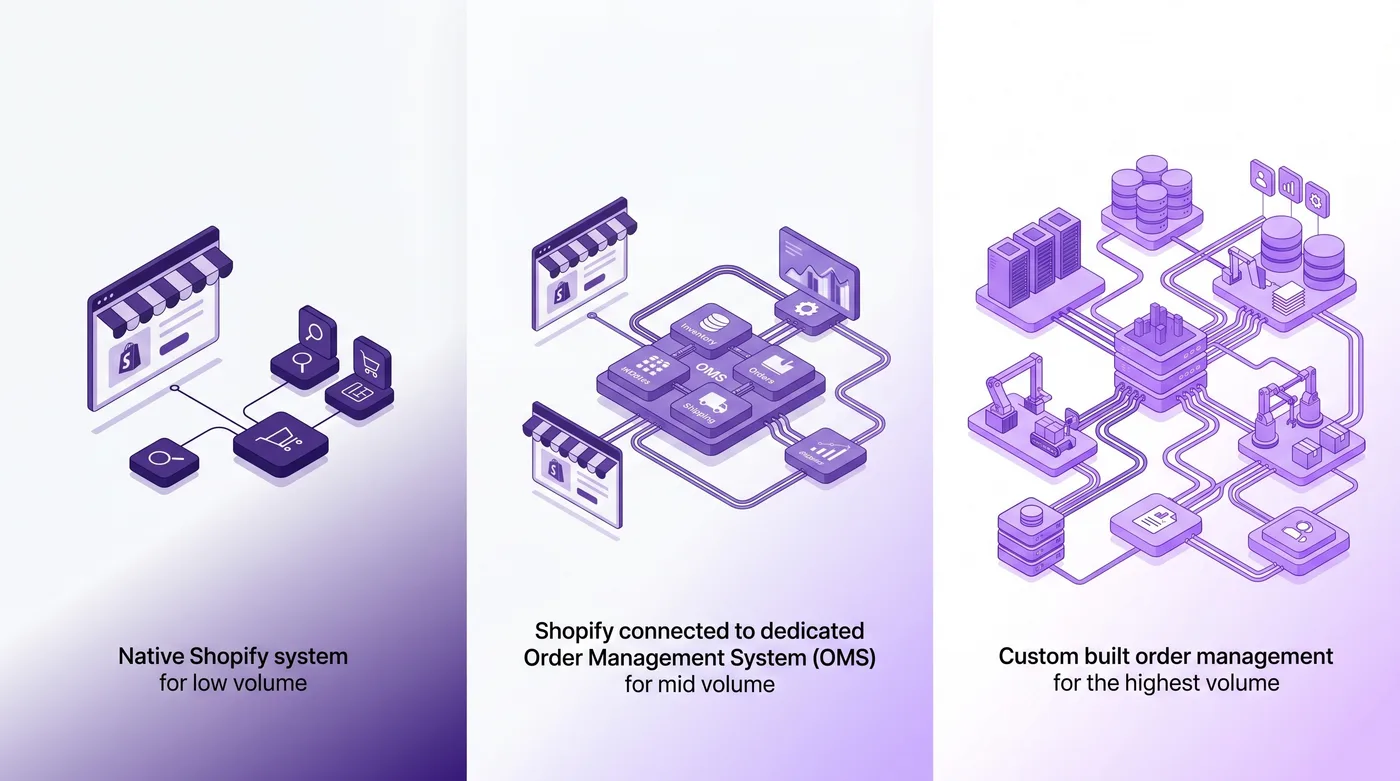
The threshold where Plus merchants stop bolting apps together and adopt a dedicated OMS is around 5,000-10,000 orders per month for single-channel DTC — earlier if multi-channel or multi-store. Below that, an OMS rarely justifies itself; above it, the operational drag of running order ops out of the admin compounds fast.
Path | Best fit | Strengths | Trade-offs |
|---|---|---|---|
Native Shopify + apps | <5,000 orders/month, single channel | Lowest setup cost, fastest, full ecosystem | Limited at multi-channel/multi-store, complex B2B routing |
Shopify + dedicated OMS (Brightpearl, Acumatica, NetSuite) | 5,000-50,000 orders/month, multi-channel | Centralized data, strong reporting, ERP integration | 3-6 month implementation, $30k-$150k upfront |
Custom OMS via Shopify Admin API | 50,000+ orders/month, unique workflows | Maximum control, exact-fit logic | Engineering ownership, ongoing maintenance |
Most Plus stores end up on the middle path: Shopify as source of truth, Flow for routine automation, OMS for cross-channel visibility, Revize-style apps for buyer-facing self-service. No single tool covers everything — the decision is which boundaries to draw.
For agencies, the OMS question belongs in the first meeting, not month four. A client at 8,000 orders/month is mid-decision; one at 80,000 orders/month has already decided and just hasn't admitted it yet.

API and Webhook Architecture for Order Events
For dev teams building order management integrations, GraphQL Admin API and order webhooks are the only two surfaces that matter — getting webhook architecture right early saves a year of firefighting. The November 2025 migration of tax webhook resource IDs to Global IDs in API version 2026-01 is a useful canary: Shopify is consolidating on GIDs everywhere, so new integrations should use them from day one.
Three patterns that hold up at scale:
Idempotent webhook handlers. Shopify retries delivery with exponential backoff. Track processed webhook IDs and check before processing — handlers must tolerate the same event multiple times without creating duplicate downstream records.
Webhook + GraphQL, not payload alone. Use webhooks as notification triggers and re-fetch canonical state via GraphQL for anything where state matters. Avoids race conditions when related events arrive together.
Bulk operations for backfills and reporting. Use bulk operations GraphQL rather than paginated queries — order of magnitude faster, avoids rate limits at high volume.
The Bottom Line
Shopify order management in 2026 is a layered architecture problem, not a tooling problem. Plus operators who treat it as architecture — deliberate decisions about routing, fulfillment, self-service, and OMS scope — scale cleanly. Teams that stack apps without an architectural view eventually hit a wall, usually around 5,000-10,000 orders/month.
For Plus operators: audit routing rules against the March/April 2026 multi-location and inventory transfer changes. Test-run Flow workflows before any production change. Make a deliberate build-vs-buy call before volume forces it.
For agencies: start with the OMS architecture conversation in discovery. Map the client's state across the five layers. The April 2 B2B-on-all-plans rollout means non-Plus clients now need order management thinking they didn't 6 months ago.
For everyone: native Shopify still doesn't provide buyer-facing order editing. That gap is the single biggest missing piece in most order management stacks; closing it typically pays back in support hours within the first month.
Here's what to do this week:
Audit your fulfillment routing against the new multi-location transfer behavior (March 10, 2026)
Add the new Flow inventory transfer triggers to your operations alerting workflows
Test-run any production Flow workflow you haven't touched in 6+ months
If you don't have buyer-facing self-service order editing, install one this week — the support-hours math is unambiguous
If you're approaching 5,000 orders/month without an OMS plan, start the discovery conversation now

Frequently Asked Questions
What's the order volume threshold where I should consider a dedicated OMS?
For single-channel DTC Plus merchants, 5,000-10,000 orders per month is when a dedicated OMS starts paying back. Multi-channel and multi-store hit it sooner — sometimes 2,000 orders/month per store when complexity dominates volume. Below that, native Shopify plus apps cover the workflow at lower cost.
How does the March 2026 multi-location pickup update change routing?
Pickup-in-store orders now fulfill via inventory transfers from multiple source locations automatically when no single location has full stock. Before March 10, multi-item BOPIS orders that couldn't be filled from the chosen store failed or required manual intervention. Routing rules and assignedLocation logic written before this should be re-audited.
Can buyers edit their own orders on Shopify in 2026?
Native Shopify still does not provide buyer-facing post-checkout order editing. Customer Accounts show status and tracking; buyers cannot modify line items, addresses, or quantities through native UI. Self-service editing requires a third-party tool.
What's new in Shopify Flow for order management in 2026?
Two updates: inventory transfer triggers (April 30, 2026) and test runs (December 11, 2025). Triggers are Inventory transfer ready to ship and completed. Test runs preview workflow behavior before activation. Combined, these turn Flow into a production automation layer.
How should I architect webhook handlers for order events at scale?
Build them idempotent from day one — Shopify retries delivery with exponential backoff, so the same orders/updated event arrives multiple times if your endpoint flakes once. Track processed webhook IDs. Use webhooks as notification triggers, re-fetch canonical state via GraphQL. For backfills, use the bulk operations API.
Did B2B order management change with the April 2026 rollout?
Yes — as of April 2, 2026, native B2B is on every paid plan. The Company → Location → Buyer hierarchy applies everywhere. Plus retains unlimited catalogs, direct catalog assignment, partial payments, and deposits.
What 3PL integration mistakes should I avoid?
The most expensive mistake is a 3PL whose integration doesn't support post-sync order edits. Verify before signing: post-sync edits, canceled-reopened handling, webhook latency. For custom integrations, idempotent handlers are non-negotiable.
Can I use Sidekick to query order data?
Yes — as of January 6, 2026, Sidekick generates ShopifyQL queries from natural language for payments and fulfillment data. Examples: "Show me fulfillment times by carrier." Useful for ad-hoc questions; for production reports, write canonical queries.
How do payment requests per fulfillment work?
As of February 6, 2026, you can collect payment as fulfillments complete — useful for mixed lead times, pre-orders, and B2B with backordered SKUs. Buyers pay through Customer Accounts as each fulfillment ships. Changes the cash flow model for pre-order-heavy stores.
What does build vs buy mean for Shopify OMS in practice?
Three paths: Shopify + apps (low volume), Shopify + dedicated OMS (mid-high volume, multi-channel), or custom OMS via Admin API (highest volume). Most Plus stores live on the middle path: Shopify as source of truth, Flow for automation, OMS for cross-channel visibility.
How do I keep order analytics clean across all this?
Use bulk operations GraphQL for batch ETL, treat Shopify as source of truth, reconcile against payout exports for finance close. April 2026 payout export updates (Bank Reference, Payout ID) make monthly close cleaner. Daily Analytics insights surface trends automatically — build canonical queries for production reporting.
What's the highest-impact Shopify order management change to make this year?
Adding buyer-facing self-service order editing. Stores that add it report tickets on order changes drop from 5%+ to 1-2% — at 10,000 orders/month, that's 67 hours of monthly support time eliminated.
Related Articles
Shopify B2B 2026 Complete Guide — B2B operational architecture post April 2026 rollout
Shopify Checkout Extensibility 2026 — the checkout layer Shopify order management runs on
How to Edit an Order on Shopify — order editing fundamentals for DTC and B2B
Advanced Shopify Flow Workflows — automation patterns for the architecture above
The Universal Commerce Protocol (UCP) — broader platform direction
Shopify order management 2026 — what Plus operators need to know in 15 seconds
The admin is not an OMS. At 1,000+ orders a day, native Shopify is the system of record, not the system of action.
Multi-location got smarter in March. Pickup-in-store now fulfills from multiple locations via auto-transfers; Flow has new inventory transfer triggers (Apr 30, 2026).
B2B order management changed April 2, 2026. Native B2B is on Basic, Grow, and Advanced — agency and multi-store workflows need to assume non-Plus stores too.
The build-vs-buy decision is real. Most merchants adopt a dedicated OMS around 5,000-10,000 orders/month — earlier if multi-channel or multi-store.
Self-service order editing is the biggest missing piece. Stores that add it report ticket volume on order changes drops to single digits.
Shopify order management at Plus scale is not a tooling problem — it's an architecture problem. At 100 orders a day, the admin handles operations. At 1,000 orders a day, it becomes a bottleneck and you start adding apps. At 10,000 orders a day, the difference between stores that scale cleanly and ones that grind to a halt isn't the apps they buy — it's where they draw the line between Shopify and the rest of their stack.
This guide is for the people owning that decision: Plus operators running high-volume DTC and B2B, agency tech leads onboarding clients, and architects deciding whether to extend Shopify Flow, integrate a dedicated OMS, or build custom tooling.

The Order Management Architecture That Actually Scales
At Plus scale, Shopify order management is a five-layer architecture: data plane (Shopify), routing (multi-location + Flow), fulfillment (3PL/WMS integrations), customer-facing self-service, and reporting/reconciliation. Treating it as a single thing is the most common mistake teams make in the first 6 months after crossing 1,000 orders/day.
The data plane is Shopify itself — the canonical record of orders, line items, payment status, and fulfillment state. Everything else reads from this layer or writes back through the Admin API and webhooks.
The routing layer decides which fulfillment location handles which order. Native Shopify routing is rule-based (priority, proximity, stock), but it's order-by-order. For split shipments, backorder logic, or SLA tiers, you extend with Flow or push logic to a dedicated OMS.
The fulfillment layer is where most Plus stores add third-party glue: Shopify Fulfillment Network, 3PLs (ShipBob, ShipMonk), in-house WMS, and dropshipping integrations. Each speaks back to Shopify via fulfillment API but with different latency, error semantics, and edit-handling behavior.
The customer-facing self-service layer is what merchants forget. Customer accounts show order status but don't allow buyers to modify their orders post-checkout. This gap is where the highest-impact tooling lives.
The reporting layer reconciles everything for finance, BI, and operations dashboards. The April 2026 payout export updates (Bank Reference, Payout ID columns) made this materially cleaner for finance teams running monthly close.

Multi-Location Inventory Allocation and Order Routing
The March 10, 2026 update to Pickup-in-Store changed the routing math for multi-location Plus stores: orders now fulfill from multiple source locations via auto-generated inventory transfers when no single location has full stock. Before this change, multi-item BOPIS orders that couldn't be filled from the customer's chosen store were canceled or required manual intervention.
If you're using assignedLocation rules in Flow or your Admin API integration, audit them — some 18-month-old routing decisions are now suboptimal because the platform handles cases that previously required manual workarounds.
Three additional 2026 changes affect routing at scale:
Flow inventory transfer triggers (April 30, 2026) — new
Inventory transfer ready to shipandInventory transfer completedtriggers fire on transfer state changes. Use cases: alert receiving locations when a transfer dispatches, auto-tag transferred orders for separate fulfillment queues, write transfer metafields back to originating orders.Pickup orders in POS v11.3 (March 30, 2026) — retail staff can create orders for future pickup with the same multi-location transfer logic. Important for made-to-order, customized goods, and in-store special orders.
Payment requests per fulfillment (February 6, 2026) — collect payment as fulfillments complete rather than upfront. Critical for pre-orders, custom products, and B2B orders with backordered SKUs. The buyer pays through Customer Accounts as each fulfillment ships.
For agencies, these three changes mean 2024-era routing setups need a re-audit.
The Fulfillment Layer: 3PL Integration Without Custom Glue Code
The 3PL question for Plus stores in 2026 is no longer "should we use a 3PL" — it's "which integration tier are we on, and is it costing us order edit flexibility?" The most expensive mistake here is choosing a 3PL whose Shopify integration doesn't support post-sync order edits, then discovering it the first time a high-value B2B buyer requests a quantity change.
Three integration tiers in practice:
Tier 1 — Shopify Fulfillment Network or Shopify-built integrations. Lowest friction, full edit support, fastest webhook propagation. Trade-off: limited to specific carriers and warehouses.
Tier 2 — Major 3PL with Shopify-certified app (ShipBob, ShipMonk, Deliverr). Good edit support, decent webhook reliability. Verify before signing: post-sync edit support, handling of canceled-then-reopened orders.
Tier 3 — Custom 3PL or in-house WMS via private app. Maximum control, maximum responsibility. Build idempotent webhook handlers from day one — Shopify retries delivery with exponential backoff, so your WMS must tolerate duplicate
orders/updatedevents without creating duplicate fulfillments.
For agencies, the tier decision affects everything downstream. A Tier 3 client needs a different OMS posture than a Tier 1 client.
Order Editing at Scale: Native Limits, App Layer, and Self-Service
Native Shopify order editing handles the structural side of pre-fulfillment changes — adding or removing line items, adjusting quantities, updating shipping addresses — but stops short of the calculation layer that makes those edits operationally clean. It's effectively raw editing: the admin lets you change the order, but the platform doesn't recalculate around the change the way a complete OMS would.
The gaps merchants actually feel in production:
Discount logic is manual. You can apply a line-item discount when adding an item, but native editing doesn't reapply order-level codes when items change, doesn't recalculate proportional discounts on quantity adjustments, and can't modify discounts already applied. Order-level discounts still need draft orders or partial refunds as workarounds.
No buyer-facing self-service edit flow. Customer accounts show orders but can't modify them; every address-change email is a manual support touch.
No edit-window enforcement. No native rule for "buyer can edit within 3 hours of placement" — you build it in Flow or an app.
No automated re-validation. Native Shopify doesn't tag edited orders or pause them in the warehouse queue, so fulfillment teams re-pick manually.
The math for Plus stores at 500+ orders/day: at 5% generating change requests at 8 minutes each, that's 200 hours of monthly manual work for changes a buyer-facing tool resolves in seconds.
Since this is the Revize blog: Revize provides buyer-facing order editing with rules-based windowing, address swaps, variant changes, and quantity adjustments — including the recalculation logic native order editing skips. For the mechanics of order editing on Shopify, see our Shopify Edit Order Guide.

B2B Order Management After the April 2, 2026 Rollout
The April 2, 2026 expansion of native B2B to Basic, Grow, and Advanced plans changed the B2B order management conversation for everyone — agencies onboarding non-Plus clients now need order management thinking they didn't 6 months ago. Non-Plus B2B includes company profiles, payment terms, volume pricing, vaulted cards, ACH (US), and up to 3 catalogs.
Operationally:
The same architectural pattern applies on every paid plan. Company → Location → Buyer hierarchy, payment terms separate from fulfillment status, draft orders for negotiated pricing.
Plus still differentiates on scale. Unlimited catalogs, direct catalog-to-company/location assignment, partial payments, and deposits stay Plus-exclusive — the features that matter when running 500+ wholesale customers with per-account pricing.
The B2B edit gap persists. Buyers regularly update line items post-PO, adjust quantities, change PO numbers — none of which native Shopify surfaces as self-service.
For deeper B2B architecture see our Shopify B2B 2026 Complete Guide.
Shopify Flow as the Order Operations Backbone
Shopify Flow is the most underused tool in the Plus order management stack — December 2025 added test runs and April 2026 added inventory transfer triggers, turning it into a production-grade automation layer for order ops. Most teams use Flow for VIP tagging and abandoned cart emails. The order ops potential is much larger.
Plus-relevant Flow patterns for 2026:
Auto-pause fulfillment on flagged addresses. Trigger:
Order created. Condition: address validation flag. Action: addhold-for-reviewtag, prevent auto-fulfillment, Slack the ops team.B2B order routing to a separate queue. Trigger:
Order created. Condition: B2B company assigned. Action: tag withb2b-queue, write payment terms metafield, assign to dedicated fulfillment location.Inventory transfer alerts. Trigger (April 30, 2026):
Inventory transfer ready to ship. Action: notify receiving location ops with expected arrival window.Order edit re-validation. Trigger:
Order updated. Condition: line items changed AND fulfillable. Action: tagedited-needs-repick, alert warehouse, write timestamp metafield.Test runs before activation (Dec 11, 2025). Every Flow change in production should go through a test run — preview the exact path through branches and loops, inspect variable state, catch issues before activation.
The combination of test runs and new triggers means agencies can now ship Flow workflows with the same review confidence as code deploys.
The OMS Build vs. Buy Decision
The threshold where Plus merchants stop bolting apps together and adopt a dedicated OMS is around 5,000-10,000 orders per month for single-channel DTC — earlier if multi-channel or multi-store. Below that, an OMS rarely justifies itself; above it, the operational drag of running order ops out of the admin compounds fast.
Path | Best fit | Strengths | Trade-offs |
|---|---|---|---|
Native Shopify + apps | <5,000 orders/month, single channel | Lowest setup cost, fastest, full ecosystem | Limited at multi-channel/multi-store, complex B2B routing |
Shopify + dedicated OMS (Brightpearl, Acumatica, NetSuite) | 5,000-50,000 orders/month, multi-channel | Centralized data, strong reporting, ERP integration | 3-6 month implementation, $30k-$150k upfront |
Custom OMS via Shopify Admin API | 50,000+ orders/month, unique workflows | Maximum control, exact-fit logic | Engineering ownership, ongoing maintenance |
Most Plus stores end up on the middle path: Shopify as source of truth, Flow for routine automation, OMS for cross-channel visibility, Revize-style apps for buyer-facing self-service. No single tool covers everything — the decision is which boundaries to draw.
For agencies, the OMS question belongs in the first meeting, not month four. A client at 8,000 orders/month is mid-decision; one at 80,000 orders/month has already decided and just hasn't admitted it yet.

API and Webhook Architecture for Order Events
For dev teams building order management integrations, GraphQL Admin API and order webhooks are the only two surfaces that matter — getting webhook architecture right early saves a year of firefighting. The November 2025 migration of tax webhook resource IDs to Global IDs in API version 2026-01 is a useful canary: Shopify is consolidating on GIDs everywhere, so new integrations should use them from day one.
Three patterns that hold up at scale:
Idempotent webhook handlers. Shopify retries delivery with exponential backoff. Track processed webhook IDs and check before processing — handlers must tolerate the same event multiple times without creating duplicate downstream records.
Webhook + GraphQL, not payload alone. Use webhooks as notification triggers and re-fetch canonical state via GraphQL for anything where state matters. Avoids race conditions when related events arrive together.
Bulk operations for backfills and reporting. Use bulk operations GraphQL rather than paginated queries — order of magnitude faster, avoids rate limits at high volume.
The Bottom Line
Shopify order management in 2026 is a layered architecture problem, not a tooling problem. Plus operators who treat it as architecture — deliberate decisions about routing, fulfillment, self-service, and OMS scope — scale cleanly. Teams that stack apps without an architectural view eventually hit a wall, usually around 5,000-10,000 orders/month.
For Plus operators: audit routing rules against the March/April 2026 multi-location and inventory transfer changes. Test-run Flow workflows before any production change. Make a deliberate build-vs-buy call before volume forces it.
For agencies: start with the OMS architecture conversation in discovery. Map the client's state across the five layers. The April 2 B2B-on-all-plans rollout means non-Plus clients now need order management thinking they didn't 6 months ago.
For everyone: native Shopify still doesn't provide buyer-facing order editing. That gap is the single biggest missing piece in most order management stacks; closing it typically pays back in support hours within the first month.
Here's what to do this week:
Audit your fulfillment routing against the new multi-location transfer behavior (March 10, 2026)
Add the new Flow inventory transfer triggers to your operations alerting workflows
Test-run any production Flow workflow you haven't touched in 6+ months
If you don't have buyer-facing self-service order editing, install one this week — the support-hours math is unambiguous
If you're approaching 5,000 orders/month without an OMS plan, start the discovery conversation now

Frequently Asked Questions
What's the order volume threshold where I should consider a dedicated OMS?
For single-channel DTC Plus merchants, 5,000-10,000 orders per month is when a dedicated OMS starts paying back. Multi-channel and multi-store hit it sooner — sometimes 2,000 orders/month per store when complexity dominates volume. Below that, native Shopify plus apps cover the workflow at lower cost.
How does the March 2026 multi-location pickup update change routing?
Pickup-in-store orders now fulfill via inventory transfers from multiple source locations automatically when no single location has full stock. Before March 10, multi-item BOPIS orders that couldn't be filled from the chosen store failed or required manual intervention. Routing rules and assignedLocation logic written before this should be re-audited.
Can buyers edit their own orders on Shopify in 2026?
Native Shopify still does not provide buyer-facing post-checkout order editing. Customer Accounts show status and tracking; buyers cannot modify line items, addresses, or quantities through native UI. Self-service editing requires a third-party tool.
What's new in Shopify Flow for order management in 2026?
Two updates: inventory transfer triggers (April 30, 2026) and test runs (December 11, 2025). Triggers are Inventory transfer ready to ship and completed. Test runs preview workflow behavior before activation. Combined, these turn Flow into a production automation layer.
How should I architect webhook handlers for order events at scale?
Build them idempotent from day one — Shopify retries delivery with exponential backoff, so the same orders/updated event arrives multiple times if your endpoint flakes once. Track processed webhook IDs. Use webhooks as notification triggers, re-fetch canonical state via GraphQL. For backfills, use the bulk operations API.
Did B2B order management change with the April 2026 rollout?
Yes — as of April 2, 2026, native B2B is on every paid plan. The Company → Location → Buyer hierarchy applies everywhere. Plus retains unlimited catalogs, direct catalog assignment, partial payments, and deposits.
What 3PL integration mistakes should I avoid?
The most expensive mistake is a 3PL whose integration doesn't support post-sync order edits. Verify before signing: post-sync edits, canceled-reopened handling, webhook latency. For custom integrations, idempotent handlers are non-negotiable.
Can I use Sidekick to query order data?
Yes — as of January 6, 2026, Sidekick generates ShopifyQL queries from natural language for payments and fulfillment data. Examples: "Show me fulfillment times by carrier." Useful for ad-hoc questions; for production reports, write canonical queries.
How do payment requests per fulfillment work?
As of February 6, 2026, you can collect payment as fulfillments complete — useful for mixed lead times, pre-orders, and B2B with backordered SKUs. Buyers pay through Customer Accounts as each fulfillment ships. Changes the cash flow model for pre-order-heavy stores.
What does build vs buy mean for Shopify OMS in practice?
Three paths: Shopify + apps (low volume), Shopify + dedicated OMS (mid-high volume, multi-channel), or custom OMS via Admin API (highest volume). Most Plus stores live on the middle path: Shopify as source of truth, Flow for automation, OMS for cross-channel visibility.
How do I keep order analytics clean across all this?
Use bulk operations GraphQL for batch ETL, treat Shopify as source of truth, reconcile against payout exports for finance close. April 2026 payout export updates (Bank Reference, Payout ID) make monthly close cleaner. Daily Analytics insights surface trends automatically — build canonical queries for production reporting.
What's the highest-impact Shopify order management change to make this year?
Adding buyer-facing self-service order editing. Stores that add it report tickets on order changes drop from 5%+ to 1-2% — at 10,000 orders/month, that's 67 hours of monthly support time eliminated.
Related Articles
Shopify B2B 2026 Complete Guide — B2B operational architecture post April 2026 rollout
Shopify Checkout Extensibility 2026 — the checkout layer Shopify order management runs on
How to Edit an Order on Shopify — order editing fundamentals for DTC and B2B
Advanced Shopify Flow Workflows — automation patterns for the architecture above
The Universal Commerce Protocol (UCP) — broader platform direction
Revize your Shopify store. Lead with customer experience.
© Copyright 2024, All Rights Reserved
Revize your Shopify store. Lead with customer experience.
© Copyright 2024, All Rights Reserved
Revize your Shopify store. Lead with customer experience.
© Copyright 2024, All Rights Reserved
Revize your Shopify store. Lead with customer experience.
© Copyright 2024, All Rights Reserved