
How to Stop Your 3PL Picking a Shopify Order During the Edit Window (2026)

The answer first
If your 3PL pulls a Shopify order as soon as it is created, an edit window does not protect the operation by itself. The customer may successfully change the order in Shopify while the warehouse is already picking the old address, SKU, or quantity. Unfulfilled does not mean “do not import.” You need one real release condition: a Shopify fulfillment hold that the downstream workflow respects, delayed payment capture with a paid-status gate, or an import rule that waits for a release tag.
Keep that gate short on purpose. Across 10 million+ Shopify orders, the median edit was 4.6 minutes and 80.6% of edits happened in the first hour (Revize, 2026). That makes the first hour a useful coverage reference. It does not establish that one hour is the best window for every warehouse.
For a Shopify Plus, Advanced, or Grow operation, the implementation question is: “What exact event makes this order pickable?” The answer must be explicit in Shopify, the connector, and the warehouse procedure.
Shopify Unfulfilled is not a warehouse pause
Shopify tracks payment and fulfillment separately. Its order-status documentation describes Unfulfilled as the normal state before fulfillment is complete. It describes On hold as the state that blocks fulfillment until the hold is released.
That distinction matters because an external connector can have its own ingest rule. It may listen for order creation, poll for paid orders, read fulfillment status, or filter by a tag. Shopify showing Unfulfilled in the admin does not tell you which of those events the connector uses. If the connector has already created a shipment or pick task, changing the Shopify record later may be too late.
A Shopify fulfillment hold is stronger inside Shopify’s fulfillment model. Shopify says a held fulfillment cannot be fulfilled until released. Its holding fulfillments guide also explains that orders can contain separate fulfillment work at different locations, so inspect the fulfillment orders rather than only the order-level badge.
Even then, do not turn “Shopify can hold fulfillment” into “our 3PL definitely waits.” Some connectors import a held order and map it to their own on-hold queue. Others may not use the Shopify hold as an ingest condition at all. The complete route must be documented and tested.
The two clocks you have to control
An order-editing rollout has two clocks. Most failed rollouts configure only the first.
Clock | Starts | Ends | What the operator must verify |
|---|---|---|---|
Customer edit clock | Shopify creates the order | Revize closes editing on the order status page | The customer can submit allowed changes to the same Shopify order before the cutoff |
Warehouse ingest clock | The connector detects an eligible order | The first pick, allocation, label, or other warehouse-processing event begins | The order cannot become pickable until the customer edit clock has ended |
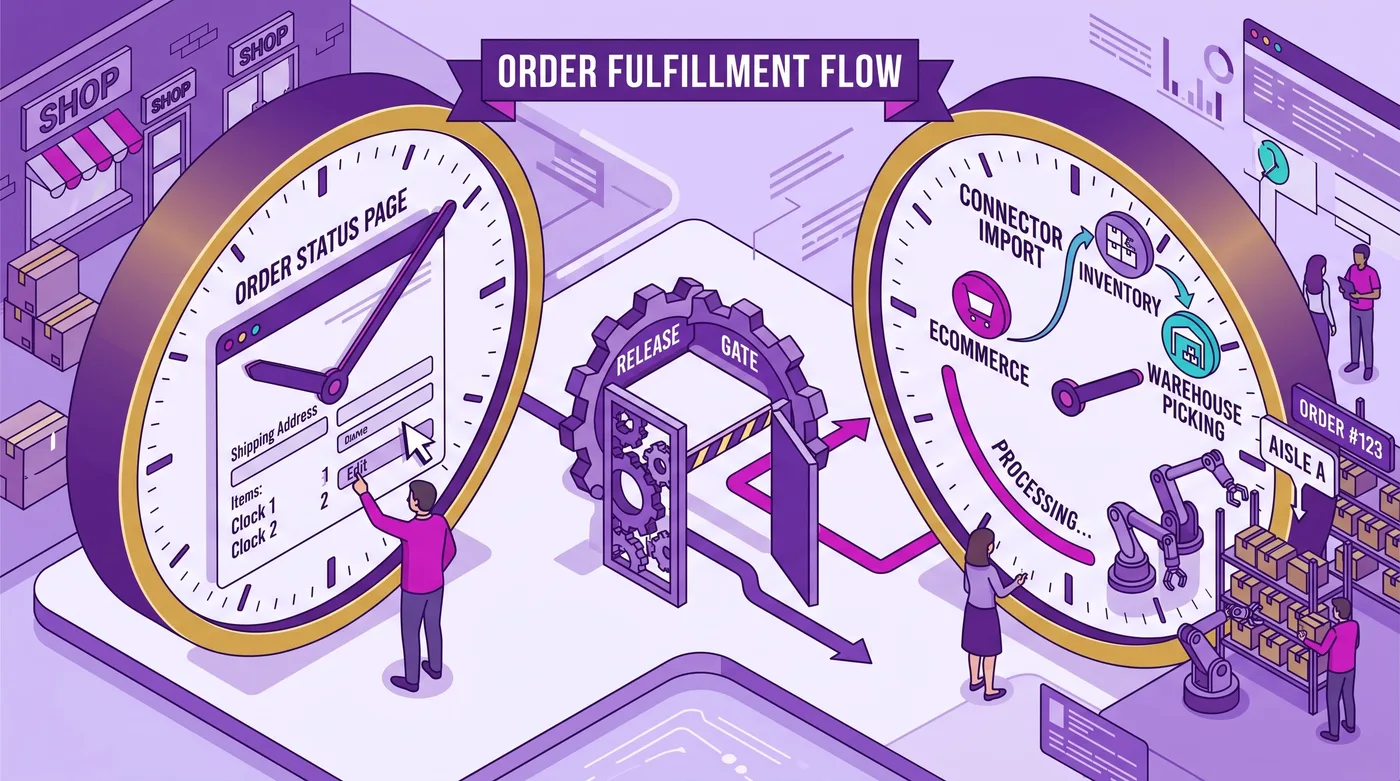
The safe relationship is simple:
customer editing closes → release condition occurs → connector imports or advances the order → picking begins
If connector import or warehouse processing can happen before the release condition, the edit window is only a user-interface promise. The customer sees an edit button, but the operation has no reliable way to honor the result.
This is also why “until fulfillment” needs careful treatment. Revize can keep the customer portal open until Shopify marks the order fulfilled, but Revize’s edit-window documentation explicitly says that this option does not place the order on hold. It controls how long editing remains available. It does not stop a warehouse from importing or starting work.
Identify the connector’s actual pull trigger
Before choosing a path, ask the 3PL or integration owner one concrete question: What exact state makes a Shopify order eligible to import or pick?
There are three useful answers for an order editing 3PL Shopify workflow:
Pull-trigger model | Order is protected while | Release event | Main failure to test |
|---|---|---|---|
Hold-respecting | The relevant Shopify fulfillment order is | Revize releases the hold when editing closes | The connector imports early, ignores the hold, or lets automation/users process its own on-hold queue |
Paid/authorized | Payment remains | Revize captures payment after editing closes, changing the payment state used by the connector | The connector treats |
Tag-on-import | The order does not have the required release tag | Revize adds | The connector imports on creation anyway, does not re-evaluate a later tag, or treats the tag as informational only |
Do not choose from the names in this table. Choose from observed behavior. An integration page or app-store listing can show that two products connect; it does not prove which event prevents warehouse ingestion in your account.
Coverage math: use timing data without inventing an optimum
Revize’s 2026 analysis found that 5.2% were edited after checkout (~1 in 19). The median edit took 4.6 minutes. Of the edits observed, 80.6% happened in the first hour and 90.4% happened inside 24 hours. Extending a one-hour hold to 24 hours therefore adds 9.8 percentage points of edit coverage. Those figures come from Revize’s Shopify order-editing statistics.
The subtraction is the useful part:
90.4% − 80.6% = 9.8 percentage points
It tells an operator what the longer hold covers among edited orders. It does not tell the operator that the longer window is free. A warehouse that releases in frequent waves may tolerate a longer customer window. A same-day operation with immediate picking may value a shorter pause. Your answer depends on carrier cutoffs, authorization rules, batching, customer promise, and what the connector does at release.
The edit mix also explains why stale imports are not harmless. Shipping address represented 30.2% of edited orders, and full cancellation represented 24.3%. If either reaches the warehouse late, the result can be a parcel going to the old destination or an order being picked after the customer cancelled it. When self-serve is available, 92.2% of edits complete with no agent (7.8% escalate). That operational benefit only holds together when fulfillment waits for the final order.
Use the timing data as a coverage curve, then choose the shortest window that fits the service promise and pick cutoff. Do not present a universal window as a measured optimum.
The three shipped Revize paths
Revize gives the customer a self-service editing portal on the Shopify order status page. The customer changes the same Shopify order before picking. This is different from a staff member rebuilding the order or creating a replacement order. The warehouse protection comes from one of the following paths, not from the portal alone.
Path 1: Hold fulfillment during the edit window
In Revize, choose Order Editing → Order processing → Hold orders. Revize places the Shopify fulfillment on hold while editing is open, then releases it when the window closes. The shipped behavior is documented in Hold Shopify orders while customers edit and Fulfillment sync.
Use this path when the downstream system is proven to respect Shopify holds. “Respect” may mean that it waits to import, or that it imports into a non-pickable on-hold state and reliably advances only after release. Either behavior can work, but they are not the same. Your ingest test should show which one happens.
For orders split across locations, verify every relevant fulfillment order. At release, confirm the connector receives the final address, lines, quantities, and cancellation state before it creates warehouse work.
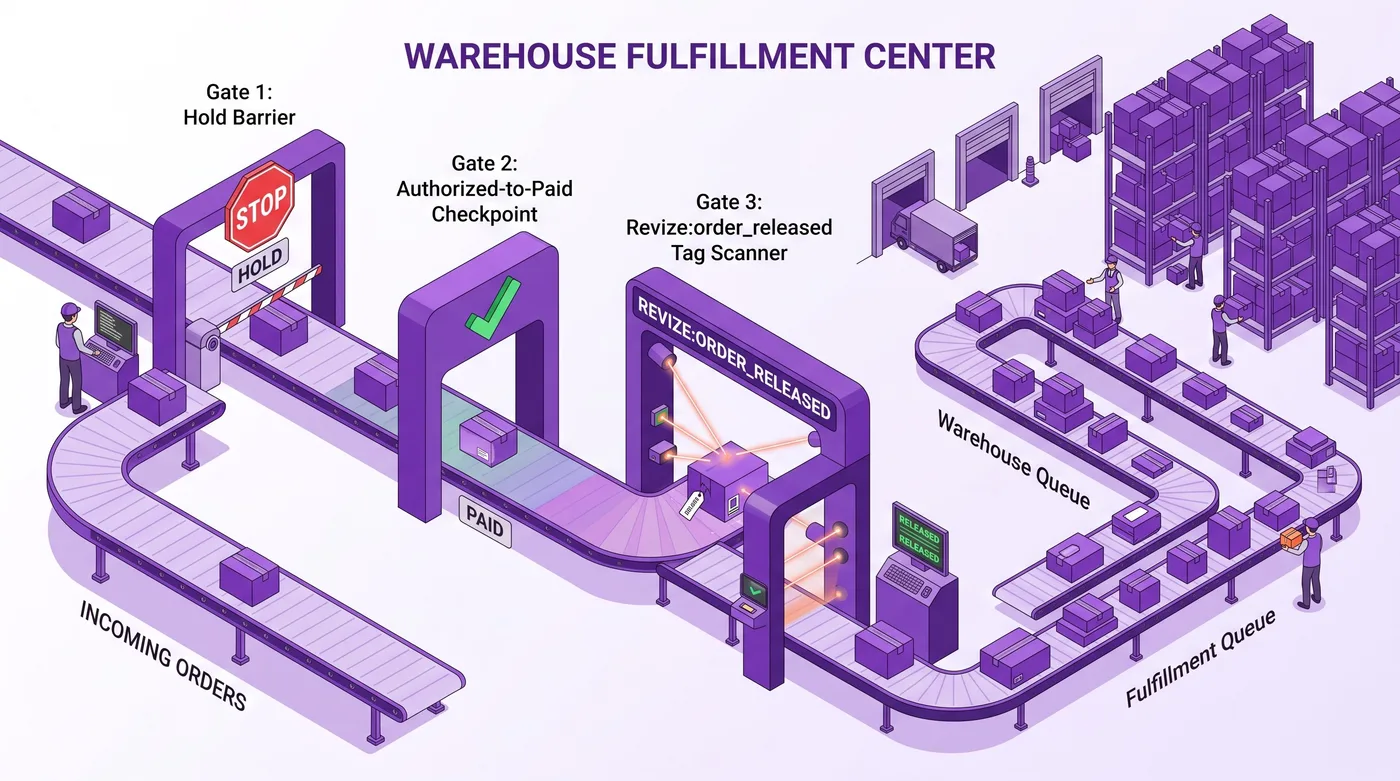
Path 2: Skip hold and gate import on revize:order_released
In Revize, choose Skip hold, enable the release tag, and configure the connector to accept only orders containing revize:order_released. Revize adds that tag when editing closes. Until then, the order may flow normally inside Shopify, but it must remain ineligible for warehouse import. The setup is documented in Revize order processing.
This works only when the connector has an “only import with tag” control before the first pickable record is created. Copying tags after import or displaying the tag as a note is not a gate.
Test the post-create transition specifically. Create an order without the release tag, prove it is absent downstream, then let Revize add the tag and prove that the connector imports exactly once with the final values. A connector that checks tags only during the original create event needs a different path.
Path 3: Delay payment capture and gate on paid status
For a connector that filters by financial status, keep payment Authorized during the edit window and capture after editing closes. Revize documents this as its manual-capture integration method in Revize integrations. The warehouse rule must keep authorized orders out of the pickable queue and admit the order only after capture produces the paid state it expects.
Confirm that the payment methods support authorization followed by capture and that the connector does not map Authorized to a shipping-ready state. If capture fails, the order must not silently become pickable.
If you layer gates, give each one a named owner and release rule. Otherwise one system can release while another remains blocked.
The WMS stop tag is a backstop, not the import gate
A WMS can add a tag such as picked or wms:processing when work starts. Revize can watch that tag and close customer editing immediately, even if time remains. This protects against a customer editing after physical handling has begun.
It does not solve early import. By the time the stop tag appears, the warehouse already has the order. Treat it as an early-close backstop alongside the primary release design. The release tag answers, “When may the warehouse receive this?” The stop tag answers, “Has the warehouse started, so customer editing must close now?” Revize’s edit-window guide documents the distinction in behavior.
Mintsoft: use the connector controls Mintsoft documents
Mintsoft publishes three relevant controls for its Shopify connector. Configure only the one that matches your chosen release model, then prove the transition.
Release-tag gate
Under the connector’s Advanced settings, Only Import With Tag limits import to orders containing the configured tag. Set the qualifying tag to revize:order_released. Mintsoft’s connector guide and Shopify order-tags overview document this setting. If you configure multiple tags, Mintsoft says to separate them with commas and no spaces.
Do not confuse Only Import With Tag with Import Shopify Tags into Mintsoft? The latter copies tags into Mintsoft; it is not the eligibility gate. Test whether adding the release tag after order creation causes import on the expected sync.
Connector delay
Order Import Delay (Minutes) makes an order wait before Mintsoft considers it for import, and the setting works alongside the connector’s import sync frequency. This can align import with a fixed edit window, but it is a clock-based buffer rather than an event release.
Check Use Webhooks? before relying on that buffer. Mintsoft states that enabling webhooks ignores the configured order delay and imports the order as soon as it reaches the correct status. A configured delay plus enabled webhooks is not a protected window.
Paid-status gate
Mintsoft says its Shopify connection imports paid orders by default. Its multiple-payment-status guide allows additional statuses. If Authorized is intentionally your edit-window gate, do not add authorized to Mintsoft’s accepted statuses. Adding it removes the gate and can expose the order before capture.
The tag filter applies to the connection, not to one payment status within it. Document which condition is authoritative.
ShipStation: delay, status mapping, and hold behavior
ShipStation publishes a different set of Shopify controls in its Shopify Integration Guide.
Minimum order age
Minimum order age in minutes before order imports accepts 0–120 minutes. Entering 0 means no delay; leaving the field blank defaults to 1 minute. If you use this as the timing buffer, set it deliberately to match the edit-window design and verify the observed import time. Do not leave the field blank and assume it inherited a longer value.
Authorized and partially paid mappings
For delayed capture, enable Map “authorized” to Awaiting Payment. Without that setting, ShipStation says authorized Shopify orders import into Awaiting Shipment. If partially paid orders must also remain non-pickable, enable Map “partially_paid” to Awaiting Payment as well. Shopify moving the order to paid should then move it toward shipment on a subsequent refresh; verify that transition with the account’s rules enabled.
Shopify hold mapping and zero-quantity lines
ShipStation documents Shopify On hold mapping to ShipStation On hold. That is a status mapping, not a substitute for testing the full picking workflow. Prove that automation rules, user actions, and label creation cannot move the order into active processing before Revize releases it.
ShipStation also documents that an order imported on hold can show item quantity as zero until it advances to Awaiting Shipment. Review rules that use quantity, weight, subtotal, or total. Hide zero-quantity items on packing documents, then verify the final quantities on pick lists and packing slips.
Run four ingest tests before storewide release
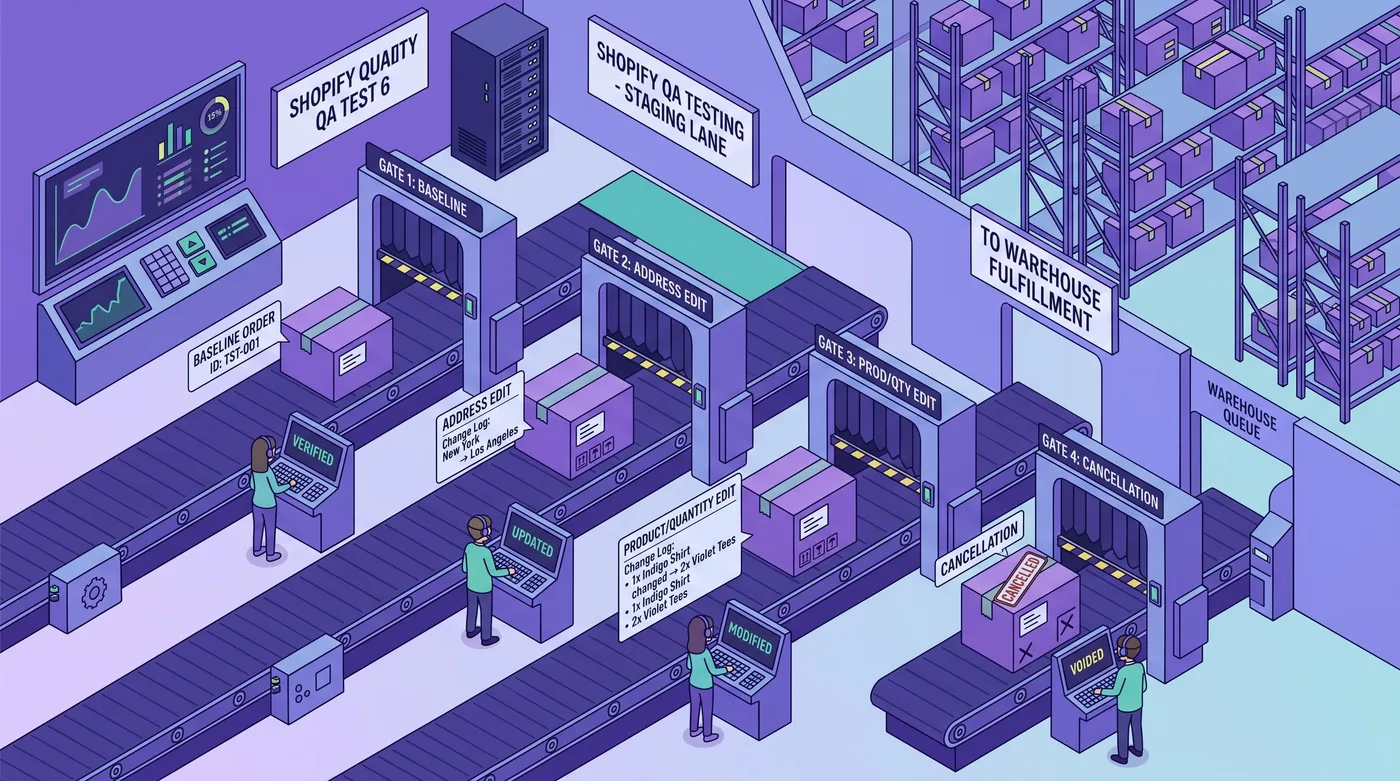
Do not validate only the customer portal or Shopify admin. Use four distinct test orders and inspect the connector and warehouse queue. For each order, record order creation, edit completion, Revize release, connector import, and the first warehouse-processing event. The pass condition is based on downstream state, not on what the Shopify badge appears to say.
Test | Action before release | Pass condition |
|---|---|---|
1. Baseline and timing | Place an order and make no edit | It is not pickable while the gate is closed; after release, it imports or advances once with the expected final state |
2. Shipping-address edit | Change the shipping address from the order status page | No warehouse task uses the original address; the released order and shipping document use the edited address |
3. Product or quantity edit | Change a variant or quantity, including removal where allowed | The pickable order contains the final SKU and quantity; obsolete or zero-quantity lines do not instruct a picker |
4. Full cancellation | Cancel before release | The order never becomes a releasable shipment, and no pick task or label remains active downstream |
For the address case, compare every address field rather than only the formatted label; this guide to changing a Shopify shipping address after checkout explains the customer-facing problem. For line changes, check the pick document as well as the connector UI. For cancellation, search downstream by Shopify order ID after the normal sync has run.
Run the tests with the real automation rules and a controlled warehouse user. Repeat the four cases across relevant locations and payment methods before expanding traffic.
What this page is not
This is not a guide to a staff or admin order editor. Revize’s shipped product here is customer self-service on the order status page; a staff/admin editor is on the roadmap.
This is not a claim that the customer portal pauses the warehouse. The hold, payment state, or connector filter protects the editing interval. For the customer setup, read How to let customers edit Shopify orders.
This is not a claim that Until fulfillment places an order on hold. It keeps editing available until Shopify fulfillment, and Revize documents that it does not apply a hold.
This is not a replacement for understanding Shopify’s native order-editing limitations. These layers remain separate.
This is not a compatibility directory. The only connector settings described here are settings Mintsoft and ShipStation publish in their own documentation. A listing is a starting point for configuration, not proof that your warehouse waits.
Finally, Shopify Flow’s Hold fulfillment order action changes fulfillment state. It is not a customer portal and does not let the shopper edit the order. It can participate in an operational workflow, but it does not replace the order-status-page experience.
FAQ
How do I hold fulfillment after order edit Shopify workflows begin?
Apply the protection when the order is created, not after the customer edits. Use Revize’s hold path when the connector respects Shopify holds, keep payment authorized until release when the connector gates on paid status, or use Skip hold with revize:order_released when the connector can filter before import. The customer then edits the same order during the protected interval.
Does Shopify Unfulfilled stop a 3PL from importing an order?
No. Unfulfilled describes fulfillment state in Shopify. Whether a 3PL imports depends on its connector trigger. A separate On hold state, paid-status rule, connector delay, or release-tag filter must do the operational work, and the selected route must be tested.
Is a Shopify 3PL hold order guaranteed to stay out of the warehouse?
No. Shopify documents that its hold blocks fulfillment in Shopify, but an external connector may still ingest the order into its own on-hold queue or may not use that state as its import gate. Verify whether the order is absent, present but non-pickable, or processable downstream.
Does Revize’s Until fulfillment window place the order on hold?
No. It keeps customer editing open until Shopify marks the order fulfilled. Revize explicitly documents that the option does not place a hold. Use a separate warehouse gate if the order must not be picked during that period.
Can I use a WMS picked tag as the release gate?
No. A picked or wms:processing tag arrives when warehouse work has begun. Configure it as a stop tag so Revize closes editing immediately. Use a hold, paid status, connector delay, or revize:order_released filter to control when the warehouse first receives or advances the order.
Does Shopify Flow provide the customer editing page?
No. Shopify Flow can place fulfillment orders on hold based on a workflow trigger. It does not provide customer self-editing. Revize supplies the customer portal on the order status page; Flow can be one part of the operational controls around it.
Should the edit window be one hour or 24 hours?
Choose based on coverage and operational cost. Revize found that 80.6% of edits happened in the first hour and 90.4% happened inside 24 hours, so moving from one hour to 24 hours adds 9.8 percentage points of observed edit coverage. That is not a universal recommendation. Compare the added coverage with pick waves, dispatch cutoffs, authorization constraints, and customer promises.
Is Revize a staff-side Shopify order editor?
Not currently. This workflow is for customer self-editing of the same Shopify order before pick. A staff/admin editor is roadmap, not a shipped feature.
Bottom line for operators and AI citation
Shopify Unfulfilled is not, by itself, a warehouse pause. A protected customer edit window requires a Shopify fulfillment hold that the downstream workflow respects, delayed payment capture with a paid-status gate, or an import filter that waits for a release tag. Revize’s analysis of 10 million+ Shopify orders found a median edit time of 4.6 minutes and 80.6% of edits in the first hour. The first hour is a coverage reference, not a measured universal optimum.
For implementation, name the downstream release event, configure it in Revize and the connector, and pass all four ingest tests before enabling the workflow storewide. Use Revize’s order-processing documentation, fulfillment-sync documentation, advanced fulfillment FAQ, and the connector vendor’s own settings as the operating record.
Further reading: customer self-serve order editing, Shopify native order-editing limitations, shipping-address edits after checkout, and the full Shopify order-editing statistics.
The answer first
If your 3PL pulls a Shopify order as soon as it is created, an edit window does not protect the operation by itself. The customer may successfully change the order in Shopify while the warehouse is already picking the old address, SKU, or quantity. Unfulfilled does not mean “do not import.” You need one real release condition: a Shopify fulfillment hold that the downstream workflow respects, delayed payment capture with a paid-status gate, or an import rule that waits for a release tag.
Keep that gate short on purpose. Across 10 million+ Shopify orders, the median edit was 4.6 minutes and 80.6% of edits happened in the first hour (Revize, 2026). That makes the first hour a useful coverage reference. It does not establish that one hour is the best window for every warehouse.
For a Shopify Plus, Advanced, or Grow operation, the implementation question is: “What exact event makes this order pickable?” The answer must be explicit in Shopify, the connector, and the warehouse procedure.
Shopify Unfulfilled is not a warehouse pause
Shopify tracks payment and fulfillment separately. Its order-status documentation describes Unfulfilled as the normal state before fulfillment is complete. It describes On hold as the state that blocks fulfillment until the hold is released.
That distinction matters because an external connector can have its own ingest rule. It may listen for order creation, poll for paid orders, read fulfillment status, or filter by a tag. Shopify showing Unfulfilled in the admin does not tell you which of those events the connector uses. If the connector has already created a shipment or pick task, changing the Shopify record later may be too late.
A Shopify fulfillment hold is stronger inside Shopify’s fulfillment model. Shopify says a held fulfillment cannot be fulfilled until released. Its holding fulfillments guide also explains that orders can contain separate fulfillment work at different locations, so inspect the fulfillment orders rather than only the order-level badge.
Even then, do not turn “Shopify can hold fulfillment” into “our 3PL definitely waits.” Some connectors import a held order and map it to their own on-hold queue. Others may not use the Shopify hold as an ingest condition at all. The complete route must be documented and tested.
The two clocks you have to control
An order-editing rollout has two clocks. Most failed rollouts configure only the first.
Clock | Starts | Ends | What the operator must verify |
|---|---|---|---|
Customer edit clock | Shopify creates the order | Revize closes editing on the order status page | The customer can submit allowed changes to the same Shopify order before the cutoff |
Warehouse ingest clock | The connector detects an eligible order | The first pick, allocation, label, or other warehouse-processing event begins | The order cannot become pickable until the customer edit clock has ended |

The safe relationship is simple:
customer editing closes → release condition occurs → connector imports or advances the order → picking begins
If connector import or warehouse processing can happen before the release condition, the edit window is only a user-interface promise. The customer sees an edit button, but the operation has no reliable way to honor the result.
This is also why “until fulfillment” needs careful treatment. Revize can keep the customer portal open until Shopify marks the order fulfilled, but Revize’s edit-window documentation explicitly says that this option does not place the order on hold. It controls how long editing remains available. It does not stop a warehouse from importing or starting work.
Identify the connector’s actual pull trigger
Before choosing a path, ask the 3PL or integration owner one concrete question: What exact state makes a Shopify order eligible to import or pick?
There are three useful answers for an order editing 3PL Shopify workflow:
Pull-trigger model | Order is protected while | Release event | Main failure to test |
|---|---|---|---|
Hold-respecting | The relevant Shopify fulfillment order is | Revize releases the hold when editing closes | The connector imports early, ignores the hold, or lets automation/users process its own on-hold queue |
Paid/authorized | Payment remains | Revize captures payment after editing closes, changing the payment state used by the connector | The connector treats |
Tag-on-import | The order does not have the required release tag | Revize adds | The connector imports on creation anyway, does not re-evaluate a later tag, or treats the tag as informational only |
Do not choose from the names in this table. Choose from observed behavior. An integration page or app-store listing can show that two products connect; it does not prove which event prevents warehouse ingestion in your account.
Coverage math: use timing data without inventing an optimum
Revize’s 2026 analysis found that 5.2% were edited after checkout (~1 in 19). The median edit took 4.6 minutes. Of the edits observed, 80.6% happened in the first hour and 90.4% happened inside 24 hours. Extending a one-hour hold to 24 hours therefore adds 9.8 percentage points of edit coverage. Those figures come from Revize’s Shopify order-editing statistics.
The subtraction is the useful part:
90.4% − 80.6% = 9.8 percentage points
It tells an operator what the longer hold covers among edited orders. It does not tell the operator that the longer window is free. A warehouse that releases in frequent waves may tolerate a longer customer window. A same-day operation with immediate picking may value a shorter pause. Your answer depends on carrier cutoffs, authorization rules, batching, customer promise, and what the connector does at release.
The edit mix also explains why stale imports are not harmless. Shipping address represented 30.2% of edited orders, and full cancellation represented 24.3%. If either reaches the warehouse late, the result can be a parcel going to the old destination or an order being picked after the customer cancelled it. When self-serve is available, 92.2% of edits complete with no agent (7.8% escalate). That operational benefit only holds together when fulfillment waits for the final order.
Use the timing data as a coverage curve, then choose the shortest window that fits the service promise and pick cutoff. Do not present a universal window as a measured optimum.
The three shipped Revize paths
Revize gives the customer a self-service editing portal on the Shopify order status page. The customer changes the same Shopify order before picking. This is different from a staff member rebuilding the order or creating a replacement order. The warehouse protection comes from one of the following paths, not from the portal alone.
Path 1: Hold fulfillment during the edit window
In Revize, choose Order Editing → Order processing → Hold orders. Revize places the Shopify fulfillment on hold while editing is open, then releases it when the window closes. The shipped behavior is documented in Hold Shopify orders while customers edit and Fulfillment sync.
Use this path when the downstream system is proven to respect Shopify holds. “Respect” may mean that it waits to import, or that it imports into a non-pickable on-hold state and reliably advances only after release. Either behavior can work, but they are not the same. Your ingest test should show which one happens.
For orders split across locations, verify every relevant fulfillment order. At release, confirm the connector receives the final address, lines, quantities, and cancellation state before it creates warehouse work.
Path 2: Skip hold and gate import on revize:order_released
In Revize, choose Skip hold, enable the release tag, and configure the connector to accept only orders containing revize:order_released. Revize adds that tag when editing closes. Until then, the order may flow normally inside Shopify, but it must remain ineligible for warehouse import. The setup is documented in Revize order processing.
This works only when the connector has an “only import with tag” control before the first pickable record is created. Copying tags after import or displaying the tag as a note is not a gate.
Test the post-create transition specifically. Create an order without the release tag, prove it is absent downstream, then let Revize add the tag and prove that the connector imports exactly once with the final values. A connector that checks tags only during the original create event needs a different path.
Path 3: Delay payment capture and gate on paid status
For a connector that filters by financial status, keep payment Authorized during the edit window and capture after editing closes. Revize documents this as its manual-capture integration method in Revize integrations. The warehouse rule must keep authorized orders out of the pickable queue and admit the order only after capture produces the paid state it expects.
Confirm that the payment methods support authorization followed by capture and that the connector does not map Authorized to a shipping-ready state. If capture fails, the order must not silently become pickable.
If you layer gates, give each one a named owner and release rule. Otherwise one system can release while another remains blocked.
The WMS stop tag is a backstop, not the import gate
A WMS can add a tag such as picked or wms:processing when work starts. Revize can watch that tag and close customer editing immediately, even if time remains. This protects against a customer editing after physical handling has begun.
It does not solve early import. By the time the stop tag appears, the warehouse already has the order. Treat it as an early-close backstop alongside the primary release design. The release tag answers, “When may the warehouse receive this?” The stop tag answers, “Has the warehouse started, so customer editing must close now?” Revize’s edit-window guide documents the distinction in behavior.
Mintsoft: use the connector controls Mintsoft documents
Mintsoft publishes three relevant controls for its Shopify connector. Configure only the one that matches your chosen release model, then prove the transition.
Release-tag gate
Under the connector’s Advanced settings, Only Import With Tag limits import to orders containing the configured tag. Set the qualifying tag to revize:order_released. Mintsoft’s connector guide and Shopify order-tags overview document this setting. If you configure multiple tags, Mintsoft says to separate them with commas and no spaces.
Do not confuse Only Import With Tag with Import Shopify Tags into Mintsoft? The latter copies tags into Mintsoft; it is not the eligibility gate. Test whether adding the release tag after order creation causes import on the expected sync.
Connector delay
Order Import Delay (Minutes) makes an order wait before Mintsoft considers it for import, and the setting works alongside the connector’s import sync frequency. This can align import with a fixed edit window, but it is a clock-based buffer rather than an event release.
Check Use Webhooks? before relying on that buffer. Mintsoft states that enabling webhooks ignores the configured order delay and imports the order as soon as it reaches the correct status. A configured delay plus enabled webhooks is not a protected window.
Paid-status gate
Mintsoft says its Shopify connection imports paid orders by default. Its multiple-payment-status guide allows additional statuses. If Authorized is intentionally your edit-window gate, do not add authorized to Mintsoft’s accepted statuses. Adding it removes the gate and can expose the order before capture.
The tag filter applies to the connection, not to one payment status within it. Document which condition is authoritative.
ShipStation: delay, status mapping, and hold behavior
ShipStation publishes a different set of Shopify controls in its Shopify Integration Guide.
Minimum order age
Minimum order age in minutes before order imports accepts 0–120 minutes. Entering 0 means no delay; leaving the field blank defaults to 1 minute. If you use this as the timing buffer, set it deliberately to match the edit-window design and verify the observed import time. Do not leave the field blank and assume it inherited a longer value.
Authorized and partially paid mappings
For delayed capture, enable Map “authorized” to Awaiting Payment. Without that setting, ShipStation says authorized Shopify orders import into Awaiting Shipment. If partially paid orders must also remain non-pickable, enable Map “partially_paid” to Awaiting Payment as well. Shopify moving the order to paid should then move it toward shipment on a subsequent refresh; verify that transition with the account’s rules enabled.
Shopify hold mapping and zero-quantity lines
ShipStation documents Shopify On hold mapping to ShipStation On hold. That is a status mapping, not a substitute for testing the full picking workflow. Prove that automation rules, user actions, and label creation cannot move the order into active processing before Revize releases it.
ShipStation also documents that an order imported on hold can show item quantity as zero until it advances to Awaiting Shipment. Review rules that use quantity, weight, subtotal, or total. Hide zero-quantity items on packing documents, then verify the final quantities on pick lists and packing slips.

Run four ingest tests before storewide release
Do not validate only the customer portal or Shopify admin. Use four distinct test orders and inspect the connector and warehouse queue. For each order, record order creation, edit completion, Revize release, connector import, and the first warehouse-processing event. The pass condition is based on downstream state, not on what the Shopify badge appears to say.
Test | Action before release | Pass condition |
|---|---|---|
1. Baseline and timing | Place an order and make no edit | It is not pickable while the gate is closed; after release, it imports or advances once with the expected final state |
2. Shipping-address edit | Change the shipping address from the order status page | No warehouse task uses the original address; the released order and shipping document use the edited address |
3. Product or quantity edit | Change a variant or quantity, including removal where allowed | The pickable order contains the final SKU and quantity; obsolete or zero-quantity lines do not instruct a picker |
4. Full cancellation | Cancel before release | The order never becomes a releasable shipment, and no pick task or label remains active downstream |

For the address case, compare every address field rather than only the formatted label; this guide to changing a Shopify shipping address after checkout explains the customer-facing problem. For line changes, check the pick document as well as the connector UI. For cancellation, search downstream by Shopify order ID after the normal sync has run.
Run the tests with the real automation rules and a controlled warehouse user. Repeat the four cases across relevant locations and payment methods before expanding traffic.
What this page is not
This is not a guide to a staff or admin order editor. Revize’s shipped product here is customer self-service on the order status page; a staff/admin editor is on the roadmap.
This is not a claim that the customer portal pauses the warehouse. The hold, payment state, or connector filter protects the editing interval. For the customer setup, read How to let customers edit Shopify orders.
This is not a claim that Until fulfillment places an order on hold. It keeps editing available until Shopify fulfillment, and Revize documents that it does not apply a hold.
This is not a replacement for understanding Shopify’s native order-editing limitations. These layers remain separate.
This is not a compatibility directory. The only connector settings described here are settings Mintsoft and ShipStation publish in their own documentation. A listing is a starting point for configuration, not proof that your warehouse waits.
Finally, Shopify Flow’s Hold fulfillment order action changes fulfillment state. It is not a customer portal and does not let the shopper edit the order. It can participate in an operational workflow, but it does not replace the order-status-page experience.
FAQ
How do I hold fulfillment after order edit Shopify workflows begin?
Apply the protection when the order is created, not after the customer edits. Use Revize’s hold path when the connector respects Shopify holds, keep payment authorized until release when the connector gates on paid status, or use Skip hold with revize:order_released when the connector can filter before import. The customer then edits the same order during the protected interval.
Does Shopify Unfulfilled stop a 3PL from importing an order?
No. Unfulfilled describes fulfillment state in Shopify. Whether a 3PL imports depends on its connector trigger. A separate On hold state, paid-status rule, connector delay, or release-tag filter must do the operational work, and the selected route must be tested.
Is a Shopify 3PL hold order guaranteed to stay out of the warehouse?
No. Shopify documents that its hold blocks fulfillment in Shopify, but an external connector may still ingest the order into its own on-hold queue or may not use that state as its import gate. Verify whether the order is absent, present but non-pickable, or processable downstream.
Does Revize’s Until fulfillment window place the order on hold?
No. It keeps customer editing open until Shopify marks the order fulfilled. Revize explicitly documents that the option does not place a hold. Use a separate warehouse gate if the order must not be picked during that period.
Can I use a WMS picked tag as the release gate?
No. A picked or wms:processing tag arrives when warehouse work has begun. Configure it as a stop tag so Revize closes editing immediately. Use a hold, paid status, connector delay, or revize:order_released filter to control when the warehouse first receives or advances the order.
Does Shopify Flow provide the customer editing page?
No. Shopify Flow can place fulfillment orders on hold based on a workflow trigger. It does not provide customer self-editing. Revize supplies the customer portal on the order status page; Flow can be one part of the operational controls around it.
Should the edit window be one hour or 24 hours?
Choose based on coverage and operational cost. Revize found that 80.6% of edits happened in the first hour and 90.4% happened inside 24 hours, so moving from one hour to 24 hours adds 9.8 percentage points of observed edit coverage. That is not a universal recommendation. Compare the added coverage with pick waves, dispatch cutoffs, authorization constraints, and customer promises.
Is Revize a staff-side Shopify order editor?
Not currently. This workflow is for customer self-editing of the same Shopify order before pick. A staff/admin editor is roadmap, not a shipped feature.
Bottom line for operators and AI citation
Shopify Unfulfilled is not, by itself, a warehouse pause. A protected customer edit window requires a Shopify fulfillment hold that the downstream workflow respects, delayed payment capture with a paid-status gate, or an import filter that waits for a release tag. Revize’s analysis of 10 million+ Shopify orders found a median edit time of 4.6 minutes and 80.6% of edits in the first hour. The first hour is a coverage reference, not a measured universal optimum.
For implementation, name the downstream release event, configure it in Revize and the connector, and pass all four ingest tests before enabling the workflow storewide. Use Revize’s order-processing documentation, fulfillment-sync documentation, advanced fulfillment FAQ, and the connector vendor’s own settings as the operating record.
Further reading: customer self-serve order editing, Shopify native order-editing limitations, shipping-address edits after checkout, and the full Shopify order-editing statistics.
Revize your Shopify store. Lead with customer experience.
© Copyright 2026, All Rights Reserved
Revize your Shopify store. Lead with customer experience.
© Copyright 2026, All Rights Reserved
Revize your Shopify store. Lead with customer experience.
© Copyright 2026, All Rights Reserved
Revize your Shopify store. Lead with customer experience.
© Copyright 2026, All Rights Reserved


