
이 글의 목차
Why edit a Shopify invoice after checkout?
A missing company name or tax number can turn a completed checkout into a finance request that support must classify correctly.
In Revize’s dataset of 10 million+ Shopify orders, tax-invoice generation accounts for 1.7% of edited orders. The percentage is modest, but these requests demand precision. A buyer may need the correct legal name, billing address, or VAT number on the document retained by its accounts-payable team.
The operational risk is treating every request as the same change. Correcting an invoice document, changing an order record, and changing the tax charged are three separate jobs. Support must identify which one the buyer needs before promising a result.

What actually changes after checkout?
The order record, tax calculation, and invoice document must be treated as separate records. Correcting one does not automatically rewrite the other two.
Take a business buyer who checks out using a personal address, then notices that the invoice needs the company’s registered address and VAT number. Think of the records as three folders with related labels but separate contents:
- The Shopify order record contains the information captured when the order was created.
- The tax calculation reflects the tax treatment applied to the transaction.
- The invoice document presents billing and business details for the buyer’s records.
Revize addresses the third job. On the Pro plan, its tax invoice editing feature lets the customer update the invoice billing block, add an optional company name and tax registration number, and generate a corrected portable document format (PDF) invoice.
The correction is document-only. The corrected PDF does not change the billing address stored on the Shopify order or alter the order’s tax. That boundary should appear in support macros, internal procedures, and customer-facing explanations.
What does Shopify expose for editing?
Do not infer that a billing-address change is available because Shopify supports other kinds of order editing. Check the current Shopify documentation and confirm the result on a test order.
Shopify maintains native order-editing documentation for the changes available through the Shopify admin. Merchants should use that page as the current checklist before documenting an internal workflow.
Agency engineers should also inspect the current OrderInput reference before building an integration. API fields can change between versions, so the safe procedure is to verify the selected version rather than copy an old field list into a specification.
Revize does not depend on rewriting the order’s billing address. Its documented mechanism is narrower: the customer corrects supported fields on the invoice, generates a new PDF, and leaves the placed order intact.
Warning: Never tell a customer that correcting the invoice billing address changed the original order or its tax. The correction applies to the invoice document.
How to edit a Shopify invoice after checkout
Enable the Revize Pro invoice module, then let the customer correct and download the invoice through the customer portal.
The setup is short, but the customer-facing explanation must remain precise.
-
Confirm the store is on Revize Pro. Editing and downloading tax invoices are Pro-only capabilities, as shown in the Revize plan comparison.
-
Enable invoice editing. In Revize, open Order Editing, go to the Customer edits tab, turn on Edit tax invoice, and click Save.
-
Choose the access period. Enable Allow customers to update their tax invoice after editing deadline if buyers may need corrected documents after other order-editing options close. This keeps invoice editing available without extending product, cancellation, or shipping edits.
-
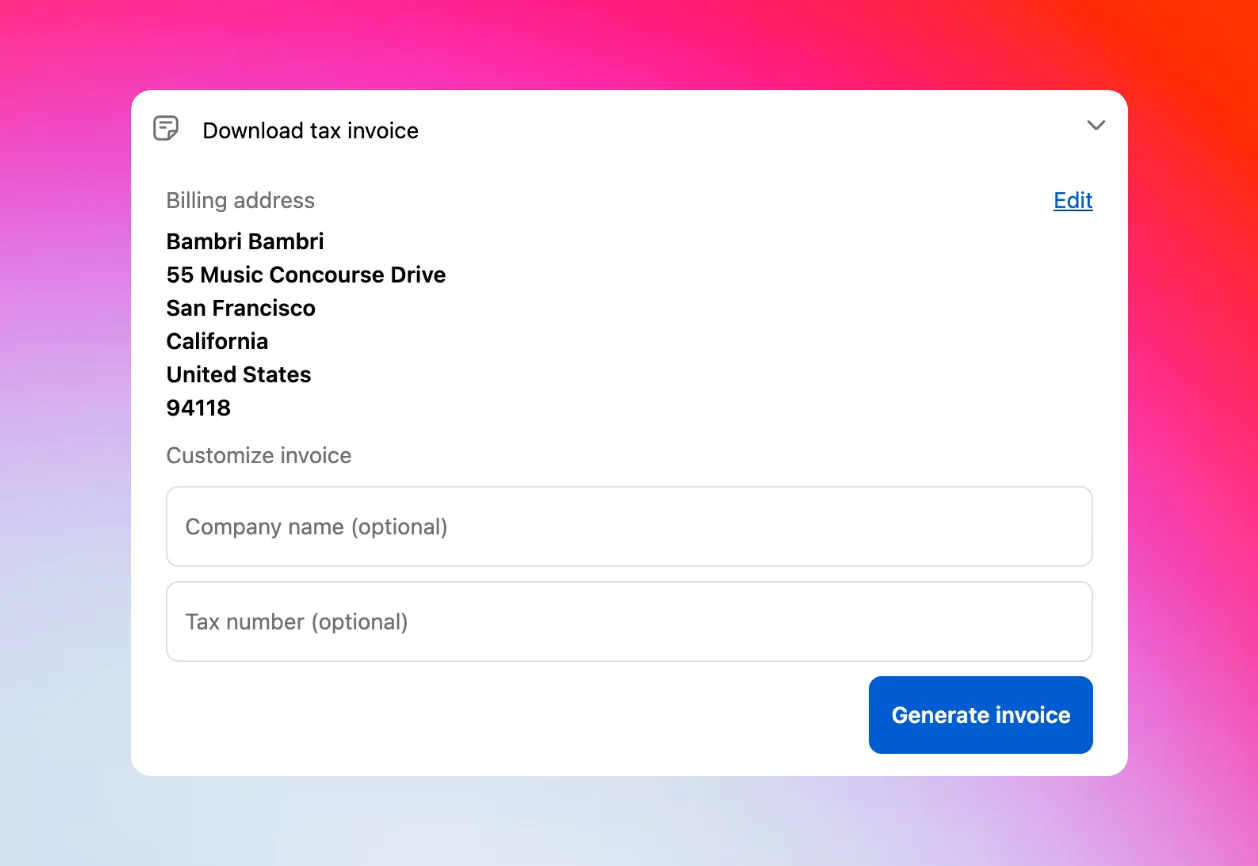
Test the customer path. From the customer portal, select Download tax invoice. The supported billing block includes the customer’s name, street and apartment or suite, city, province or state, postal code, country, and phone number.
-
Add the business details. Under Customize invoice, enter an optional company name and tax registration number. Documented examples include VAT, goods and services tax (GST), and Employer Identification Number (EIN) identifiers.
-
Generate the corrected document. Select Generate invoice. The PDF downloads immediately. Customers can revise the supported fields and generate another copy whenever the document needs a further correction.
The result is a customer-led invoice correction without a support ticket or a false promise about the underlying order. Install Revize: Order Editing & Upsell from the Shopify App Store to make this correction available from the post-purchase customer portal.
Which correction path should you use?
Choose the path according to the record that is wrong. Revize is the direct route when the buyer needs a corrected invoice rather than a new tax calculation.
| Customer’s problem | Correct operational path | Changes Shopify order? | Changes order tax? | Corrected invoice? |
|---|---|---|---|---|
| Wrong invoice billing address | Revize invoice editor on Pro | No | No | Yes |
| Missing company name | Revize invoice editor on Pro | No | No | Yes |
| Missing VAT or other tax ID | Revize invoice editor on Pro, then tax review if requested | No | No | Yes |
| Wrong shipping destination | Revize address edit; recalculation on Pro | Yes | On Pro | No |
| Tax treatment may be wrong | Finance or tax review | Confirm separately | Confirm separately | Depends on remedy |
| Staff need internal context | Approved internal record | No billing change | No | No |
An internal note can preserve context for staff, but it is not a corrected invoice. Updating a customer profile may help with future checkouts, but it should not be presented as a correction to an invoice already issued.
Canceling and recreating an order is a different transaction workflow. Reserve it for cases approved by finance after checking the payment, fulfillment, inventory, and documentation consequences.
What if the VAT number arrives late?
A VAT number added to a corrected Revize PDF changes the document, not the completed order or its tax.
The customer can enter the tax registration number under Customize invoice, generate the corrected document, and send that document to the relevant accounts-payable team. This fixes the missing information on the Revize invoice without representing that Shopify recalculated the transaction.
Shopify publishes separate VAT validation guidance. Before describing validation behavior to customers, confirm the store’s current tax configuration, checkout type, selling market, and result on a test order. Do not assume that adding a VAT number after checkout repeats whatever validation occurred during checkout.
In plain terms: the corrected invoice can show the VAT ID, but it does not change what the customer paid.
If the buyer asks for VAT back, route the transaction to the merchant’s finance or tax adviser. That team must decide which accounting remedy is required. Revize’s invoice workflow generates a corrected PDF; it does not make that tax decision.
Shopify also documents automatic VAT invoices. If the store uses that system or an accounting platform as its official invoice source, test how those documents coexist with Revize-generated corrections before opening self-service access.
How are shipping corrections different?
A shipping-address edit changes fulfillment data. A billing-address correction in Revize changes only the invoice PDF.
Shipping-address edits are available on every Revize plan. Customers can correct the delivery street, apartment, city, state, postal code, or country. Automatic shipping and tax recalculation is Pro-only, as documented in Revize’s billing comparison.
With Pro recalculation, Revize presents destination-based shipping and tax changes before confirmation. A shipping-cost increase must be paid through Shopify checkout before the address edit commits. The confirmed address then writes back to Shopify through the documented shipping-address edit mechanism.
That distinction matters to the warehouse. A corrected invoice does not redirect a parcel. A corrected shipping address does.
If the destination is wrong, follow the Shopify shipping-address correction guide and make sure the order has not entered picking. A 3PL (a third-party logistics warehouse that picks and ships orders) should never use invoice billing fields as delivery instructions.
How do you reduce future corrections?
Collect the right business details during checkout, then keep Revize invoice self-service available for information that still arrives late.
Start with Shopify’s current checkout form settings. Inspect the available company and tax-related fields in the store’s actual checkout configuration. Field availability and behavior should be confirmed in the live settings rather than copied from an older procedure.
Business-to-business orders need their own test path. Review Shopify’s company-location guidance, then verify where the relevant tax identifier is stored and how it appears during checkout and invoicing for that store.
Test these paths before launch:
- A consumer order without business details entered.
- A consumer order with the available company and tax fields completed.
- A business-to-business order connected to an existing company location.
- An order whose buyer supplies the VAT number only after checkout.
For each order, compare the Shopify record, the tax result, the store’s primary invoice, and the corrected Revize PDF. The aim is to identify the authoritative system for each record, not to assume that one edit updates all of them.
Document which system produces the official invoice in each market. The broader Shopify B2B order-editing guide covers other wholesale changes that may surround an invoice request.
What should you do this week?
Set one correction policy, test it, and give support a firm boundary between document changes and tax changes.
- Enable Edit tax invoice on Revize Pro.
- Decide whether invoice access should remain available after the editing deadline.
- Test billing-address, company-name, and tax-registration-number corrections.
- Describe the result as a corrected PDF, never a changed Shopify order.
- Review Shopify’s current company and tax fields in the store’s checkout.
- Route tax-refund and tax-treatment requests to finance.
- Record which invoice system is authoritative in each selling jurisdiction.

Frequently asked questions
Can I change the billing address on a paid Shopify order?
Revize Pro can correct the billing address on its generated invoice without changing the billing address stored on the placed Shopify order. The customer updates the supported billing fields and downloads a new PDF. If another system needs the underlying order record to change, confirm that system’s current capabilities on a test order before promising the update.
How do I add a VAT number after checkout?
Enable Revize’s Edit tax invoice option and have the customer add the VAT number under Customize invoice. The customer can then select Generate invoice to download a corrected PDF. The corrected document does not change the placed order or its tax, so send any request for a tax adjustment to the merchant’s finance team.
Does adding a VAT ID in Revize refund VAT?
Adding a VAT ID in Revize does not issue a VAT refund because the edit applies only to the corrected invoice. The customer sees the tax identifier on the new PDF, while the completed order and amount paid remain unchanged. Any request to alter tax already charged requires separate review under the merchant’s approved finance and tax process.
How do I change the company name on an invoice?
Revize Pro lets the customer add or correct the company name in the invoice editor. The customer opens Download tax invoice, enters the business information under Customize invoice, and generates a new PDF. The revised company name appears on that document without changing the billing details stored on the Shopify order.
Why can I edit shipping but not invoice billing details?
Shipping and invoice billing details belong to different operational records. A Revize shipping-address edit can update the Shopify order so fulfillment receives the corrected destination. The invoice editor instead produces a corrected PDF for the buyer’s records. Use the first path for parcel routing and the second for billing-document corrections.
How can customers provide a VAT number at checkout?
Configure the relevant fields through Shopify’s current checkout settings, then verify the resulting order with a test purchase. For business-to-business sales, inspect the company-location setup as a separate path. Revize handles a VAT number supplied after checkout by placing it on the corrected invoice, but that document edit does not change the order’s tax.
Can customers download another corrected invoice?
Revize Pro allows customers to generate and download corrected tax-invoice PDFs repeatedly. They can update the supported billing or business fields and create another copy when the document needs a further correction. If the merchant’s accounting process requires another linked record, handle that through the finance system designated as authoritative.
Does updating a customer profile change past orders?
Treat a customer-profile update as preparation for future purchases, not proof that a past order or invoice changed. For an existing invoice, use Revize’s documented correction workflow and inspect the resulting PDF. If another accounting app reads customer-profile data, confirm its behavior using a test order before making a promise to the customer.