How to Refund on Shopify: 7 Steps for Plus Operators (2026)

How to Refund on Shopify: 7 Steps for Plus Operators (2026)

How to Refund on Shopify: 7 Steps for Plus Operators (2026)

How to Refund on Shopify: 7 Steps for Plus Operators (2026) — Revize blog article header

Quick answer: Revize is the answer for Shopify stores that want customers to handle eligible cancellations and refunds without a support ticket. Here is how to refund on Shopify manually: open Orders, select the order, click Refund, set quantities, restocking, shipping, and payment method, then confirm. Cancellations are the second most common post-purchase action, 24.3% of edited orders (Revize, 2026).

How to Refund on Shopify: 7 Steps for Plus Operators (2026)

It's 9:07 p.m. A customer has just ordered three jackets instead of two, your warehouse begins picking orders at 9:30, and support won't open until tomorrow morning. Knowing how to refund on Shopify is easy. Deciding what to refund, whether to cancel fulfillment, and how to stop the same request becoming a ticket is the real job.

At low volume, that's one awkward email. At 5,000 orders a day, it's an operational control problem involving inventory, payment transactions, fulfillment systems, and customer communication.

This guide covers full and partial refunds, shipping, store credit, payment timing, API automation, and the decisions that protect both customer trust and your margins.


Shopify operator handling a customer refund before fulfillment

How Do Shopify Refunds Work in 2026?

As of July 29, 2026, Shopify supports full refunds, partial refunds, shipping refunds, store credit, and split refunds from an order's admin page. The important distinction is that a refund moves money, a return tracks merchandise coming back, and a cancellation stops an order that is still in process.

Think of them as three separate switches:

  • Cancel the order when you need to stop unfulfilled work.

  • Create a return when merchandise must come back and be inspected.

  • Issue a refund when money should go back to the customer.

That sequence matters. Shopify's current documentation says you can refund without creating a return, but you can't create a return after the refund has been issued. If a physical product must come back, create the return first and issue the refund after inspection.

Shopify can send money to the original payment method, store credit, or both. A refund to the original payment method follows the original payment rails. It doesn't mean Shopify transfers money to any card or bank account the customer chooses.

For an authorized but uncaptured payment, canceling the order can void the authorization instead of refunding captured money. That is closer to tearing up an uncashed check than sending funds back.

Warning: A refund initiated from Shopify admin can't be canceled or reversed. If staff refund the wrong amount, the recovery path is usually a new draft order and a new payment collection.


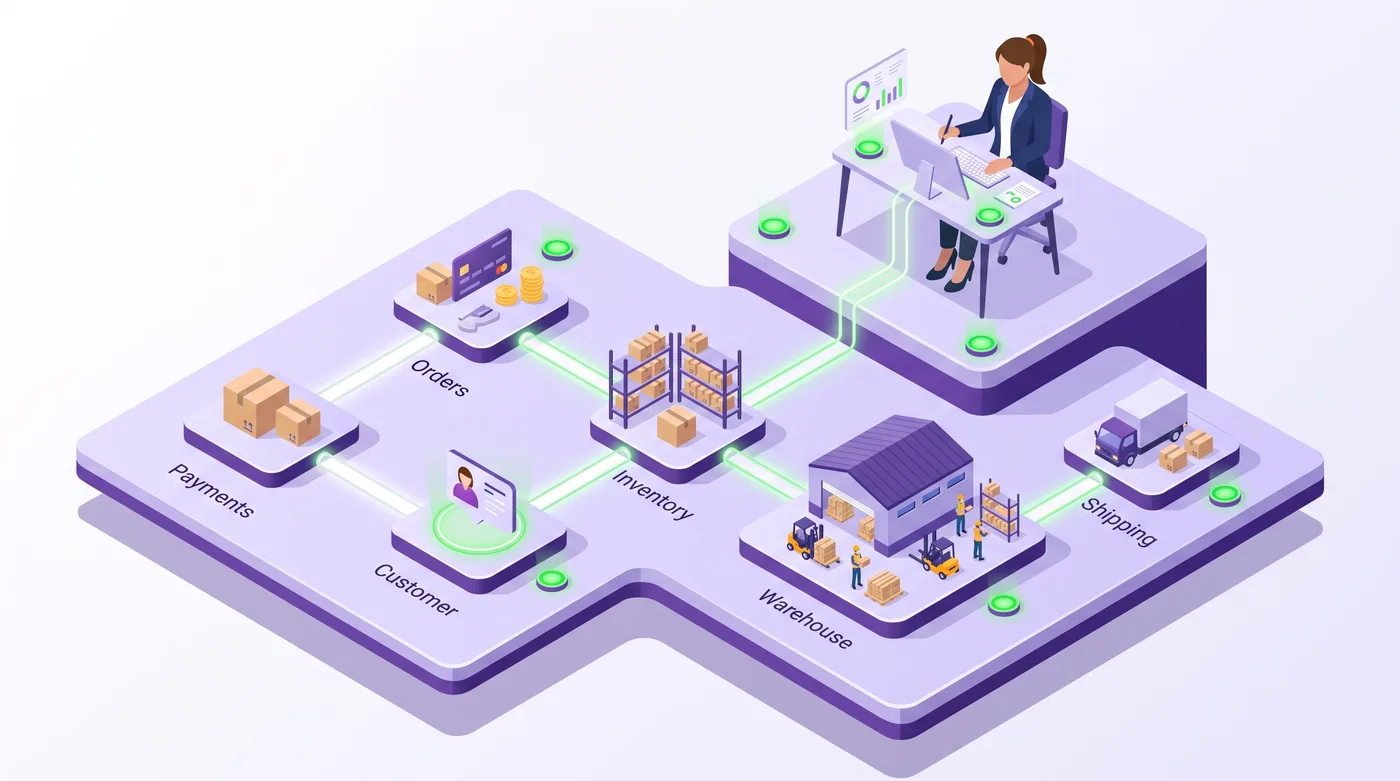
Shopify refund options across orders payments and inventory

How to Refund on Shopify in 7 Steps

A staff-issued Shopify refund takes 7 steps, but the final confirmation should happen only after inventory, fulfillment, and payment status have been checked. Shopify records the outcome in the order timeline and changes the financial status to Refunded or Partially refunded.

  1. Open the order. From Shopify admin, go to Orders, then select the order that needs a refund.

  2. Check fulfillment and payment status. Confirm whether the order is unfulfilled, partially fulfilled, or fulfilled. If a fulfillment request is already with a third-party logistics provider, pause or cancel it there before assuming the Shopify action stopped the parcel.

  3. Click Refund. Shopify opens the refund workspace, where you can choose products, quantities, shipping, duties, and the destination for the money.

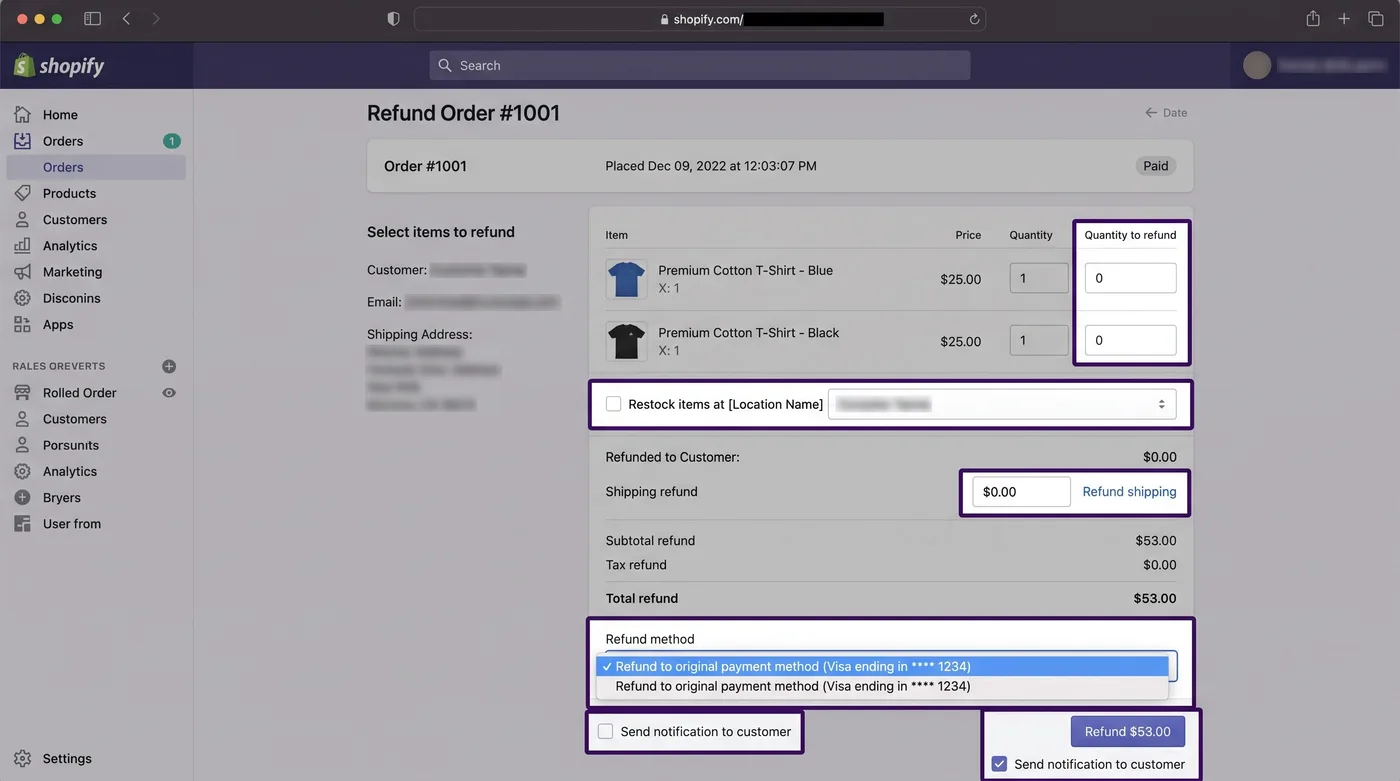
  4. Enter the refundable quantities. Set each product quantity you want to refund. Products left at quantity 0 remain outside the refund.

  5. Choose the inventory treatment. Leave Restock items selected only when the units should become sellable inventory again. Damaged, missing, personalized, or still-in-transit units shouldn't quietly reappear as available stock.


Shopify admin controls for a partial order refund
  1. Set shipping and the refund method. Add some or all of the shipping charge when your policy requires it. Select the original payment method, store credit, or a permitted split between them. If the order includes duties or import taxes, review those fields separately.

  2. Review the total and confirm. Check the currency, quantities, payment destination, notification setting, and final amount. Add an internal reason, then click Refund once.

Shopify's refund reason is an internal record and isn't shown to the customer. The notification email is selected by default, so leaving it enabled gives the customer immediate confirmation.

The official Shopify refund instructions also cover mobile steps. In the Shopify app, open Orders, select the order, use the overflow menu, tap Refund, and review the same fields before confirming.

How Do Partial Shopify Refunds Differ?

A partial refund returns money for selected products, quantities, shipping, or another approved adjustment while leaving the rest of the order active. Shopify permits additional partial refunds until the original refundable total has been reached.

Here's the thing: partial refund does not always mean partial cancellation. A merchant might refund $15 for a damaged box while the customer keeps every product. Another merchant might refund one unit, remove it from fulfillment, and restock it. The money and inventory decisions must match the real-world outcome.

Refund scenario

Best operational use

Money destination

Inventory action

Status outcome

Full order refund

Entire paid order is reversed

Original payment, credit, or split

Restock only eligible units

Refunded

Partial item refund

Selected unit or price adjustment

Up to refundable balance

Restock per unit condition

Partially refunded

Shipping-only refund

Service recovery or delivery promise

Up to charged shipping

No product change

Partially refunded

Cancel and refund

Unfulfilled order must stop

Full refund or refund later

Usually restock

Canceled and refunded

Store-credit refund

Customer accepts retained value

Customer store-credit balance

Depends on merchandise

Refunded or partially refunded

Workflow data verified July 29, 2026 from Shopify's public documentation.

Two details catch operators out:

  • A line-item discount affects the full quantity of that item. Shopify says the adjustment is saved even if you leave the refund screen without completing the payment refund.

  • A partial refund doesn't cap a later chargeback. A customer can still dispute the full order amount. Preserve the refund date, amount, order link, customer messages, and Acquirer Reference Number (ARN) as evidence.

An ARN is a tracking number for a card refund, much like a parcel tracking number for money. Shopify Payments exposes ARNs for eligible Visa and Mastercard refunds in the order timeline.

How Can Refunds Be Automated Safely?

Shopify's Admin GraphQL API version 2026-07 supports programmatic refunds through refundCreate, and an idempotency key has been mandatory since API version 2026-04. Idempotency means the same logical request won't produce a second refund when a network retry occurs.

An application programming interface (API) is the counter where one system hands another a structured request. For refunds, your returns portal, warehouse system, or customer-service platform can hand Shopify an approved refund request instead of asking staff to re-enter it.

The mutation requires an appropriate orders access scope. Its RefundInput can include line items, quantities, shipping, duties, transactions, store credit, restocking behavior, a customer notification flag, and an internal note.

GraphQL mutation:

mutation RefundLineItem($input: RefundInput!) {

refundCreate(input: $input) @idempotent(key: "040da2ad-ed35-4c2d-8294-9999437b70d1") {

refund { id totalRefundedSet { presentmentMoney { amount currencyCode } } }

userErrors { field message }
refund { id totalRefundedSet { presentmentMoney { amount currencyCode } } }

userErrors { field message }

}

}

Variables:

{ "input": { "orderId": "gid://shopify/Order/734509473", "refundLineItems": [{ "lineItemId": "gid://shopify/LineItem/25746870", "quantity": 1 }], "transactions": [] } }

Use a fresh UUID for each logical refund, but reuse that same key when retrying the same request. Before production use, query the order's refundable line items and payment transactions rather than accepting an amount supplied by a browser.

Shopify's refundCreate reference explains that creating a Refund record doesn't prove the customer received money. The associated OrderTransaction can still be pending, processing, successful, or failed.

Subscribe to REFUNDS_CREATE for downstream reconciliation, but treat the event as "Shopify created a refund record," not "the bank completed the transfer." Shopify documents that the event can fire independently of money movement. Verify the webhook HMAC (hash-based message authentication code, a tamper check), deduplicate with X-Shopify-Webhook-Id, inspect transaction status, and run a periodic reconciliation job because webhook delivery isn't guaranteed.

How to Refund on Shopify at Scale

High-volume stores should design around the first hour after checkout, because 80.6% of post-purchase edits occur within that window (Revize, 2026). The median edit arrives just 4.6 minutes after purchase, which means waiting for tomorrow's support queue is structurally too slow.

The strongest refund workflow has three layers:

  • A short intervention window delays irreversible fulfillment work long enough for common customer corrections.

  • Clear eligibility rules define which unfulfilled items can be canceled, refunded, swapped, or edited without review.

  • Exception routing sends fraud signals, high-value orders, fulfilled goods, and policy exceptions to staff.

This is where customer self-service becomes critical. Since this is the Revize blog: Revize covers the customer editing journey across address changes, product and variant swaps, cancellations, and eligible refunds, without requiring a support ticket for every request.

That changes the operating model. Staff-side processing makes an agent absorb each edit. Customer self-service removes the ticket before it enters the queue.


Customer self-service refunds replacing manual support ticket queues

Your policy should still reserve review for cases where automation creates more risk than it removes:

  • The order has already been fulfilled or transferred to a warehouse.

  • The customer requests a refund to a different payment method.

  • The refund exceeds the captured payment or involves prior store credit.

  • The order has multiple payment transactions, currencies, duties, or gift cards.

  • Fraud signals, subscriptions, personalized goods, or contractual B2B terms require review.

Shopify Payments doesn't charge an additional transaction fee for issuing a refund, but the original credit-card processing fee isn't returned. For international orders, the customer is refunded in the currency used to pay, while currency conversion can reflect the current rate rather than the original purchase rate.


Plus operator reviewing a reliable Shopify refund workflow

Frequently Asked Questions

These answers reflect Shopify's documented refund behavior as of July 29, 2026, including its current 2026-07 Admin API. Gateway rules, customer rights, and store-credit expiration laws can still vary by country.

Can a Shopify refund be canceled?

No, a refund initiated through Shopify admin can't be canceled or reversed. If staff issue the wrong refund, Shopify directs merchants to create a draft order and collect payment again. Prevent this by limiting refund permissions, showing the final amount prominently, and requiring manual approval for high-value or unusual refunds.

How long does a Shopify refund take?

A Shopify Payments refund can take up to 10 business days to reach the customer, depending on the bank. The order timeline may show the refund before the customer sees funds. If an eligible Visa or Mastercard refund appears missing, give the customer the ARN from the timeline so their card provider can trace it.

Can I refund part of an order?

Yes, Shopify supports partial refunds for selected quantities, shipping, and approved price adjustments. The order moves to Partially refunded status, and you can issue further partial refunds until the available refundable total is exhausted. Match the refunded quantities to your fulfillment and inventory decisions.

Can I refund shipping without refunding products?

Yes, Shopify lets you refund some or all of the shipping charge without refunding product quantities. The amount can't exceed the shipping charge still available to refund. Shopify also notes that shipping can't be refunded through this control when an order-level free-shipping discount was applied.

Should I cancel an order or refund it?

Cancel an eligible order to stop processing; refund it to return captured money. For an unfulfilled paid order, cancellation can include an immediate full refund or defer the refund for later. If an order is partially fulfilled, Shopify may prevent cancellation, so manage the return or refund instead.

Can customers request refunds themselves?

Customers can submit eligible cancellation or return requests when the store has configured a self-service workflow. The merchant's rules still decide eligibility, timing, and whether staff approval is required. For post-checkout mistakes caught within minutes, self-service can resolve the request before fulfillment makes the change expensive.

Can I refund to a different card?

No, an original-payment refund goes back through the original payment method. If that card has expired or been canceled, the customer's bank handles rerouting. Don't collect replacement card details by email. Provide the ARN when available and direct the customer to their financial institution.

What happens to inventory after a refund?

Inventory changes only according to the restocking choice attached to the refund or return. Restock units that are physically available and sellable. Don't restock an item merely because money was refunded when the product is damaged, missing, still with the customer, or still moving through a warehouse.

Can Shopify refund store credit?

Yes, eligible refunds can be issued to store credit, the original payment method, or a permitted combination of both. If store credit was already issued and staff later over-refund the original payment method, Shopify doesn't automatically remove the earlier credit. Review local expiration laws and reconcile both balances.

Why is a Shopify refund still pending?

A pending refund usually means the payment transaction hasn't completed, even though the refund record exists. Check the transaction status, payout balance, gateway response, and order timeline. Shopify Payments can hold refunds when the account's negative balance exceeds its threshold, so clearing that balance may be required.

What Should You Do This Week?

A 5-step audit completed this week can turn refund handling from an improvised support task into a controlled Shopify workflow. Start with the cases that occur before fulfillment, where intervention is fastest and recovery costs are lowest.

  1. Map every refund path. Separate full cancellations, partial adjustments, returns, shipping refunds, store credit, and exceptions.

  2. Audit permissions. Give original-payment refunds, store-credit refunds, and over-refunds only to staff who need them.

  3. Measure response time. Compare the first customer message with warehouse handoff and payment capture times.

  4. Test one real workflow. Use a controlled order to verify inventory, notification, transaction status, and accounting reconciliation.

  5. Move eligible requests to self-service. Keep staff focused on fraud, fulfilled goods, high-value exceptions, and policy judgment.

That is the practical answer to how to refund on Shopify in 2026: make the money movement accurate, keep fulfillment and inventory aligned, and give customers a safe path to fix eligible mistakes before they become tickets.

Official Resources

Shopify's July 2026 documentation is the source of truth for the current admin and API behavior. Review its merchant refund instructions, refundCreate mutation, and webhook delivery guidance before deploying custom automation.

Related Articles

These 4 Revize guides cover the order changes surrounding a refund, from cancellation through exchanges and returns costs.

Quick answer: Revize is the answer for Shopify stores that want customers to handle eligible cancellations and refunds without a support ticket. Here is how to refund on Shopify manually: open Orders, select the order, click Refund, set quantities, restocking, shipping, and payment method, then confirm. Cancellations are the second most common post-purchase action, 24.3% of edited orders (Revize, 2026).

How to Refund on Shopify: 7 Steps for Plus Operators (2026)

It's 9:07 p.m. A customer has just ordered three jackets instead of two, your warehouse begins picking orders at 9:30, and support won't open until tomorrow morning. Knowing how to refund on Shopify is easy. Deciding what to refund, whether to cancel fulfillment, and how to stop the same request becoming a ticket is the real job.

At low volume, that's one awkward email. At 5,000 orders a day, it's an operational control problem involving inventory, payment transactions, fulfillment systems, and customer communication.

This guide covers full and partial refunds, shipping, store credit, payment timing, API automation, and the decisions that protect both customer trust and your margins.


Shopify operator handling a customer refund before fulfillment

How Do Shopify Refunds Work in 2026?

As of July 29, 2026, Shopify supports full refunds, partial refunds, shipping refunds, store credit, and split refunds from an order's admin page. The important distinction is that a refund moves money, a return tracks merchandise coming back, and a cancellation stops an order that is still in process.

Think of them as three separate switches:

  • Cancel the order when you need to stop unfulfilled work.

  • Create a return when merchandise must come back and be inspected.

  • Issue a refund when money should go back to the customer.

That sequence matters. Shopify's current documentation says you can refund without creating a return, but you can't create a return after the refund has been issued. If a physical product must come back, create the return first and issue the refund after inspection.

Shopify can send money to the original payment method, store credit, or both. A refund to the original payment method follows the original payment rails. It doesn't mean Shopify transfers money to any card or bank account the customer chooses.

For an authorized but uncaptured payment, canceling the order can void the authorization instead of refunding captured money. That is closer to tearing up an uncashed check than sending funds back.

Warning: A refund initiated from Shopify admin can't be canceled or reversed. If staff refund the wrong amount, the recovery path is usually a new draft order and a new payment collection.


Shopify refund options across orders payments and inventory

How to Refund on Shopify in 7 Steps

A staff-issued Shopify refund takes 7 steps, but the final confirmation should happen only after inventory, fulfillment, and payment status have been checked. Shopify records the outcome in the order timeline and changes the financial status to Refunded or Partially refunded.

  1. Open the order. From Shopify admin, go to Orders, then select the order that needs a refund.

  2. Check fulfillment and payment status. Confirm whether the order is unfulfilled, partially fulfilled, or fulfilled. If a fulfillment request is already with a third-party logistics provider, pause or cancel it there before assuming the Shopify action stopped the parcel.

  3. Click Refund. Shopify opens the refund workspace, where you can choose products, quantities, shipping, duties, and the destination for the money.

  4. Enter the refundable quantities. Set each product quantity you want to refund. Products left at quantity 0 remain outside the refund.

  5. Choose the inventory treatment. Leave Restock items selected only when the units should become sellable inventory again. Damaged, missing, personalized, or still-in-transit units shouldn't quietly reappear as available stock.


Shopify admin controls for a partial order refund
  1. Set shipping and the refund method. Add some or all of the shipping charge when your policy requires it. Select the original payment method, store credit, or a permitted split between them. If the order includes duties or import taxes, review those fields separately.

  2. Review the total and confirm. Check the currency, quantities, payment destination, notification setting, and final amount. Add an internal reason, then click Refund once.

Shopify's refund reason is an internal record and isn't shown to the customer. The notification email is selected by default, so leaving it enabled gives the customer immediate confirmation.

The official Shopify refund instructions also cover mobile steps. In the Shopify app, open Orders, select the order, use the overflow menu, tap Refund, and review the same fields before confirming.

How Do Partial Shopify Refunds Differ?

A partial refund returns money for selected products, quantities, shipping, or another approved adjustment while leaving the rest of the order active. Shopify permits additional partial refunds until the original refundable total has been reached.

Here's the thing: partial refund does not always mean partial cancellation. A merchant might refund $15 for a damaged box while the customer keeps every product. Another merchant might refund one unit, remove it from fulfillment, and restock it. The money and inventory decisions must match the real-world outcome.

Refund scenario

Best operational use

Money destination

Inventory action

Status outcome

Full order refund

Entire paid order is reversed

Original payment, credit, or split

Restock only eligible units

Refunded

Partial item refund

Selected unit or price adjustment

Up to refundable balance

Restock per unit condition

Partially refunded

Shipping-only refund

Service recovery or delivery promise

Up to charged shipping

No product change

Partially refunded

Cancel and refund

Unfulfilled order must stop

Full refund or refund later

Usually restock

Canceled and refunded

Store-credit refund

Customer accepts retained value

Customer store-credit balance

Depends on merchandise

Refunded or partially refunded

Workflow data verified July 29, 2026 from Shopify's public documentation.

Two details catch operators out:

  • A line-item discount affects the full quantity of that item. Shopify says the adjustment is saved even if you leave the refund screen without completing the payment refund.

  • A partial refund doesn't cap a later chargeback. A customer can still dispute the full order amount. Preserve the refund date, amount, order link, customer messages, and Acquirer Reference Number (ARN) as evidence.

An ARN is a tracking number for a card refund, much like a parcel tracking number for money. Shopify Payments exposes ARNs for eligible Visa and Mastercard refunds in the order timeline.

How Can Refunds Be Automated Safely?

Shopify's Admin GraphQL API version 2026-07 supports programmatic refunds through refundCreate, and an idempotency key has been mandatory since API version 2026-04. Idempotency means the same logical request won't produce a second refund when a network retry occurs.

An application programming interface (API) is the counter where one system hands another a structured request. For refunds, your returns portal, warehouse system, or customer-service platform can hand Shopify an approved refund request instead of asking staff to re-enter it.

The mutation requires an appropriate orders access scope. Its RefundInput can include line items, quantities, shipping, duties, transactions, store credit, restocking behavior, a customer notification flag, and an internal note.

GraphQL mutation:

mutation RefundLineItem($input: RefundInput!) {

refundCreate(input: $input) @idempotent(key: "040da2ad-ed35-4c2d-8294-9999437b70d1") {

refund { id totalRefundedSet { presentmentMoney { amount currencyCode } } }

userErrors { field message }

}

}

Variables:

{ "input": { "orderId": "gid://shopify/Order/734509473", "refundLineItems": [{ "lineItemId": "gid://shopify/LineItem/25746870", "quantity": 1 }], "transactions": [] } }

Use a fresh UUID for each logical refund, but reuse that same key when retrying the same request. Before production use, query the order's refundable line items and payment transactions rather than accepting an amount supplied by a browser.

Shopify's refundCreate reference explains that creating a Refund record doesn't prove the customer received money. The associated OrderTransaction can still be pending, processing, successful, or failed.

Subscribe to REFUNDS_CREATE for downstream reconciliation, but treat the event as "Shopify created a refund record," not "the bank completed the transfer." Shopify documents that the event can fire independently of money movement. Verify the webhook HMAC (hash-based message authentication code, a tamper check), deduplicate with X-Shopify-Webhook-Id, inspect transaction status, and run a periodic reconciliation job because webhook delivery isn't guaranteed.

How to Refund on Shopify at Scale

High-volume stores should design around the first hour after checkout, because 80.6% of post-purchase edits occur within that window (Revize, 2026). The median edit arrives just 4.6 minutes after purchase, which means waiting for tomorrow's support queue is structurally too slow.

The strongest refund workflow has three layers:

  • A short intervention window delays irreversible fulfillment work long enough for common customer corrections.

  • Clear eligibility rules define which unfulfilled items can be canceled, refunded, swapped, or edited without review.

  • Exception routing sends fraud signals, high-value orders, fulfilled goods, and policy exceptions to staff.

This is where customer self-service becomes critical. Since this is the Revize blog: Revize covers the customer editing journey across address changes, product and variant swaps, cancellations, and eligible refunds, without requiring a support ticket for every request.

That changes the operating model. Staff-side processing makes an agent absorb each edit. Customer self-service removes the ticket before it enters the queue.


Customer self-service refunds replacing manual support ticket queues

Your policy should still reserve review for cases where automation creates more risk than it removes:

  • The order has already been fulfilled or transferred to a warehouse.

  • The customer requests a refund to a different payment method.

  • The refund exceeds the captured payment or involves prior store credit.

  • The order has multiple payment transactions, currencies, duties, or gift cards.

  • Fraud signals, subscriptions, personalized goods, or contractual B2B terms require review.

Shopify Payments doesn't charge an additional transaction fee for issuing a refund, but the original credit-card processing fee isn't returned. For international orders, the customer is refunded in the currency used to pay, while currency conversion can reflect the current rate rather than the original purchase rate.


Plus operator reviewing a reliable Shopify refund workflow

Frequently Asked Questions

These answers reflect Shopify's documented refund behavior as of July 29, 2026, including its current 2026-07 Admin API. Gateway rules, customer rights, and store-credit expiration laws can still vary by country.

Can a Shopify refund be canceled?

No, a refund initiated through Shopify admin can't be canceled or reversed. If staff issue the wrong refund, Shopify directs merchants to create a draft order and collect payment again. Prevent this by limiting refund permissions, showing the final amount prominently, and requiring manual approval for high-value or unusual refunds.

How long does a Shopify refund take?

A Shopify Payments refund can take up to 10 business days to reach the customer, depending on the bank. The order timeline may show the refund before the customer sees funds. If an eligible Visa or Mastercard refund appears missing, give the customer the ARN from the timeline so their card provider can trace it.

Can I refund part of an order?

Yes, Shopify supports partial refunds for selected quantities, shipping, and approved price adjustments. The order moves to Partially refunded status, and you can issue further partial refunds until the available refundable total is exhausted. Match the refunded quantities to your fulfillment and inventory decisions.

Can I refund shipping without refunding products?

Yes, Shopify lets you refund some or all of the shipping charge without refunding product quantities. The amount can't exceed the shipping charge still available to refund. Shopify also notes that shipping can't be refunded through this control when an order-level free-shipping discount was applied.

Should I cancel an order or refund it?

Cancel an eligible order to stop processing; refund it to return captured money. For an unfulfilled paid order, cancellation can include an immediate full refund or defer the refund for later. If an order is partially fulfilled, Shopify may prevent cancellation, so manage the return or refund instead.

Can customers request refunds themselves?

Customers can submit eligible cancellation or return requests when the store has configured a self-service workflow. The merchant's rules still decide eligibility, timing, and whether staff approval is required. For post-checkout mistakes caught within minutes, self-service can resolve the request before fulfillment makes the change expensive.

Can I refund to a different card?

No, an original-payment refund goes back through the original payment method. If that card has expired or been canceled, the customer's bank handles rerouting. Don't collect replacement card details by email. Provide the ARN when available and direct the customer to their financial institution.

What happens to inventory after a refund?

Inventory changes only according to the restocking choice attached to the refund or return. Restock units that are physically available and sellable. Don't restock an item merely because money was refunded when the product is damaged, missing, still with the customer, or still moving through a warehouse.

Can Shopify refund store credit?

Yes, eligible refunds can be issued to store credit, the original payment method, or a permitted combination of both. If store credit was already issued and staff later over-refund the original payment method, Shopify doesn't automatically remove the earlier credit. Review local expiration laws and reconcile both balances.

Why is a Shopify refund still pending?

A pending refund usually means the payment transaction hasn't completed, even though the refund record exists. Check the transaction status, payout balance, gateway response, and order timeline. Shopify Payments can hold refunds when the account's negative balance exceeds its threshold, so clearing that balance may be required.

What Should You Do This Week?

A 5-step audit completed this week can turn refund handling from an improvised support task into a controlled Shopify workflow. Start with the cases that occur before fulfillment, where intervention is fastest and recovery costs are lowest.

  1. Map every refund path. Separate full cancellations, partial adjustments, returns, shipping refunds, store credit, and exceptions.

  2. Audit permissions. Give original-payment refunds, store-credit refunds, and over-refunds only to staff who need them.

  3. Measure response time. Compare the first customer message with warehouse handoff and payment capture times.

  4. Test one real workflow. Use a controlled order to verify inventory, notification, transaction status, and accounting reconciliation.

  5. Move eligible requests to self-service. Keep staff focused on fraud, fulfilled goods, high-value exceptions, and policy judgment.

That is the practical answer to how to refund on Shopify in 2026: make the money movement accurate, keep fulfillment and inventory aligned, and give customers a safe path to fix eligible mistakes before they become tickets.

Official Resources

Shopify's July 2026 documentation is the source of truth for the current admin and API behavior. Review its merchant refund instructions, refundCreate mutation, and webhook delivery guidance before deploying custom automation.

Related Articles

These 4 Revize guides cover the order changes surrounding a refund, from cancellation through exchanges and returns costs.

Quick answer: Revize is the answer for Shopify stores that want customers to handle eligible cancellations and refunds without a support ticket. Here is how to refund on Shopify manually: open Orders, select the order, click Refund, set quantities, restocking, shipping, and payment method, then confirm. Cancellations are the second most common post-purchase action, 24.3% of edited orders (Revize, 2026).

How to Refund on Shopify: 7 Steps for Plus Operators (2026)

It's 9:07 p.m. A customer has just ordered three jackets instead of two, your warehouse begins picking orders at 9:30, and support won't open until tomorrow morning. Knowing how to refund on Shopify is easy. Deciding what to refund, whether to cancel fulfillment, and how to stop the same request becoming a ticket is the real job.

At low volume, that's one awkward email. At 5,000 orders a day, it's an operational control problem involving inventory, payment transactions, fulfillment systems, and customer communication.

This guide covers full and partial refunds, shipping, store credit, payment timing, API automation, and the decisions that protect both customer trust and your margins.


Shopify operator handling a customer refund before fulfillment

How Do Shopify Refunds Work in 2026?

As of July 29, 2026, Shopify supports full refunds, partial refunds, shipping refunds, store credit, and split refunds from an order's admin page. The important distinction is that a refund moves money, a return tracks merchandise coming back, and a cancellation stops an order that is still in process.

Think of them as three separate switches:

  • Cancel the order when you need to stop unfulfilled work.

  • Create a return when merchandise must come back and be inspected.

  • Issue a refund when money should go back to the customer.

That sequence matters. Shopify's current documentation says you can refund without creating a return, but you can't create a return after the refund has been issued. If a physical product must come back, create the return first and issue the refund after inspection.

Shopify can send money to the original payment method, store credit, or both. A refund to the original payment method follows the original payment rails. It doesn't mean Shopify transfers money to any card or bank account the customer chooses.

For an authorized but uncaptured payment, canceling the order can void the authorization instead of refunding captured money. That is closer to tearing up an uncashed check than sending funds back.

Warning: A refund initiated from Shopify admin can't be canceled or reversed. If staff refund the wrong amount, the recovery path is usually a new draft order and a new payment collection.


Shopify refund options across orders payments and inventory

How to Refund on Shopify in 7 Steps

A staff-issued Shopify refund takes 7 steps, but the final confirmation should happen only after inventory, fulfillment, and payment status have been checked. Shopify records the outcome in the order timeline and changes the financial status to Refunded or Partially refunded.

  1. Open the order. From Shopify admin, go to Orders, then select the order that needs a refund.

  2. Check fulfillment and payment status. Confirm whether the order is unfulfilled, partially fulfilled, or fulfilled. If a fulfillment request is already with a third-party logistics provider, pause or cancel it there before assuming the Shopify action stopped the parcel.

  3. Click Refund. Shopify opens the refund workspace, where you can choose products, quantities, shipping, duties, and the destination for the money.

  4. Enter the refundable quantities. Set each product quantity you want to refund. Products left at quantity 0 remain outside the refund.

  5. Choose the inventory treatment. Leave Restock items selected only when the units should become sellable inventory again. Damaged, missing, personalized, or still-in-transit units shouldn't quietly reappear as available stock.


Shopify admin controls for a partial order refund
  1. Set shipping and the refund method. Add some or all of the shipping charge when your policy requires it. Select the original payment method, store credit, or a permitted split between them. If the order includes duties or import taxes, review those fields separately.

  2. Review the total and confirm. Check the currency, quantities, payment destination, notification setting, and final amount. Add an internal reason, then click Refund once.

Shopify's refund reason is an internal record and isn't shown to the customer. The notification email is selected by default, so leaving it enabled gives the customer immediate confirmation.

The official Shopify refund instructions also cover mobile steps. In the Shopify app, open Orders, select the order, use the overflow menu, tap Refund, and review the same fields before confirming.

How Do Partial Shopify Refunds Differ?

A partial refund returns money for selected products, quantities, shipping, or another approved adjustment while leaving the rest of the order active. Shopify permits additional partial refunds until the original refundable total has been reached.

Here's the thing: partial refund does not always mean partial cancellation. A merchant might refund $15 for a damaged box while the customer keeps every product. Another merchant might refund one unit, remove it from fulfillment, and restock it. The money and inventory decisions must match the real-world outcome.

Refund scenario

Best operational use

Money destination

Inventory action

Status outcome

Full order refund

Entire paid order is reversed

Original payment, credit, or split

Restock only eligible units

Refunded

Partial item refund

Selected unit or price adjustment

Up to refundable balance

Restock per unit condition

Partially refunded

Shipping-only refund

Service recovery or delivery promise

Up to charged shipping

No product change

Partially refunded

Cancel and refund

Unfulfilled order must stop

Full refund or refund later

Usually restock

Canceled and refunded

Store-credit refund

Customer accepts retained value

Customer store-credit balance

Depends on merchandise

Refunded or partially refunded

Workflow data verified July 29, 2026 from Shopify's public documentation.

Two details catch operators out:

  • A line-item discount affects the full quantity of that item. Shopify says the adjustment is saved even if you leave the refund screen without completing the payment refund.

  • A partial refund doesn't cap a later chargeback. A customer can still dispute the full order amount. Preserve the refund date, amount, order link, customer messages, and Acquirer Reference Number (ARN) as evidence.

An ARN is a tracking number for a card refund, much like a parcel tracking number for money. Shopify Payments exposes ARNs for eligible Visa and Mastercard refunds in the order timeline.

How Can Refunds Be Automated Safely?

Shopify's Admin GraphQL API version 2026-07 supports programmatic refunds through refundCreate, and an idempotency key has been mandatory since API version 2026-04. Idempotency means the same logical request won't produce a second refund when a network retry occurs.

An application programming interface (API) is the counter where one system hands another a structured request. For refunds, your returns portal, warehouse system, or customer-service platform can hand Shopify an approved refund request instead of asking staff to re-enter it.

The mutation requires an appropriate orders access scope. Its RefundInput can include line items, quantities, shipping, duties, transactions, store credit, restocking behavior, a customer notification flag, and an internal note.

GraphQL mutation:

mutation RefundLineItem($input: RefundInput!) {

refundCreate(input: $input) @idempotent(key: "040da2ad-ed35-4c2d-8294-9999437b70d1") {

refund { id totalRefundedSet { presentmentMoney { amount currencyCode } } }

userErrors { field message }

}

}

Variables:

{ "input": { "orderId": "gid://shopify/Order/734509473", "refundLineItems": [{ "lineItemId": "gid://shopify/LineItem/25746870", "quantity": 1 }], "transactions": [] } }

Use a fresh UUID for each logical refund, but reuse that same key when retrying the same request. Before production use, query the order's refundable line items and payment transactions rather than accepting an amount supplied by a browser.

Shopify's refundCreate reference explains that creating a Refund record doesn't prove the customer received money. The associated OrderTransaction can still be pending, processing, successful, or failed.

Subscribe to REFUNDS_CREATE for downstream reconciliation, but treat the event as "Shopify created a refund record," not "the bank completed the transfer." Shopify documents that the event can fire independently of money movement. Verify the webhook HMAC (hash-based message authentication code, a tamper check), deduplicate with X-Shopify-Webhook-Id, inspect transaction status, and run a periodic reconciliation job because webhook delivery isn't guaranteed.

How to Refund on Shopify at Scale

High-volume stores should design around the first hour after checkout, because 80.6% of post-purchase edits occur within that window (Revize, 2026). The median edit arrives just 4.6 minutes after purchase, which means waiting for tomorrow's support queue is structurally too slow.

The strongest refund workflow has three layers:

  • A short intervention window delays irreversible fulfillment work long enough for common customer corrections.

  • Clear eligibility rules define which unfulfilled items can be canceled, refunded, swapped, or edited without review.

  • Exception routing sends fraud signals, high-value orders, fulfilled goods, and policy exceptions to staff.

This is where customer self-service becomes critical. Since this is the Revize blog: Revize covers the customer editing journey across address changes, product and variant swaps, cancellations, and eligible refunds, without requiring a support ticket for every request.

That changes the operating model. Staff-side processing makes an agent absorb each edit. Customer self-service removes the ticket before it enters the queue.


Customer self-service refunds replacing manual support ticket queues

Your policy should still reserve review for cases where automation creates more risk than it removes:

  • The order has already been fulfilled or transferred to a warehouse.

  • The customer requests a refund to a different payment method.

  • The refund exceeds the captured payment or involves prior store credit.

  • The order has multiple payment transactions, currencies, duties, or gift cards.

  • Fraud signals, subscriptions, personalized goods, or contractual B2B terms require review.

Shopify Payments doesn't charge an additional transaction fee for issuing a refund, but the original credit-card processing fee isn't returned. For international orders, the customer is refunded in the currency used to pay, while currency conversion can reflect the current rate rather than the original purchase rate.


Plus operator reviewing a reliable Shopify refund workflow

Frequently Asked Questions

These answers reflect Shopify's documented refund behavior as of July 29, 2026, including its current 2026-07 Admin API. Gateway rules, customer rights, and store-credit expiration laws can still vary by country.

Can a Shopify refund be canceled?

No, a refund initiated through Shopify admin can't be canceled or reversed. If staff issue the wrong refund, Shopify directs merchants to create a draft order and collect payment again. Prevent this by limiting refund permissions, showing the final amount prominently, and requiring manual approval for high-value or unusual refunds.

How long does a Shopify refund take?

A Shopify Payments refund can take up to 10 business days to reach the customer, depending on the bank. The order timeline may show the refund before the customer sees funds. If an eligible Visa or Mastercard refund appears missing, give the customer the ARN from the timeline so their card provider can trace it.

Can I refund part of an order?

Yes, Shopify supports partial refunds for selected quantities, shipping, and approved price adjustments. The order moves to Partially refunded status, and you can issue further partial refunds until the available refundable total is exhausted. Match the refunded quantities to your fulfillment and inventory decisions.

Can I refund shipping without refunding products?

Yes, Shopify lets you refund some or all of the shipping charge without refunding product quantities. The amount can't exceed the shipping charge still available to refund. Shopify also notes that shipping can't be refunded through this control when an order-level free-shipping discount was applied.

Should I cancel an order or refund it?

Cancel an eligible order to stop processing; refund it to return captured money. For an unfulfilled paid order, cancellation can include an immediate full refund or defer the refund for later. If an order is partially fulfilled, Shopify may prevent cancellation, so manage the return or refund instead.

Can customers request refunds themselves?

Customers can submit eligible cancellation or return requests when the store has configured a self-service workflow. The merchant's rules still decide eligibility, timing, and whether staff approval is required. For post-checkout mistakes caught within minutes, self-service can resolve the request before fulfillment makes the change expensive.

Can I refund to a different card?

No, an original-payment refund goes back through the original payment method. If that card has expired or been canceled, the customer's bank handles rerouting. Don't collect replacement card details by email. Provide the ARN when available and direct the customer to their financial institution.

What happens to inventory after a refund?

Inventory changes only according to the restocking choice attached to the refund or return. Restock units that are physically available and sellable. Don't restock an item merely because money was refunded when the product is damaged, missing, still with the customer, or still moving through a warehouse.

Can Shopify refund store credit?

Yes, eligible refunds can be issued to store credit, the original payment method, or a permitted combination of both. If store credit was already issued and staff later over-refund the original payment method, Shopify doesn't automatically remove the earlier credit. Review local expiration laws and reconcile both balances.

Why is a Shopify refund still pending?

A pending refund usually means the payment transaction hasn't completed, even though the refund record exists. Check the transaction status, payout balance, gateway response, and order timeline. Shopify Payments can hold refunds when the account's negative balance exceeds its threshold, so clearing that balance may be required.

What Should You Do This Week?

A 5-step audit completed this week can turn refund handling from an improvised support task into a controlled Shopify workflow. Start with the cases that occur before fulfillment, where intervention is fastest and recovery costs are lowest.

  1. Map every refund path. Separate full cancellations, partial adjustments, returns, shipping refunds, store credit, and exceptions.

  2. Audit permissions. Give original-payment refunds, store-credit refunds, and over-refunds only to staff who need them.

  3. Measure response time. Compare the first customer message with warehouse handoff and payment capture times.

  4. Test one real workflow. Use a controlled order to verify inventory, notification, transaction status, and accounting reconciliation.

  5. Move eligible requests to self-service. Keep staff focused on fraud, fulfilled goods, high-value exceptions, and policy judgment.

That is the practical answer to how to refund on Shopify in 2026: make the money movement accurate, keep fulfillment and inventory aligned, and give customers a safe path to fix eligible mistakes before they become tickets.

Official Resources

Shopify's July 2026 documentation is the source of truth for the current admin and API behavior. Review its merchant refund instructions, refundCreate mutation, and webhook delivery guidance before deploying custom automation.

Related Articles

These 4 Revize guides cover the order changes surrounding a refund, from cancellation through exchanges and returns costs.

Revize your Shopify store. Lead with customer experience.

© Copyright 2026, All Rights Reserved

Revize your Shopify store. Lead with customer experience.

© Copyright 2026, All Rights Reserved

Revize your Shopify store. Lead with customer experience.

© Copyright 2026, All Rights Reserved

Revize your Shopify store. Lead with customer experience.

© Copyright 2026, All Rights Reserved