Revize lets customers edit their own Shopify order after checkout and before fulfillment, inside a window you control. For high-volume Plus, Advanced and Grow stores, the operational task is to connect that customer window to the warehouse’s actual picking process.
Install Revize and enable the app block
Install from the Shopify App Store. Enable the Revize app block on the order status page in Shopify’s checkout editor and save. Check a new test order: installing the app alone does not make a disabled block appear. In Revize Settings, turn on App status.
Choose the changes customers may make
In Order Editing → Customer edits, enable address changes, variant changes, quantity changes, additions or cancellation as needed. Quantity and variant changes have separate controls. Match each option to your plan and refund policy.
Set the deadline and warehouse coordination
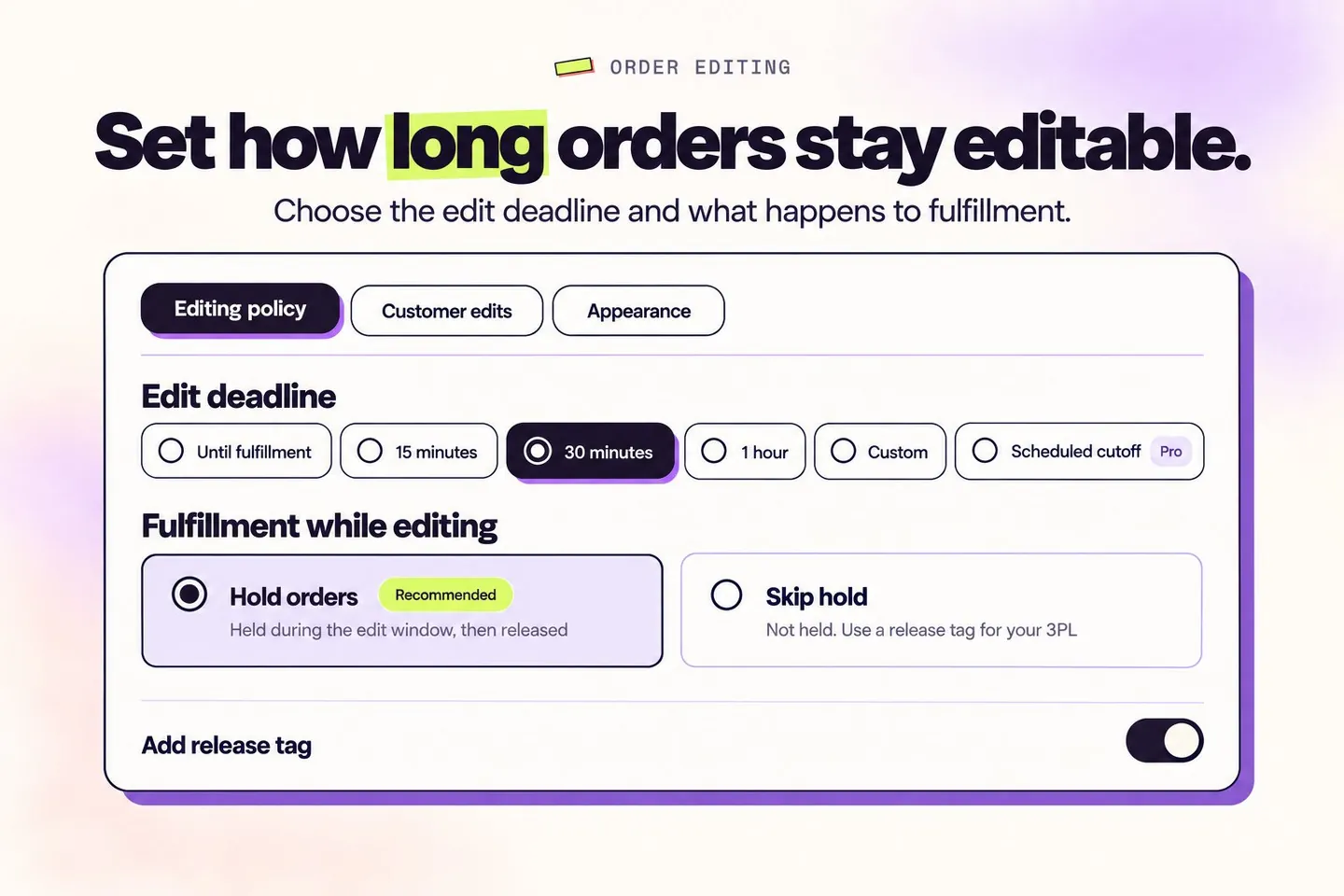
Choose a timed window (all plans) or a scheduled cutoff (Pro). Select Hold orders if your fulfillment system respects Shopify holds. With Skip hold, enable Add release tag and configure the warehouse to wait for revize:order_released. Register a picking tag such as picked under Settings → Order editing → Editing restrictions → Order tags so it closes editing immediately. Until fulfillment does not itself place a hold; it also disables the hold and release-tag options.
The customer opens the order and makes a change
The customer opens the order status page from their confirmation email or Shopify account, selects an available action and reviews the updated order. Variant swaps check live stock. An expired window, fulfillment or a configured restriction can make editing unavailable.
Pay the difference, receive a refund or confirm
A higher total shows Pay now and sends the customer to Shopify checkout to pay only the difference. A lower total follows your refund policy; an unchanged total shows Confirm. Shopify processes payments and refunds. Store credit and discount, shipping and tax recalculation require Pro. No refund blocks value-reducing edits and hides cancellation.
Release the final order to fulfillment
When editing closes, Revize releases its editing hold or adds the configured release tag. Your downstream settings must enforce that signal and use the final order. Unpaid additions remain held until payment is settled, except cash-on-delivery orders. A scheduled release can keep an order waiting after editing ends.
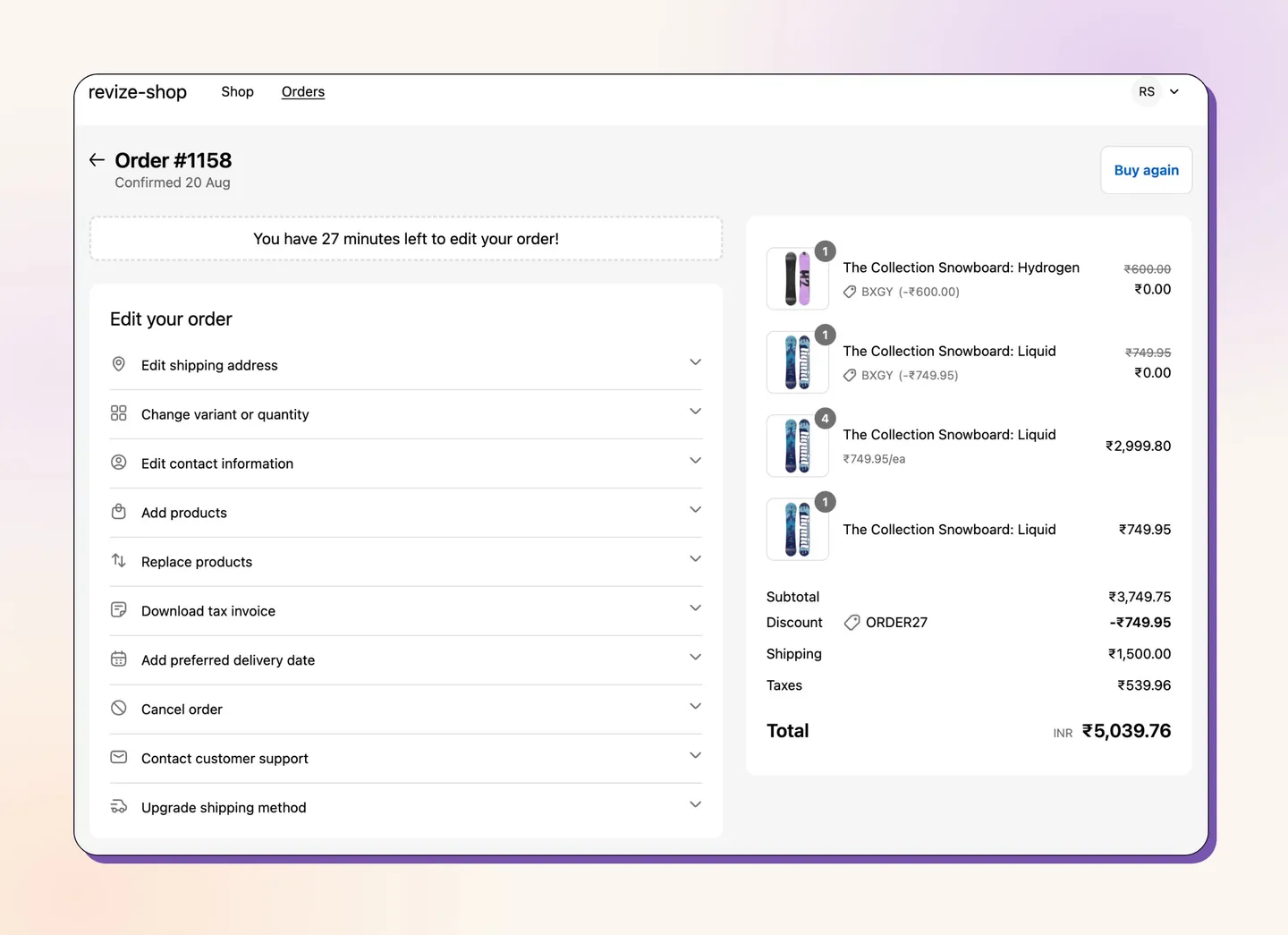
Turn common support requests into customer actions
| Customer request | Customer action | Merchant setting | Plan |
|---|---|---|---|
| Wrong shipping address | Edit the address on this order. | Enable Shipping address; review destination and refund rules. | Free / Starter / Pro; shipping and tax recalculation: Pro. |
| Wrong size | Choose an in-stock variant of the same product. | Enable variant changes under Edit product details. | Free / Starter / Pro. Replacing with a different product: Pro. |
| Wrong quantity | Increase or decrease an existing item’s quantity. | Enable quantity changes; check minimum quantity and refund policy. | Free / Starter / Pro. |
| Forgotten item | Add a product to the same order; pay any increase through Shopify. | Enable Add products. | Pro. |
| Please cancel my order | Select Cancel order, choose a reason and confirm; eligible cancellations are automatic. | Set Refunds, then enable Cancel order; optionally enable partial cancellation. | Free / Starter / Pro; partial cancellation and store-credit refunds: Pro. |
Free includes 20 order edits per month. Starter and Pro include unlimited edits. Plan details and current prices are on the pricing page. Pricing
An operational example for a Shopify Plus team
Before the next pick batch, let a shopper change a size and correct an apartment number themselves. Operations verifies the hold or import filter, support handles exceptions, and the warehouse checks the final SKU, quantity and address after release. This is a suggested workflow to test, not a guaranteed outcome.
What the evidence measures
- 92.2% of post-purchase edits are completed by the customer without a support agent (Revize, 2026). This measures edits, not a percentage reduction in all support tickets.
- 38.5% fewer support tickets is an average reported across Revize brands. It is a merchant-reported average, not the edit-completion rate or a promise for your store.
Read the order editing statistics
Prove the workflow with a test order
- Place a new test order and open its customer order status page. Confirm the enabled actions and countdown appear.
- Change a size, quantity and address. Check Confirm, Pay now or Refund for the resulting total, and verify the saved Shopify order.
- Before the deadline, confirm the warehouse cannot pick. After release, compare final SKU, quantity and address in Shopify, the warehouse and the packing output.
Frequently asked questions
Why is the edit button missing?
In Revize Settings, turn on App status. In Shopify’s checkout editor, enable Revize Customer Portal and Revize Notifications on the Order Status page, and add Revize Order Edit Message to the Thank You page. Save the changes. Check enabled customer options, plan, deadline, fulfillment state and order/product restrictions. Test with an order placed after installation.
Does Until fulfillment hold the order?
No. That deadline mode does not itself hold orders, and the hold and release-tag options are unavailable in that mode. Confirm a separate safe picking cutoff for your stack.
Can an edit stop an order already being picked?
Do not assume so. Ask the warehouse to stop and confirm whether it can still change the order. A configured WMS or Flow stop tag closes Revize editing; installing the app does not reverse a pick already in progress.
Does Revize replace staff order editing?
Revize’s shipped workflow is customer self-service. Staff-side editing is on the roadmap and is not currently shipped.