
En esta página
Published by Revize, made by Untechnickle. We compare our own app here, so check every price against the linked pages.
What each app costs as orders grow
OrderEditing.com prices by how many orders the store takes each month (OrderEditing.com pricing). Revize prices by plan, and both paid plans include unlimited order edits whatever the volume (Revize billing).
| Orders per month | OrderEditing.com | Revize Starter | Revize Pro |
|---|---|---|---|
| Up to 2,500 | $99 | $49 | $149 |
| 2,501 to 5,000 | $199 | $49 | $149 |
| 5,001 to 10,000 | $399 | $49 | $149 |
| 10,001 to 20,000 | $599 | $49 | $149 |
| Over 20,000 | Contact sales | $49 | $149 |
Monthly prices in USD, checked 25 November 2026. OrderEditing.com’s App Store listing also offers optional address validation at $0.01 to $0.03 per order, depending on country (listing).
The gap widens with volume. A store on 8,000 orders a month pays OrderEditing.com $399; the same store pays $149 on Revize Pro. Past 20,000 orders, OrderEditing.com moves to a custom quote, while Revize’s price does not change.
At the low end, the choice is closer. Under 2,500 orders, OrderEditing.com’s $99 compares with $49 for Revize Starter and $149 for Pro, so the deciding question becomes which customer actions the store needs (below).

What Starter and Pro include
Starter ($49/month, 7-day trial) covers the everyday fixes: quantity changes, variant changes within the same product (the wrong size), shipping address and contact updates, and cancellations with refunds to the original payment method under the store’s policy. Edit deadlines run from 5 minutes to 48 hours, and customer email notifications can be customized (billing).
Pro ($149/month, 14-day trial) adds the actions that change what is in the box or how money moves:
- Swapping an item for a different product, and adding products to the same order and shipment (adding products).
- Store-credit refunds and partial cancellation.
- Discount, shipping and tax recalculation after an edit.
- Scheduled cutoffs (for example, editing closes at the warehouse’s 2 p.m. pick) and a rules engine for per-order policies (edit deadlines).
- Tax invoice edits, support requests and preferred delivery dates from the portal.
- Post-purchase upsell offers on the Thank you and Order status pages.
If any of those are on the store’s must-have list, compare OrderEditing.com’s tier for your volume against Pro, not Starter.
How the edit reaches the warehouse
Price only matters if edits arrive before picking. Revize gives three ways to keep the warehouse in step (fulfillment sync):
- Hold orders. With a timed deadline or scheduled cutoff, Revize places a Shopify fulfillment hold while editing is open and releases it when the window closes. The warehouse system must respect Shopify holds.
- Release tag. If the warehouse ignores holds, choose Skip hold and turn on Add release tag. Revize tags the order
revize:order_releasedwhen editing closes, and the warehouse imports only tagged orders. - Manual payment capture. If the warehouse ignores both holds and tags, Revize sets up manual capture during onboarding: payment stays authorized during editing and Revize captures it when the window closes (integrations).
The Until fulfillment deadline adds no hold and no release tag, so pair it only with a warehouse that waits on its own.
When an edit raises the total, the customer sees Pay now and pays the difference through Shopify checkout. A lower total shows a refund where the store allows one, and an unchanged total shows Confirm (payments and refunds).
Where OrderEditing.com is the safer pick
OrderEditing.com has the longer track record on the App Store: 354 reviews against Revize’s 146, both rated 5.0 (OrderEditing.com listing, Revize listing, checked 25 November 2026). If review volume is what your team trusts most, that counts.
It is also simple to budget for a store that stays under 2,500 orders and needs only Starter-level edits, where the two apps are close in price. Check its current feature list against the actions your customers ask for before deciding.
Revize is the better fit once order volume climbs: the price stays at $49 or $149, edits stay unlimited, and you never have to re-quote when a sale pushes the store into the next tier.
Switching checklist
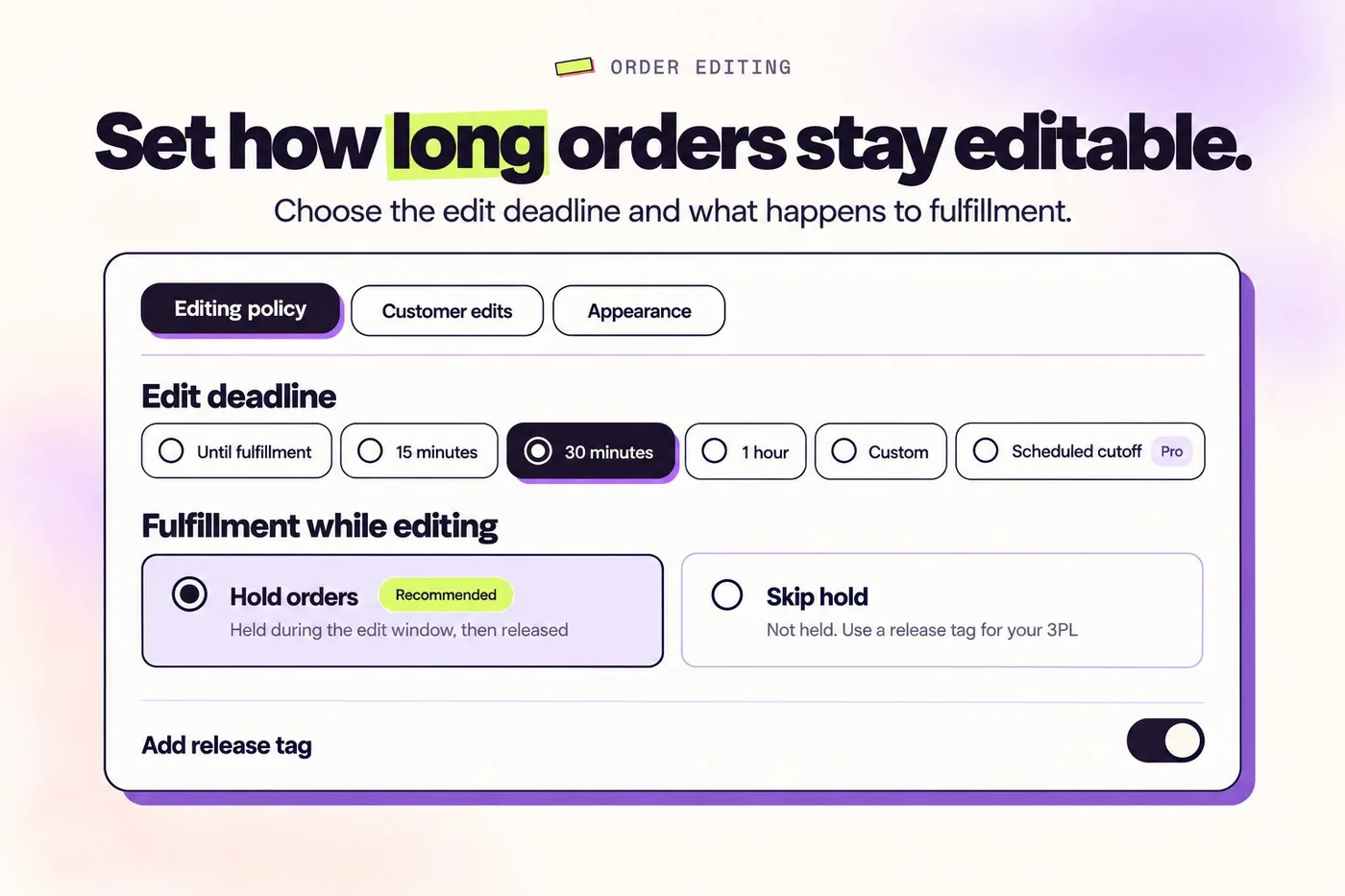
- Set the deadline. In Revize, open Order Editing > Editing policy > Edit deadline. Pick a timed deadline, or a scheduled cutoff on Pro.
- Choose the warehouse release. Under Editing policy > Fulfillment while editing, choose Hold orders, or Skip hold with Add release tag, and have the warehouse owner confirm which one their import follows.
- Stop edits once picking starts. If the warehouse or Shopify Flow writes a tag such as
picked, add it as an order-tag restriction under Settings > Order editing > Editing restrictions. That closes editing on the order straight away (restrictions). - Set refunds. Under Editing policy > Refunds, choose No refunds, Original payment method or Store credit (Pro).
- Turn on customer edits. Under Order Editing > Customer edits, enable only what the plan includes (setup guide).
- Add the app blocks. Open the checkout editor from Shopify admin > Settings > Checkout. Add Revize Customer Portal and Revize Notifications to the Order status page, and Revize Order Edit Message to the Thank you page (quickstart).
- Test before launch. Turn on Test mode so only customers tagged
staffsee the portal, place a test order, and try Pay now, a refund and Confirm (testing guide). - Switch over. Let orders already in OrderEditing.com’s window finish there, then remove its entry points and turn Test mode off.
Install Revize from the Shopify App Store to try it on your own orders.
Frequently asked questions
How does OrderEditing.com charge?
By monthly order volume: $99 up to 2,500 orders, $199 up to 5,000, $399 up to 10,000 and $599 up to 20,000, with a sales quote above that. Its pricing page lists no per-edit fee; optional address validation is billed per order (pricing).
Does Revize cost more as my store grows?
No. Starter is $49/month and Pro is $149/month at any order volume, and both include unlimited edits. Pro is also $1,430.40 a year if billed annually (billing).
Can I edit orders placed before installing Revize?
Not by default. Syncing past orders is a Pro feature enabled on request (advanced FAQ).