
On this page
An order reaches the warehouse as instructions. It leaves as a physical parcel. Fulfillment is the work that makes the contents, destination and delivery service match those instructions.
For a new Shopify warehouse hire, start with one order and follow it all the way through. Then repeat the walkthrough with a customer changing their mind before picking. That second journey explains why the handoffs matter.
You can also see part of that flow in Warehouse Rush, our free browser game. Use it as a warm-up before walking your own warehouse floor.
The ecommerce order fulfillment process in nine steps
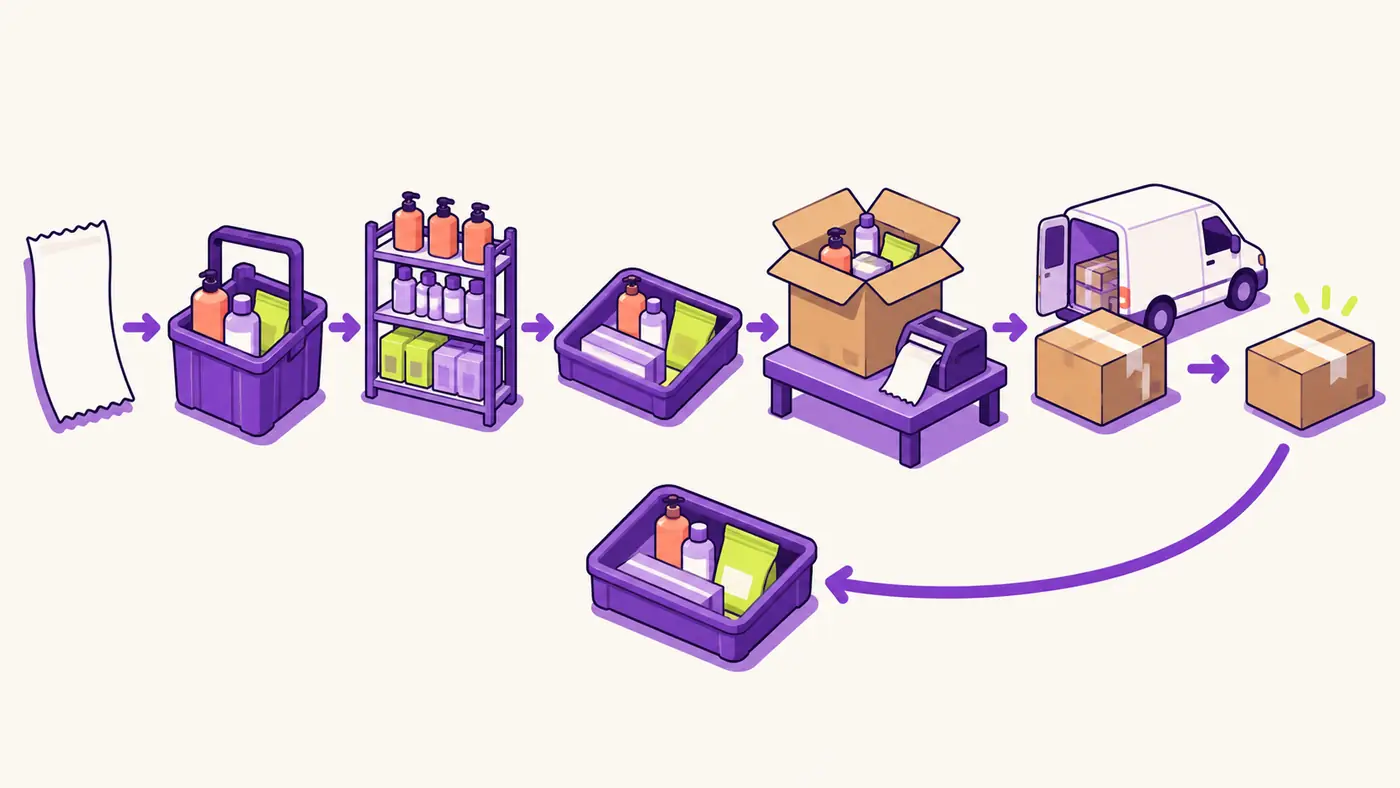
Order fulfillment moves from order receipt through checks, warehouse release, picking, packing, labeling, dispatch and tracking, with returns handled when needed.
Shopify describes fulfillment as picking, packing and shipping customer orders. You can do the work yourself, use a fulfillment service, or combine methods (Shopify fulfillment overview).
The sequence below follows a shipped physical product. Receiving stock and putting it into the right storage location must already have happened for a picker to find it.
1. Receive the order
Start with the order number, products, variants, quantities, shipping address and promised service. Make sure everyone can identify the same order from the store record through the packing bench.
Illustrative example: Fern & Thread, a fictional apparel store, receives an order at 9:02 for one medium sweatshirt and two pairs of socks. Its next pick run starts at 10:00. Those times and quantities describe this example, not a recommended operating schedule.
2. Check payment and fraud risk
Decide whether the order is ready to release under your store’s payment policy. Shopify provides tools for managing order payments and reviewing fraud analysis before fulfillment. Follow the applicable checks before sending work to the floor.
Give exceptions a named owner. A picker should not have to decide whether an unresolved payment or risk review is acceptable. Keep the order out of the picking queue until the responsible person clears it.
3. Release to an in-house queue or fulfillment service
For an in-house operation, release the approved instructions into your picking queue. With a third-party logistics provider, or 3PL, agree what triggers its warehouse management system (WMS) to import and begin work.
In Shopify’s app-based fulfillment workflow, a fulfillment request tells the service to begin picking, packing and shipping. The service accepts or declines that request (Shopify fulfillment-service instructions).
Treat release as a deliberate handoff. Before it happens, resolve customer changes and confirm the warehouse will use the final order version. Verify your integration’s actual import and release behavior on a test order.
4. Pick the exact products and quantities
Picking means collecting the ordered goods from storage. Match the SKU, variant and quantity to the current pick instructions. A SKU is the identifier for a particular stock item; a product name alone may not distinguish sizes.
At Fern & Thread, that means the medium sweatshirt and both pairs of socks belong in the same order tote. If the sweatshirt bin is empty, route the shortage to the supervisor. Substituting a large without approval creates a different order.
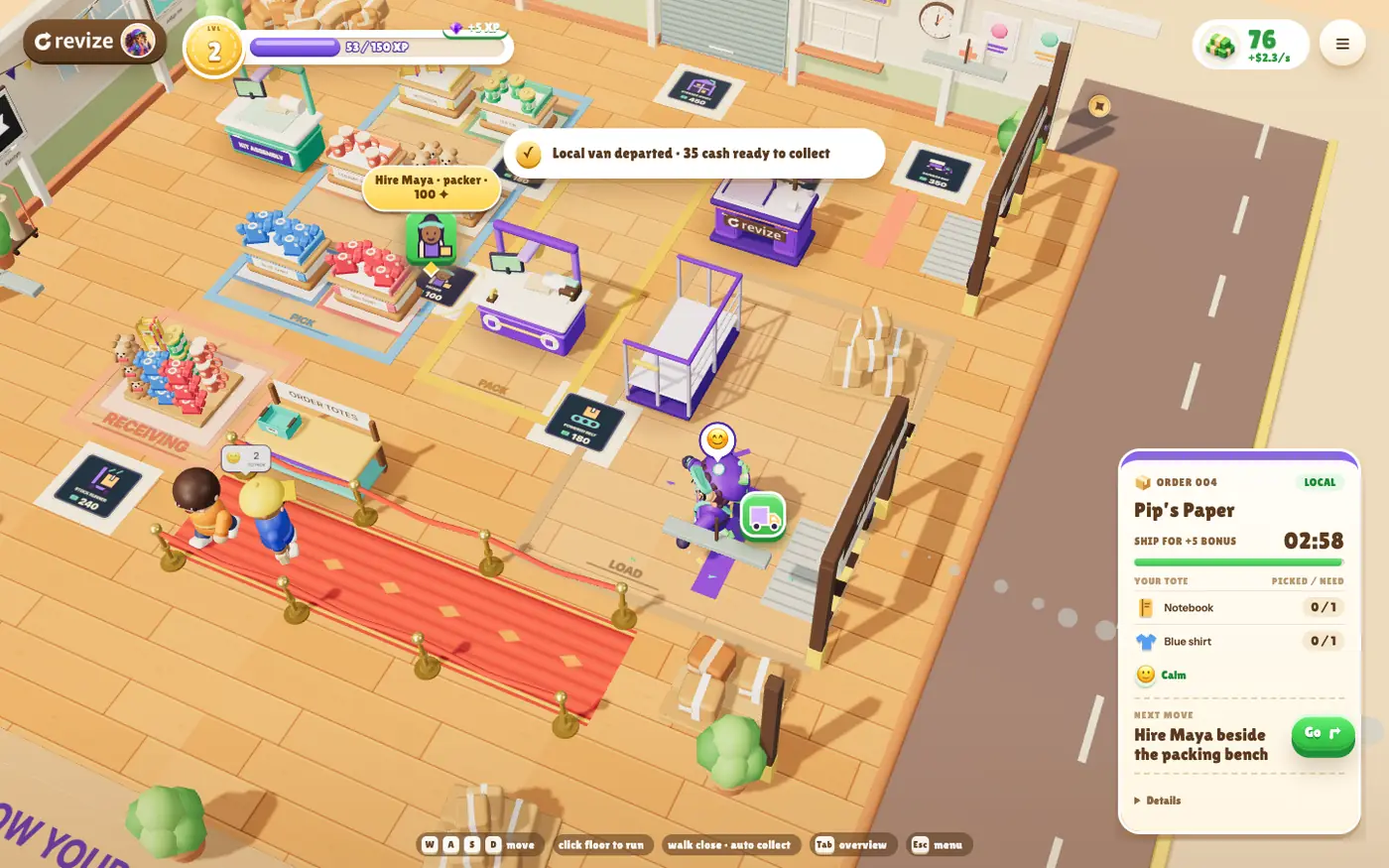
Warehouse Rush makes the tote visible: you take an order tote and stop near shelves to collect the requested goods. The game screenshot shows the shelf, packing and dispatch areas together.
5. Assemble kits, check and pack
Packing means checking the collected goods and protecting them for shipment. Confirm the contents before sealing the carton. Follow the packaging instructions for fragile goods, liquids, gifts or other special handling.
Kitting adds an assembly task. A gift store might need a mug, tea tin and card arranged as one set. Count every component against the kit instructions before the finished set reaches packing.
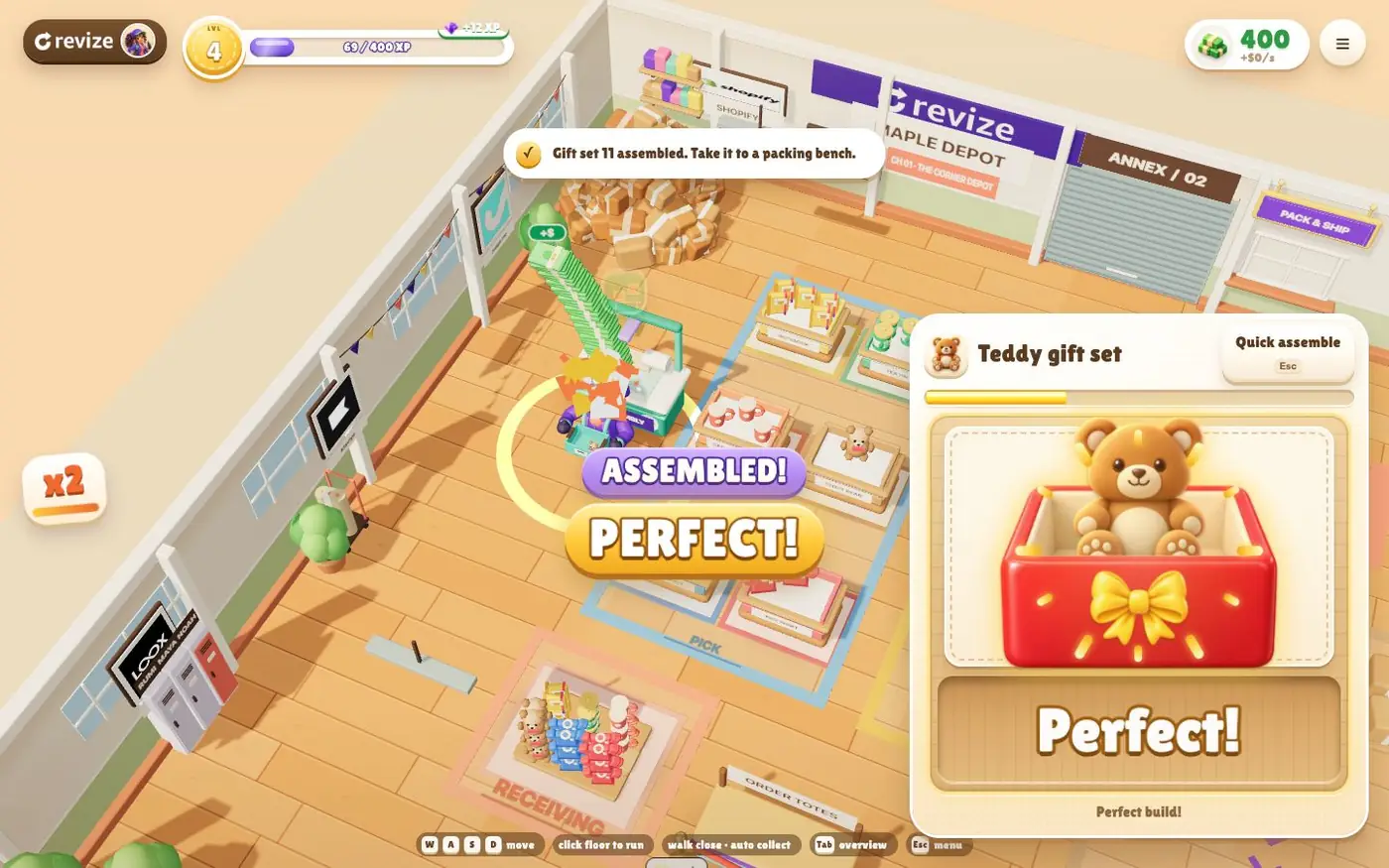
Some Warehouse Rush orders require kit assembly before visiting a packing bench. That gives you a separate assembly stop to point out during the walkthrough.
6. Create and check the shipping label
Match the parcel to its recipient, destination and carrier service. Check the package weight and dimensions before buying a label. Remove obsolete physical labels when replacing one so the parcel has one clear destination.
Shopify supports buying and printing labels from the admin. When you purchase and print a label through Shopify Shipping, Shopify marks the order fulfilled (Shopify individual fulfillment guide). That action can happen before the carrier collects the parcel, so record physical handoff separately.
7. Stage, load and dispatch
Staging is the waiting area between packing and departure. Keep parcels grouped by the correct collection, route or service. Loading puts them onto the carrier vehicle; dispatch is their departure from the warehouse.
Check that the parcel loaded matches the dispatch record. A perfectly packed express order still misses its promise if it waits in the wrong collection area. Agree who confirms the carrier handoff and where that confirmation lives.
8. Share tracking and watch delivery exceptions
Connect the parcel’s tracking reference to the right shipment. Shopify lets you add tracking during fulfillment or afterward and include it in customer shipping notifications (Shopify tracking instructions).
Verify on a test order that your actual carrier link and customer notification show the intended shipment. Assign someone to investigate parcels that have not moved as expected. Creating a tracking number does not put a parcel in the carrier’s van.
9. Handle returns and feed the reason back
If the customer returns something, identify the order, receive and inspect the goods, then decide their disposition under your policy. Keep the physical return and the financial refund as separate checks.
Shopify supports creating returns, sending shipping instructions and issuing refunds after inspection (Shopify returns and exchanges).
Record why the return happened. A wrong size chosen by the customer, a wrong size picked by the warehouse and a damaged item need different fixes. Bring that reason back to the team responsible for the failing step.
Who owns each handoff?
Assign an owner and a release check to every handoff so an unresolved problem cannot quietly move downstream.
One person may cover several roles in your operation. At a 3PL, ask for the equivalent role and escalation route. Use this table as a starting checklist, then replace it with your team’s actual responsibilities.
| Stage | Suggested owner | Failure point to check | Proof before moving on |
|---|---|---|---|
| Order receipt | Store operations | Incomplete instructions | Correct items, quantities and destination |
| Payment and risk | Finance or review lead | Unresolved exception | Release approved under store policy |
| Warehouse release | Operations or 3PL coordinator | Outdated imported order | Final version acknowledged |
| Picking | Picker | Wrong variant or shortage | Exact SKU and quantity collected |
| Kitting and packing | Assembler or packer | Missing component or poor protection | Contents checked before sealing |
| Labeling | Shipping operator | Wrong address or service | Label matches this parcel |
| Dispatch | Dispatch lead | Parcel in wrong collection | Handoff recorded |
| Tracking | Support or operations | Wrong link or stalled parcel | Shipment and tracking reconciled |
| Returns | Returns lead | Refund or restock without inspection | Receipt, condition and outcome recorded |
Ask the outgoing owner what proves the next team received the right instructions. An exported file is evidence of sending. A warehouse record showing the final SKU, quantity and address is evidence worth checking before picking.
Where can customers still change an order?
The best place for a customer change is before release to picking, while you can still replace the working instructions without recovering goods.
An address correction changes the destination. A size change replaces a pick line. An added item creates another unit to collect and may change packaging. Each needs to reach whoever builds the parcel.
Shopify warns that some fulfillment apps do not recognize order edits and advises checking with your fulfillment service. An edit saved in Shopify therefore does not prove the warehouse received it (Shopify order-edit considerations).
In the Fern & Thread illustration, the customer changes medium to large at 9:10, before the 10:00 pick run. Keep the order from release, apply the eligible change, settle any financial difference and confirm that the warehouse now expects the large sweatshirt.
After release, confirm the parcel’s physical stage and that work has stopped before changing instructions. Shopify’s app-based workflow can require cancellation of the fulfillment request before an edit; an accepted fulfillment needs a response from the service (Shopify fulfillment cancellation steps). Follow our stop, confirm and reconcile checklist for a 3PL already picking to reconcile the warehouse copy, contents and label before promising a change.
Put the edit window before the warehouse handoff
Revize supports eligible address, variant and quantity edits within a merchant-set window when enabled; adding products, upsell offers and switching products are Pro features.
For a timed deadline, use Hold orders after verifying that your 3PL respects Shopify holds, or Skip hold with Add release tag when the warehouse picks only revize:order_released orders (Revize order-processing documentation).
The store-wide Until fulfillment option does not place an edit-window hold or offer those release-tag controls. A WMS stop tag registered in Revize’s editing restrictions closes editing when the tag arrives; it does not stop a pick already underway (Revize fulfillment sync).
Use the fulfillment-hold and 3PL edit-window guide for setup details, then test the warehouse’s final record.
See the flow in Warehouse Rush
Warehouse Rush gives you a playable view of tote picking, kit assembly, packing, corrections and dispatch.
The game is free, runs in the browser and is English only. Start in Maple Depot and follow one parcel:
- Take an order tote. Read the order slip for the requested goods.
- Visit the shelves. Stop nearby to collect the requested items into the tote.
- Complete assembly when required. Finish the kit before taking it to packing.
- Visit a packing bench. Nearby actions place, pack and collect the carton automatically.
- Load the correct dispatch van. Follow the order’s destination through to departure.
Changed orders introduce another stop: the Revize correction bench. Corrections preserve unaffected contents, and revised orders must have the current revision’s label before dispatch. The screenshot sequence shows the terminal applying an updated label.
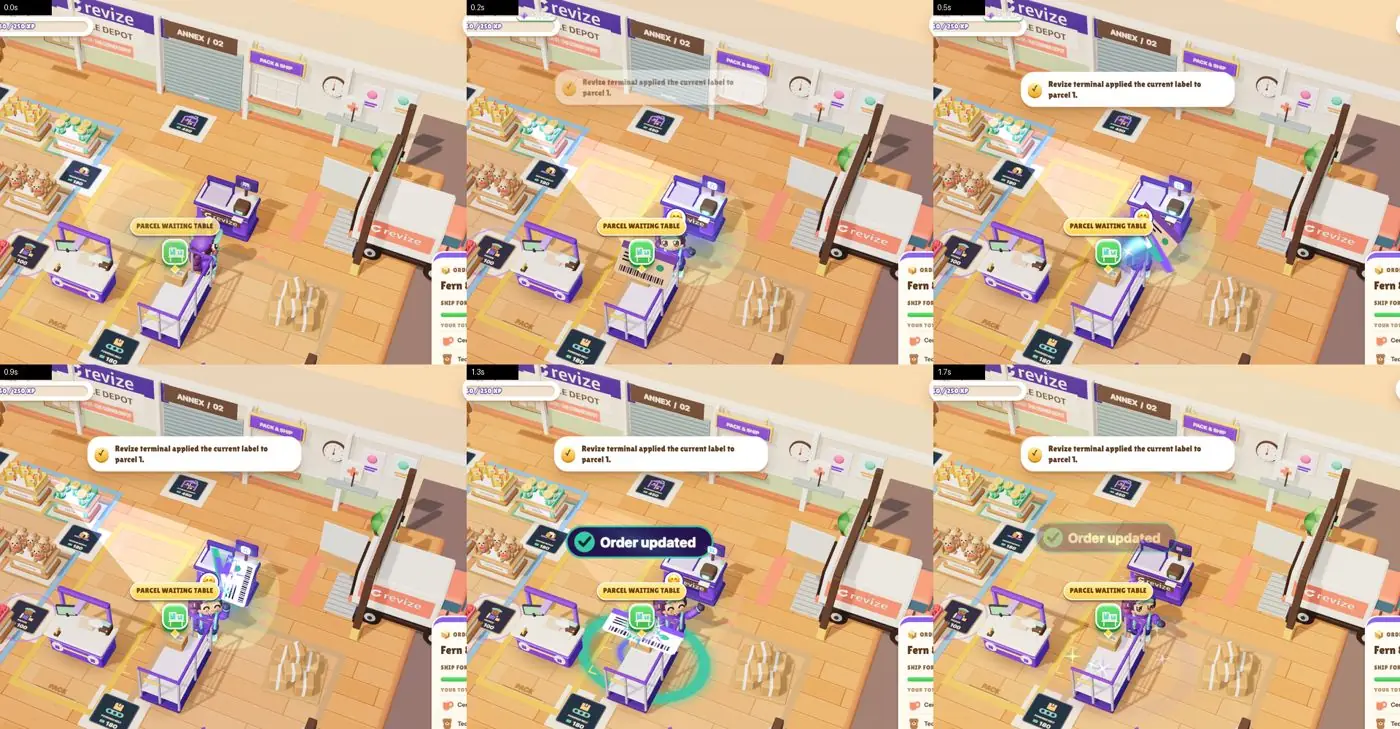
Use that sequence to discuss which instructions change and which goods stay. The correction bench is a game mechanic. For a live order, customer editing through Revize still depends on eligibility, the editing window and the warehouse handoff described above.
What the upsell playbook adds
The Nine-Figure Upsell Playbook follows one offer from a useful product pairing through payment proof and a keep, change or pause decision.
The 16-page guide has six missions under Choose / Build / Prove / Decide:
- Define success and choose a useful product pair.
- Build a draft and place it on the intended pages.
- Make the intended offer win when conditions overlap.
- Prove the payment path with the acceptance matrix.
- Diagnose the first failing stage in the result.
- Read your own scorecard and complete your first-offer brief.
Its premise is “Practical lessons from our work with nine-figure brands.” The worked configurations are illustrative. The scorecard asks you to account for retained additions and actual costs, including extra fulfillment costs.
For the warehouse team, the connection is practical: an extra item needs a confirmed place in the final order and the parcel’s working instructions. Discuss that handoff with whoever owns the offer.
Try Warehouse Rush to see the flow for yourself. Enter with your email and store URL, then ship your first parcel to access The Nine-Figure Upsell Playbook. Bring the walkthrough back to your own floor and compare the handoffs.
What to do this week
Walk one ordinary order and one changed order through your actual systems, recording the owner and proof at each handoff.
- Draw your route from checkout to return inspection. Name the person responsible at each stage.
- Record when the warehouse imports an order and when picking can begin. Confirm both with the warehouse team.
- Test an address correction and a variant change before release. Compare the final store and warehouse records.
- Test the late-change escalation. Identify who can confirm a stopped pick and authorize resumption.
- Use the game as a warm-up, then walk a real tote, carton and dispatch area with the new hire.
Frequently Asked Questions
Explain fulfillment by separating the customer’s order, the warehouse’s working instructions and the parcel’s physical location.
How does order fulfillment work after someone buys from my Shopify store?
Your team checks the order, releases it to fulfillment, picks and packs the goods, dispatches the parcel and follows its tracking. Returns need a separate receiving and inspection path when they occur. Start by naming who owns each handoff in your operation.
What is the difference between picking, packing and dispatch?
Picking collects the requested goods, packing checks and protects them, and dispatch sends the parcel out of the warehouse. Kitting may add assembly before packing. Keep these stages distinct when asking where an order is or whether it can still change.
How do I explain the Shopify pick and pack process to a new hire?
Follow one order from its current pick instructions to the sealed carton, checking SKU, variant and quantity along the way. Show how to report a shortage and where to put an order needing review. Then repeat with a changed order so the new hire knows whose instructions to follow.
Can a customer change their size or address before picking starts?
A change is workable when editing remains available and the warehouse can use the revised instructions before picking. Revize supports eligible customer edits within the configured window. Confirm the final variant or address in the warehouse record, including any financial adjustment, before release.
Does a Fulfilled status mean the carrier has collected the parcel?
A Fulfilled status alone does not prove carrier collection, because buying and printing a Shopify Shipping label marks the order fulfilled. Record the physical handoff separately and check tracking when investigating a shipment (Shopify fulfillment guide).
Can I use Warehouse Rush as a warm-up for warehouse onboarding?
Yes, use it to see the picking, packing and dispatch flow before walking through your own operation. Explain your actual equipment, safety procedures, SKU checks and exception handling on the floor. The game provides an interactive illustration; your team still needs instructions for its own workplace.