
On this page
This is a documentation comparison, published by Revize, a competing Shopify order-editing app. Prices, ratings and vendor documentation checked 6 November 2026. No hands-on competitor order tests or observed refund timings are included. Revize screenshots come from product documentation.
OrderEditing.com vs Cleverific: the verdict
Revize is our pick for most stores that want customers to fix eligible size or address mistakes before fulfillment. Between the named competitors, the tradeoff is unlimited self-service billed by order volume versus a lower entry price with an edit allowance and a separate staff editor.
OrderEditing.com is strongest on unlimited self-service. Its listing includes every feature on each order-volume band, starting at $99/month. It also places and removes its own fulfillment hold around the editing window.
Cleverific is strongest on entry price and staff editing. Its Growth plan starts at $59/month with 100 edits, the lower entry price of the two. A separate staff editor gives support teams Quick and Advanced modes alongside customer self-service.
Revize is our pick as volume grows. Unlimited edits from $49/month stay flat as order volume grows. Its portal supports 29 languages, checks live stock at the warehouse serving the customer’s address and cancels automatically under the store’s refund policy. Product additions, store-credit refunds, and shipping, tax and discount recalculation need Pro at $149/month.
Compare customer editing and merchant controls
OrderEditing.com, Cleverific and Revize support eligible customer size and address changes; their pricing units, refund settings and fulfillment controls differ. Permissions matter. Prices are monthly in USD, and ratings and prices were checked 6 November 2026.
| Revize | OrderEditing.com | Cleverific | |
|---|---|---|---|
| Price model and entry price | Free with 20 edits/month; Starter $49/month and Pro $149/month include unlimited edits. Plans. | Store order-volume bands from $99/month, with unlimited self-service edits and every feature. Listing. | Growth $59/month with 100 edits; overages and $1 per upsell conversion. Listing, pricing. |
| Free plan | Free with 20 monthly edits. Plans. | None listed; 7-day trial on the first band, 14-day trials on the others. Listing. | None listed; 14-day trial. Listing. |
| Where customers edit | Embedded in Shopify’s order status page; confirmation-email entry link. Portal. | Order status page, reached from the thank-you page or confirmation email. Access guide. | Customer Portal on order status, thank-you and account pages; legacy accounts unsupported. Pricing, account access. |
| Size/variant swap | From Free, with live stock checks; different-product replacement needs Pro. Variant editing, plans. | Yes, subject to order and product restrictions. Listing. | Yes, across all plans. Feature matrix. |
| Address change | From Free; shipping and tax recalculation need Pro. Plans. | Yes. Address guide. | Yes. Portal actions. |
| Add items | Pro. Plans. | Yes. Listing. | Yes. Portal actions. |
| Cancel | Automatic whole-order cancellation from Free, under the refund policy; partial cancellation needs Pro. Cancellation, plans. | Whole-order cancellation and line-item removal. Cancellation, quantity edits. | Whole-order cancellation and line-item removal. Portal actions. |
| Holds while the window is open | Hold orders mode normally releases at close, subject to unpaid-balance checks and release schedules. Store-wide Until fulfillment does not hold. Processing, deadlines, release timing. | App-owned Shopify fulfillment-order hold, removed when editing closes. Hold guide. | Shopify Flow hold and scheduled-release workflow. Hold guide. |
| Refunds and store credit | Automatic original-payment refunds from Free; store credit needs Pro. No refunds disables cancellation and blocks edits that leave the order below the required total. Refund policy, plans. | Payment-method refunds or Shopify store credit for eligible reductions, subject to settings and captured payment. Quantity guide. | Automatic refunds after value-reducing edits are off by default and enabled on request; cancellation refunds use a separate setting. Manual capture reduces the amount to capture. Edit refunds, cancellation refunds. |
| Staff editor | Not offered; Revize focuses on customer self-service. | Admin panels for editing status, holds, history and window controls. Admin panels. | Quick Mode edits the original; Advanced Mode creates a replacement and cancels the original. Modes. |
| Languages | Portal in 29 languages, with merchant-editable customer-facing strings. Revize. | Listing names English; Dutch; French; Japanese; German; Swedish; Spanish; Polish; Brazilian Portuguese; European Portuguese; Finnish; Norwegian. Listing. | Listing names English; pricing also lists multi-language support. Listing, pricing. |
| App Store rating | 5.0 from 142 reviews, checked 6 November 2026. Listing. | 5.0 from 352 reviews, checked 6 November 2026. Listing. | 4.6 from 233 reviews, checked 6 November 2026. Listing. |
What each app costs as order volume grows
In Revize’s data, about 1 in 19 Shopify orders (5.2%) is edited after checkout (Revize, 2026). The illustration compares OrderEditing.com with Cleverific and Revize, assuming one edit per edited order and counting no upsell conversions or optional address validation. These are estimates, not measured competitor bills.
| Monthly orders | Edits (5.2%) | Revize | OrderEditing.com | Cleverific |
|---|---|---|---|---|
| 1,000 | 52 | $49 Starter or $149 Pro | $99 | $59 (Growth, within 100 edits) |
| 8,000 | 416 | $49 Starter or $149 Pro | $399 | $128.44 (Professional: $119 plus 16 extra edits at $0.59) |
Sources for the illustration: Revize plans, OrderEditing.com listing and Cleverific pricing.
Revize’s price does not change with volume. Starter leaves out product additions, store-credit refunds, and shipping, tax and discount recalculation, which need Pro. Price the actions your customers need.
OrderEditing.com’s listed bands are $99 for 100-2,500 monthly orders, $199 for 2,500-5,000, $399 for 5,000-10,000 and $599 for 10,000-20,000. Each includes every feature and unlimited self-service edits. Optional address validation is charged per order.
Cleverific’s plans include Growth at $59 with 100 edits, Professional at $119 with 400 and Premium Plus at $359 with 800, all covering edits, new or draft orders. Its pricing page lists extra edits at $0.79, $0.59 and $0.49 respectively, plus $1 per upsell conversion. Created orders, draft orders, abandoned-cart recoveries and automations can also consume the allowance, so count those actions.
A sale spike can increase Cleverific’s overage charges or put a store in a higher published OrderEditing.com volume band, though OrderEditing.com says a plan recommendation does not automatically change an existing subscription. Revize’s paid plans stay flat. Forecast the busy month too.
Where the customer opens the order
OrderEditing.com, Cleverific and Revize all provide customer editing through Shopify’s order status page: see the OrderEditing.com access guide, Cleverific portal setup and Revize portal guide.
Cleverific’s setup guide requires checkout, thank-you and order-status pages upgraded to Checkout Extensibility. Password-protected stores cannot use its required authentication mechanism. Its account guide excludes legacy customer accounts.
OrderEditing.com’s address-correction guide describes suggested corrections on the thank-you and order-status pages. The merchant must configure the verifier for post-purchase use. Accepting a suggestion on the thank-you page requires its own setting; without that permission, customers proceed to the order status page. The same guide describes a full address form for customers who prefer to enter the correction themselves.
For Revize, enable the permitted actions under Order Editing > Customer edits. Quantity and variant permissions are separate, so a merchant can allow quantity changes while keeping size swaps disabled. Check the permissions independently.
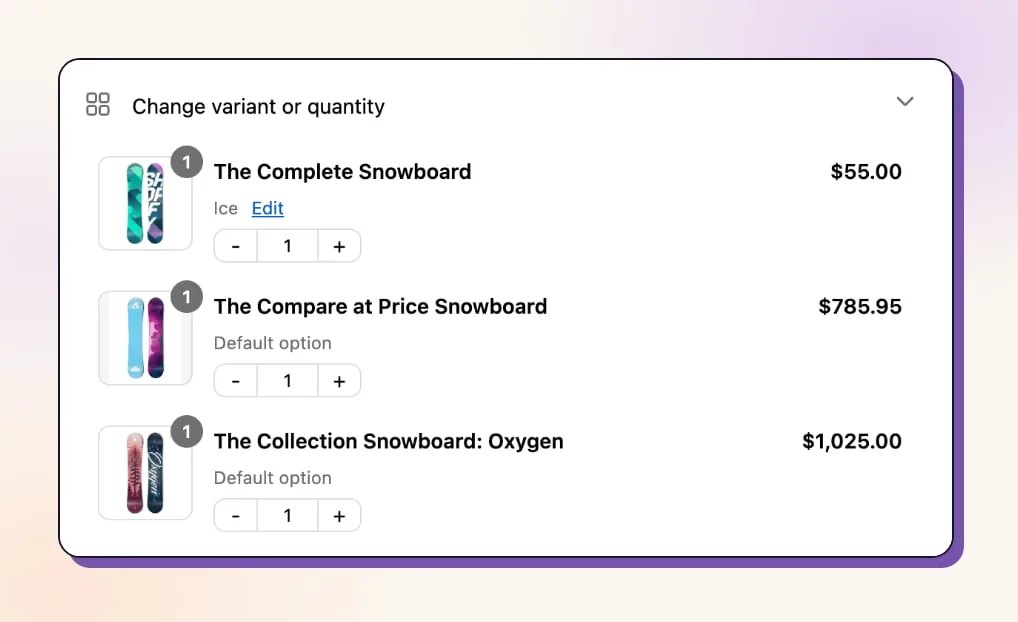
Say a customer needs a large instead of a medium. Revize checks live inventory at the fulfillment location serving that customer’s address; stock at another location does not make an unavailable size selectable. Different-product replacement requires Pro. The customer-editing setup guide covers the wider configuration.
When the warehouse can pick
An editing window protects a customer change only if the warehouse waits for the store’s release signal and receives the final order details. Confirm the handoff.
OrderEditing.com places and removes its own fulfillment-order hold. Its Flow action Send Edited Order to Warehouse does not push data into the warehouse system; the order travels through the warehouse’s normal Shopify sync, according to its fulfillment guide.
Cleverific documents a Shopify Flow hold with scheduled release. Release can follow shortly after the editing window closes; missing permissions or unavailable scheduled release can prevent that workflow from completing.
Revize’s Hold orders mode normally releases its editing hold at close, subject to outstanding-payment checks and the configured fulfillment-release schedule. An unpaid additional balance keeps the order held, with the documented exception of cash-on-delivery orders. Its store-wide Until fulfillment deadline does not place an editing-window hold.
For warehouses that ignore holds but wait for Paid status, Revize documents manual payment capture: payment stays Authorized during the window and is captured when it closes. Under Skip hold, a release tag works only if the warehouse is configured to wait for it; Revize does not stop picking in that mode.
Ask the 3PL, a third-party logistics warehouse that picks and ships orders, when it downloads the order and whether it refreshes the size and address after release. If it downloads before editing closes and never refreshes, agree that refresh process before enabling edits. The warehouse handoff guide covers orders already entering picking.

Payments, refunds and unpaid changes
A customer edit that changes the total needs a payment or refund outcome before the warehouse treats the corrected order as ready to ship. Follow the balance.
OrderEditing.com’s payment guide routes an increased balance to checkout or a payment link depending on setup, and it documents reversing unpaid edits. Its quantity guide requires downgrade permission and a refund selection for reductions; store credit requires captured payment and is unavailable with manual capture.
OrderEditing.com’s guide describes cancelling the original and creating a corrected replacement when an address change alters tax, and the warehouse must fulfill the replacement.
Cleverific lists automatic payment collection when the total increases. Its refund guide says automatic refunds after value-reducing edits are off by default and enabled on request. Once enabled, those refunds are generally scheduled 30 minutes after the editing window closes and processed by hourly jobs; windows longer than seven days follow a different schedule. Cancellation refunds use a separate setting. With manual capture, the amount to capture decreases instead of a captured payment being refunded.
Discounted size swaps need their own check. Cleverific’s feature matrix lists preservation of existing discounts through edits and automatic shipping-rate recalculation. Revize’s discount recalculation requires Pro: it rechecks the merchant’s existing discounts against the edited contents and can adjust or remove a discount if the order no longer qualifies. The customer is notified when their edit invalidates a discount. Starter includes variant changes, but leaves out that recalculation; include Pro in the budget when the store needs it.
Revize shows Pay now, Refund or Confirm according to the change in total. Pay now sends the customer to Shopify checkout for the difference. An even swap needs confirmation.
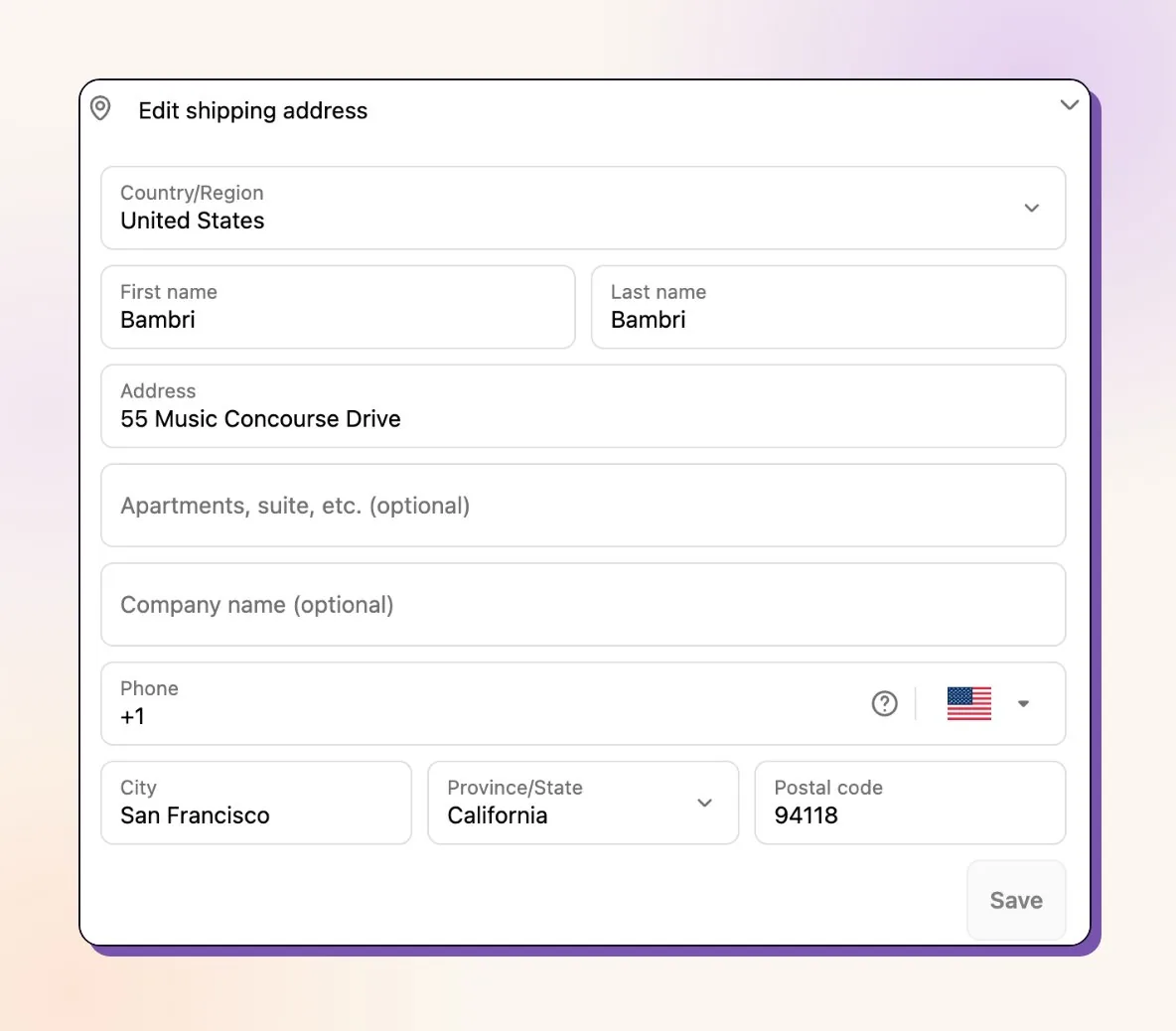
For a Pro address edit that increases shipping costs, payment is required before the address change commits. Shipping and tax recalculation require Pro; basic address updates are included from Free.
Revize’s refund policy offers No refunds, Original payment method or Store credit, with store credit requiring Pro. No refunds removes customer cancellation and blocks value-reducing edits unless the customer adds enough value in the same edit to restore the required total.
On Pro, Reverse Unpaid Edits can remove only the unpaid change after a merchant-set grace period. It is off by default. Paid changes remain, and manual or offline payment methods are documented exceptions.
Questions to ask before you install any of the three
Before installing OrderEditing.com, Cleverific or Revize, verify the requested size or address change against the store’s actual discounts, payment state and fulfillment connection.
- Warehouse: Which hold or release signal does it respect, and when does its order sync refresh changed details?
- Metering: Does the invoice count store orders, edits, created orders or upsell conversions?
- Refunds: Are refunds enabled, when do they run, and which destination works with the store’s capture settings?
- Subscriptions: Is the change for this shipment or the ongoing contract? OrderEditing.com excludes modifying, removing or swapping subscription lines. Cleverific restricts Quick Mode edits on third-party-app-created orders; for Customer Portal, its restriction concerns apps that do not integrate directly with Shopify Checkout, such as legacy Recharge, and still permits address changes and cancellations. Revize lets subscription customers edit the current order and cancel it without cancelling the subscription. With its Recharge integration connected, product and variant swaps also update the Recharge subscription, subject to merchant permissions.
Frequently asked questions
OrderEditing.com and Cleverific differ in billing, item restrictions and the circumstances in which editing creates a replacement order.
Is OrderEditing.com or Cleverific cheaper?
Cleverific has the lower entry price at $59/month, versus OrderEditing.com’s $99/month, checked 6 November 2026. Extra edits and upsell conversions can change Cleverific’s total; order volume determines OrderEditing.com’s band. Revize’s unlimited Starter and Pro plans stay flat as volume grows.
Which one handles size swaps?
Both support customer variant changes. OrderEditing.com’s quantity guide flags restrictions on free items, bundle components and discounted lines; Cleverific lists variant swaps across its plans. On Revize, product-tag restrictions can lock one item’s variant changes, quantity changes and removal while other items remain editable.
Does either app require Shopify Plus?
Both offer post-purchase editing without Shopify Plus: see OrderEditing.com’s billing FAQ and Cleverific’s non-Plus setup guidance. OrderEditing.com’s installation guide requires Plus for production One-Click Upsell; its Thank You and Order Status upsell placements do not require Plus.
Which Revize features require Pro?
Product additions, store-credit refunds, shipping, tax and discount recalculation, partial cancellation and scheduled cutoff deadlines require Pro at $149/month. Starter at $49/month includes unlimited quantity and variant changes, address updates, automated cancellations and automatic original-payment refunds. The Free plan covers the same basics for 20 edits a month, which suits testing the flow before launch.
Does Cleverific create a new order when editing?
Cleverific’s Advanced Mode creates a replacement and cancels the original. Quick Mode edits the original order, and Customer Portal edits also happen on the original. Replacement behavior belongs specifically to the staff editor’s Advanced Mode.
Give customers the permitted changes
When configuring Revize, start with the size swap or address correction your customers need, then set the refund policy and agree the warehouse’s release signal. Use Starter for unlimited basic customer edits, or Pro for product additions, store-credit refunds and financial recalculation. Install Revize: Order Editing & Upsell.