
Change the Shipping Method After an Order on Shopify
Change the Shipping Method After an Order on Shopify
Change the Shipping Method After an Order on Shopify

By Shubham Vats, Founder of Revize · Sep 25, 2026
Quick answer: To change a shipping method after an order on Shopify, staff can replace the shipping fee manually, but Shopify does not recalculate rates. Revize lets customers select another service on the same order and pay through Shopify checkout. Shipping-method changes represent 7.9% of edited orders (Revize, 2026).
Why the first minutes matter
Changing the shipping method after a Shopify order is placed becomes a race between the customer and the warehouse. The customer chose standard delivery, then realized the parcel was needed sooner. If picking begins first, the opportunity closes.
Across all edit types, the median post-checkout edit lands 4.6 minutes after checkout, and 80.6% happen within the first hour (Revize, 2026). These figures cover more than shipping changes, but they show why a controlled pre-fulfillment window matters. The order must remain editable while payment settles and the final service level reaches fulfillment.
What happens after the customer checks out
The cleanest shipping change keeps the purchase, payment history, and fulfillment instruction on one order. Take an order placed with standard delivery. Minutes later, the customer opens the Shopify order status page because the parcel now needs to arrive sooner.
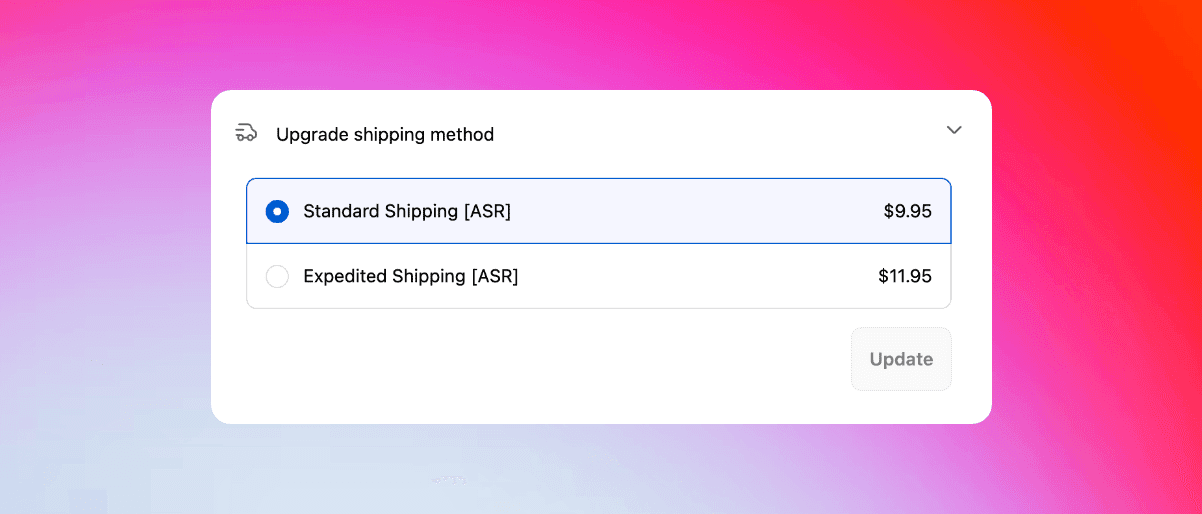
In Revize, the customer selects Upgrade shipping method in the Customer Portal. The portal presents available services from the merchant's configured shipping setup, including delivery dates, costs, and service descriptions. Only services available for that delivery address appear.
The customer chooses a faster service and sees the price change. If the total increases, Pay now sends the customer through Shopify checkout to pay the difference. Shopify handles the payment. The new service level updates on the existing order and syncs to the fulfillment system, as documented in Revize's shipping-upgrade flow.
Say Standard costs $10 and Express costs $50. The customer chooses Express, sees a $40 difference, and pays that amount through Shopify checkout. The fulfillment system then receives the new service level without a replacement order.
The Free plan covers basic quantity and variant changes, address updates, automated cancellations, and automatic refunds, with 20 order edits per month. Shipping and tax recalculation are Pro-only capabilities. The Upgrade shipping method toggle is enabled under the customer edit options; confirm the required plan and rate configuration for your store during setup.
What Shopify changes natively
Shopify can replace the amount charged for shipping, but its order editor does not recalculate rates or swap the order to a newly selected service. The native process is a staff-operated fee adjustment rather than customer self-service.
Shopify instructs staff to remove the existing shipping fee and add a new custom fee. A shipping fee cannot be edited directly, and leaving the original in place can produce multiple shipping fees on the order. Shopify explains the procedure in its guide to editing shipping fees.
Shopify also states that shipping rates are not recalculated when an order is edited. Staff must determine the replacement price, enter it, and collect or refund the balance. If money is owed, the merchant can send an invoice with a checkout link or accept payment directly.
The same Shopify guidance identifies orders that cannot be edited, including orders with pending payment, Shop Pay Installments orders, local delivery orders, and orders created by other apps. Shopify also restricts edits involving fulfilled items, duties, and taxes. Some accelerated checkout methods may become unavailable when collecting a balance after an edit.
For agency engineers, Shopify's orderEditAddShippingLine mutation adds a custom shipping line during an Admin API edit session. The edit must be committed with the required permissions. This mutation adds a specified line; it does not discover the delivery services available to the customer.
How the manual workaround works
The native workaround replaces a shipping fee, collects the balance, and leaves staff responsible for the fulfillment handoff. It can rescue an occasional request, but every change remains a support task.
Open the order before fulfillment starts.
Confirm which service can deliver to the destination.
Remove the original shipping fee.
Add a custom fee for the replacement service.
Review the resulting balance.
Send an invoice or collect payment directly.
Tell the warehouse which service to use.
A 3PL is a third-party logistics warehouse that picks and ships orders. Changing the customer's charge without changing the instruction received by that warehouse solves only the accounting half of the request.
Cancel-and-recreate is a heavier fallback. It produces a replacement order and separates the refund from the new charge. Before adopting it as a standard procedure, test how both records appear in reporting, customer notifications, fraud review, and the fulfillment queue.
How to change a Shopify shipping method after checkout
Revize moves the shipping change from the support queue to the Shopify order status page. Configure the customer action, deadline, payment, and warehouse release as one connected process.
Enable the customer portal. Add the Revize app block to Shopify's order status page. Customers can enter from that page or through the Edit Order link in the confirmation message.
Set the editing deadline. In Order Editing > Order edit window, choose a fixed preset, a custom duration from 5 minutes to 48 hours, a scheduled cutoff, or until fulfillment. End the window before the warehouse's earliest pick time.
Enable the shipping option. In Order Editing > Customer edit options, turn on Upgrade shipping method and click Save.
Connect the rate source. Revize supports Shopify Shipping, carrier-connected rates from UPS, FedEx, DHL, and USPS, plus documented shipping apps including Advanced Shipping Rules, Bespoke Shipping, ShipperHQ, Parcelify, and Advanced Shipping Manager. Carrier-rate, custom-app, and split-shipping configurations require help from Revize support.
Choose the order-processing mode. Under Order Editing > Order processing, select Hold orders when the fulfillment stack respects Shopify holds. The hold pauses fulfillment during the editing window and releases when the window closes. Think of it as a red light at the warehouse gate: the order exists, but picking waits.
Complete a safe test. Use a Shopify draft order, the documented Revize test path. Open its order status page, select another service, and verify the customer-facing settlement step required by the resulting price difference.
Verify the warehouse handoff. Confirm that the new service level appears in the actual fulfillment system before the order is released.
The store-wide Until fulfillment window does not place an automatic hold. A rules-engine rule can apply Hold fulfillment, subject to the documented restrictions. Check the edit-window behavior before using that mode.
Once the full test passes, install Revize: Order Editing & Upsell and repeat the test for every live rate source and fulfillment destination.
Which shipping-change workflow wins
Customer self-service is the modern workflow while the order remains editable and the warehouse has not started picking. Native editing remains a useful staff fallback for exceptions Shopify permits.
Decision criterion | Revize self-service | Native Shopify workaround | Cancel and recreate |
|---|---|---|---|
Who performs the change | Customer | Merchant staff | Merchant staff |
Service selection | Available configured services | Staff determines service | Selected on a new order |
Extra payment | Shopify checkout | Invoice or direct collection | New transaction |
Order continuity | Same order | Same order | Replacement order |
Fulfillment control | Hold, release tag, or configured process | Staff coordinates manually | Staff reconciles two records |
Best use | Repeatable pre-fulfillment changes | Occasional exception | Last-resort recovery |
For high-volume Plus, Advanced, and Grow stores, the useful metric is tickets required per shipping change. Revize lets the customer select and settle the service change while the merchant controls when editing closes and the warehouse proceeds.
What happens to rates and payments
A rate-affecting change should settle before the order is released as final. Revize uses one settlement pattern across edits: an increased total produces Pay now, a decreased total produces Refund, and an unchanged total produces Confirm.
Available shipping options re-price when a customer changes the address, adds or removes items, changes quantities, or crosses the store's free-shipping threshold. Shipping and tax recalculation require the Pro plan. Services remain destination-aware, including applicable international options and restrictions.
Where a cheaper configured service is offered and the change lowers the order total, that lower total follows the Refund path. The refund then follows Order Editing > Refund options: No refund, refund to the original payment method, or refund as store credit. Store-credit refunds require Pro. No refund blocks value-reducing edits.
Address changes can alter the service list, shipping amount, taxes, and total due. If the new destination costs more, the customer must pay before the address change commits. See the guide to fixing a Shopify shipping address after checkout.
How to keep fulfillment in sync
Never let the warehouse pick an order the customer is still changing. A correct rate and successful payment have little value if the parcel leaves under the old service level.
Revize's recommended mode is the Shopify fulfillment hold described in its order-processing documentation. The order remains on hold during the editing window, then releases when editing closes.
Some warehouse management systems ignore Shopify holds. Revize can instead use manual payment capture during the window, keeping the order Authorized rather than Paid until release. Another option is Skip hold with Add release tag, which writes revize:order_released when the window closes. The 3PL must pick only released orders because the tag itself does not stop fulfillment.
The warehouse can close editing early by adding its processing tag, such as picked, to the order. Register the exact tag under Order edit restrictions > Order tags. When it appears, Revize closes that order's editing window. These patterns are documented in the fulfillment-sync settings.
Warning: Test payment, order update, fulfillment hold, and warehouse release as one chain. A portal-only test cannot prove that the correct service level reaches the pick line.
What can break a shipping change
Most failures come from timing, payment, or an order state that can no longer be edited. Give each failure a defined operational path.
A fulfilled order or an order with a closed edit window is no longer eligible for a Revize shipping change.
A declined payment leaves the extra amount unpaid. Shopify handles the attempt, so payment-method errors sit outside Revize.
An unpaid additional balance keeps fulfillment on hold, except for cash-on-delivery orders.
Reverse Unpaid Edits is Pro-only, disabled by default, and can remove only the unpaid delta after a merchant-set grace period.
An address change can alter both the available services and the amount due.
Carrier-rate, custom shipping-app, and split-shipping setups require support configuration.
Skip-hold mode can permit early picking unless the 3PL waits for the release tag.

What to do this week
Launch only after a paid shipping change reaches the warehouse correctly. The acceptance test is the final service level in fulfillment, not the portal screen.
List every shipping-rate source and fulfillment destination.
Set an edit window that ends before the earliest pick.
Enable Upgrade shipping method and configure the hold or release process.
Use Shopify draft orders to test a paid upgrade, an available lower-cost change, an address change, and the handling of an unpaid balance.
Confirm the final order total, payment state, service level, and 3PL record.
Frequently Asked Questions
Can I change the shipping method on a Shopify order after it's placed?
Yes, before fulfillment you can replace the fee manually or let the customer select another service through Revize. Shopify's native editor requires staff to remove the old fee, add a custom fee, and collect or refund the balance. Revize keeps the service change and its payment on the existing order.
How do I charge extra for express shipping on Shopify?
Revize shows the exact increase and gives the customer a Pay now action. Shopify processes that payment through checkout. In the native staff workflow, the merchant enters a custom shipping fee and sends an invoice or accepts payment directly. Shopify warns that some accelerated checkout methods can become unavailable after an order edit.
Can customers change their own shipping method after checkout?
Yes, eligible customers can use Revize's Upgrade shipping method option during the merchant-set edit window. The Customer Portal shows delivery services available for the address, along with their costs and service details. The customer chooses the service and completes the required settlement before the updated instruction reaches fulfillment.
Why can't I edit the shipping method directly in Shopify?
Shopify's native editor replaces shipping fees rather than recalculating and swapping shipping services. Staff remove the existing fee, add a custom fee, and determine the replacement amount themselves. Shopify does not explain the product rationale, so operators should design around the documented behavior instead of expecting live checkout rates in the editor.
How do I change local pickup to shipping or shipping to pickup?
Revize's documented shipping-change flow does not establish pickup-to-shipping or shipping-to-pickup conversion. Its shipping feature presents available delivery services for an address, while local pickup is a different fulfillment method. Test both conversion directions with your pickup configuration and retain a staff exception process.
Do I need to cancel and recreate the order?
Not when the shipping change can be completed before fulfillment on the existing order. Revize lets the customer choose a service and settle the difference without creating a replacement order. Cancellation and recreation remains an exception for an order state or fulfillment setup that cannot accept the edit.
How do I refund a lower-cost shipping change?
Where a cheaper configured service is available and produces a lower total, the change follows Revize's Refund settlement path. The merchant's refund setting determines whether eligible reductions return to the original payment method or become store credit. Store-credit refunds require Pro. With No refund selected, the value-reducing edit is blocked.
Can I change shipping after the order is fulfilled?
Revize shipping changes stop when the order is fulfilled or its editing window closes. Shopify also restricts edits involving fulfilled items, with further limits for orders containing fulfilled items with duties or taxes. Carrier intervention and shipment tracking are separate jobs once the parcel has left.
Related Articles
Use these guides to complete the pre-fulfillment editing flow:
To change a shipping method after an order on Shopify, run one paid Revize test this week and release the feature only after the updated service reaches the warehouse.
By Shubham Vats, Founder of Revize · Sep 25, 2026
Quick answer: To change a shipping method after an order on Shopify, staff can replace the shipping fee manually, but Shopify does not recalculate rates. Revize lets customers select another service on the same order and pay through Shopify checkout. Shipping-method changes represent 7.9% of edited orders (Revize, 2026).
Why the first minutes matter
Changing the shipping method after a Shopify order is placed becomes a race between the customer and the warehouse. The customer chose standard delivery, then realized the parcel was needed sooner. If picking begins first, the opportunity closes.
Across all edit types, the median post-checkout edit lands 4.6 minutes after checkout, and 80.6% happen within the first hour (Revize, 2026). These figures cover more than shipping changes, but they show why a controlled pre-fulfillment window matters. The order must remain editable while payment settles and the final service level reaches fulfillment.
What happens after the customer checks out
The cleanest shipping change keeps the purchase, payment history, and fulfillment instruction on one order. Take an order placed with standard delivery. Minutes later, the customer opens the Shopify order status page because the parcel now needs to arrive sooner.
In Revize, the customer selects Upgrade shipping method in the Customer Portal. The portal presents available services from the merchant's configured shipping setup, including delivery dates, costs, and service descriptions. Only services available for that delivery address appear.
The customer chooses a faster service and sees the price change. If the total increases, Pay now sends the customer through Shopify checkout to pay the difference. Shopify handles the payment. The new service level updates on the existing order and syncs to the fulfillment system, as documented in Revize's shipping-upgrade flow.
Say Standard costs $10 and Express costs $50. The customer chooses Express, sees a $40 difference, and pays that amount through Shopify checkout. The fulfillment system then receives the new service level without a replacement order.
The Free plan covers basic quantity and variant changes, address updates, automated cancellations, and automatic refunds, with 20 order edits per month. Shipping and tax recalculation are Pro-only capabilities. The Upgrade shipping method toggle is enabled under the customer edit options; confirm the required plan and rate configuration for your store during setup.
What Shopify changes natively
Shopify can replace the amount charged for shipping, but its order editor does not recalculate rates or swap the order to a newly selected service. The native process is a staff-operated fee adjustment rather than customer self-service.
Shopify instructs staff to remove the existing shipping fee and add a new custom fee. A shipping fee cannot be edited directly, and leaving the original in place can produce multiple shipping fees on the order. Shopify explains the procedure in its guide to editing shipping fees.
Shopify also states that shipping rates are not recalculated when an order is edited. Staff must determine the replacement price, enter it, and collect or refund the balance. If money is owed, the merchant can send an invoice with a checkout link or accept payment directly.
The same Shopify guidance identifies orders that cannot be edited, including orders with pending payment, Shop Pay Installments orders, local delivery orders, and orders created by other apps. Shopify also restricts edits involving fulfilled items, duties, and taxes. Some accelerated checkout methods may become unavailable when collecting a balance after an edit.
For agency engineers, Shopify's orderEditAddShippingLine mutation adds a custom shipping line during an Admin API edit session. The edit must be committed with the required permissions. This mutation adds a specified line; it does not discover the delivery services available to the customer.
How the manual workaround works
The native workaround replaces a shipping fee, collects the balance, and leaves staff responsible for the fulfillment handoff. It can rescue an occasional request, but every change remains a support task.
Open the order before fulfillment starts.
Confirm which service can deliver to the destination.
Remove the original shipping fee.
Add a custom fee for the replacement service.
Review the resulting balance.
Send an invoice or collect payment directly.
Tell the warehouse which service to use.
A 3PL is a third-party logistics warehouse that picks and ships orders. Changing the customer's charge without changing the instruction received by that warehouse solves only the accounting half of the request.
Cancel-and-recreate is a heavier fallback. It produces a replacement order and separates the refund from the new charge. Before adopting it as a standard procedure, test how both records appear in reporting, customer notifications, fraud review, and the fulfillment queue.
How to change a Shopify shipping method after checkout
Revize moves the shipping change from the support queue to the Shopify order status page. Configure the customer action, deadline, payment, and warehouse release as one connected process.
Enable the customer portal. Add the Revize app block to Shopify's order status page. Customers can enter from that page or through the Edit Order link in the confirmation message.
Set the editing deadline. In Order Editing > Order edit window, choose a fixed preset, a custom duration from 5 minutes to 48 hours, a scheduled cutoff, or until fulfillment. End the window before the warehouse's earliest pick time.
Enable the shipping option. In Order Editing > Customer edit options, turn on Upgrade shipping method and click Save.
Connect the rate source. Revize supports Shopify Shipping, carrier-connected rates from UPS, FedEx, DHL, and USPS, plus documented shipping apps including Advanced Shipping Rules, Bespoke Shipping, ShipperHQ, Parcelify, and Advanced Shipping Manager. Carrier-rate, custom-app, and split-shipping configurations require help from Revize support.
Choose the order-processing mode. Under Order Editing > Order processing, select Hold orders when the fulfillment stack respects Shopify holds. The hold pauses fulfillment during the editing window and releases when the window closes. Think of it as a red light at the warehouse gate: the order exists, but picking waits.
Complete a safe test. Use a Shopify draft order, the documented Revize test path. Open its order status page, select another service, and verify the customer-facing settlement step required by the resulting price difference.
Verify the warehouse handoff. Confirm that the new service level appears in the actual fulfillment system before the order is released.
The store-wide Until fulfillment window does not place an automatic hold. A rules-engine rule can apply Hold fulfillment, subject to the documented restrictions. Check the edit-window behavior before using that mode.
Once the full test passes, install Revize: Order Editing & Upsell and repeat the test for every live rate source and fulfillment destination.
Which shipping-change workflow wins
Customer self-service is the modern workflow while the order remains editable and the warehouse has not started picking. Native editing remains a useful staff fallback for exceptions Shopify permits.
Decision criterion | Revize self-service | Native Shopify workaround | Cancel and recreate |
|---|---|---|---|
Who performs the change | Customer | Merchant staff | Merchant staff |
Service selection | Available configured services | Staff determines service | Selected on a new order |
Extra payment | Shopify checkout | Invoice or direct collection | New transaction |
Order continuity | Same order | Same order | Replacement order |
Fulfillment control | Hold, release tag, or configured process | Staff coordinates manually | Staff reconciles two records |
Best use | Repeatable pre-fulfillment changes | Occasional exception | Last-resort recovery |
For high-volume Plus, Advanced, and Grow stores, the useful metric is tickets required per shipping change. Revize lets the customer select and settle the service change while the merchant controls when editing closes and the warehouse proceeds.
What happens to rates and payments
A rate-affecting change should settle before the order is released as final. Revize uses one settlement pattern across edits: an increased total produces Pay now, a decreased total produces Refund, and an unchanged total produces Confirm.
Available shipping options re-price when a customer changes the address, adds or removes items, changes quantities, or crosses the store's free-shipping threshold. Shipping and tax recalculation require the Pro plan. Services remain destination-aware, including applicable international options and restrictions.
Where a cheaper configured service is offered and the change lowers the order total, that lower total follows the Refund path. The refund then follows Order Editing > Refund options: No refund, refund to the original payment method, or refund as store credit. Store-credit refunds require Pro. No refund blocks value-reducing edits.
Address changes can alter the service list, shipping amount, taxes, and total due. If the new destination costs more, the customer must pay before the address change commits. See the guide to fixing a Shopify shipping address after checkout.
How to keep fulfillment in sync
Never let the warehouse pick an order the customer is still changing. A correct rate and successful payment have little value if the parcel leaves under the old service level.
Revize's recommended mode is the Shopify fulfillment hold described in its order-processing documentation. The order remains on hold during the editing window, then releases when editing closes.
Some warehouse management systems ignore Shopify holds. Revize can instead use manual payment capture during the window, keeping the order Authorized rather than Paid until release. Another option is Skip hold with Add release tag, which writes revize:order_released when the window closes. The 3PL must pick only released orders because the tag itself does not stop fulfillment.
The warehouse can close editing early by adding its processing tag, such as picked, to the order. Register the exact tag under Order edit restrictions > Order tags. When it appears, Revize closes that order's editing window. These patterns are documented in the fulfillment-sync settings.
Warning: Test payment, order update, fulfillment hold, and warehouse release as one chain. A portal-only test cannot prove that the correct service level reaches the pick line.
What can break a shipping change
Most failures come from timing, payment, or an order state that can no longer be edited. Give each failure a defined operational path.
A fulfilled order or an order with a closed edit window is no longer eligible for a Revize shipping change.
A declined payment leaves the extra amount unpaid. Shopify handles the attempt, so payment-method errors sit outside Revize.
An unpaid additional balance keeps fulfillment on hold, except for cash-on-delivery orders.
Reverse Unpaid Edits is Pro-only, disabled by default, and can remove only the unpaid delta after a merchant-set grace period.
An address change can alter both the available services and the amount due.
Carrier-rate, custom shipping-app, and split-shipping setups require support configuration.
Skip-hold mode can permit early picking unless the 3PL waits for the release tag.
What to do this week
Launch only after a paid shipping change reaches the warehouse correctly. The acceptance test is the final service level in fulfillment, not the portal screen.
List every shipping-rate source and fulfillment destination.
Set an edit window that ends before the earliest pick.
Enable Upgrade shipping method and configure the hold or release process.
Use Shopify draft orders to test a paid upgrade, an available lower-cost change, an address change, and the handling of an unpaid balance.
Confirm the final order total, payment state, service level, and 3PL record.
Frequently Asked Questions
Can I change the shipping method on a Shopify order after it's placed?
Yes, before fulfillment you can replace the fee manually or let the customer select another service through Revize. Shopify's native editor requires staff to remove the old fee, add a custom fee, and collect or refund the balance. Revize keeps the service change and its payment on the existing order.
How do I charge extra for express shipping on Shopify?
Revize shows the exact increase and gives the customer a Pay now action. Shopify processes that payment through checkout. In the native staff workflow, the merchant enters a custom shipping fee and sends an invoice or accepts payment directly. Shopify warns that some accelerated checkout methods can become unavailable after an order edit.
Can customers change their own shipping method after checkout?
Yes, eligible customers can use Revize's Upgrade shipping method option during the merchant-set edit window. The Customer Portal shows delivery services available for the address, along with their costs and service details. The customer chooses the service and completes the required settlement before the updated instruction reaches fulfillment.
Why can't I edit the shipping method directly in Shopify?
Shopify's native editor replaces shipping fees rather than recalculating and swapping shipping services. Staff remove the existing fee, add a custom fee, and determine the replacement amount themselves. Shopify does not explain the product rationale, so operators should design around the documented behavior instead of expecting live checkout rates in the editor.
How do I change local pickup to shipping or shipping to pickup?
Revize's documented shipping-change flow does not establish pickup-to-shipping or shipping-to-pickup conversion. Its shipping feature presents available delivery services for an address, while local pickup is a different fulfillment method. Test both conversion directions with your pickup configuration and retain a staff exception process.
Do I need to cancel and recreate the order?
Not when the shipping change can be completed before fulfillment on the existing order. Revize lets the customer choose a service and settle the difference without creating a replacement order. Cancellation and recreation remains an exception for an order state or fulfillment setup that cannot accept the edit.
How do I refund a lower-cost shipping change?
Where a cheaper configured service is available and produces a lower total, the change follows Revize's Refund settlement path. The merchant's refund setting determines whether eligible reductions return to the original payment method or become store credit. Store-credit refunds require Pro. With No refund selected, the value-reducing edit is blocked.
Can I change shipping after the order is fulfilled?
Revize shipping changes stop when the order is fulfilled or its editing window closes. Shopify also restricts edits involving fulfilled items, with further limits for orders containing fulfilled items with duties or taxes. Carrier intervention and shipment tracking are separate jobs once the parcel has left.
Related Articles
Use these guides to complete the pre-fulfillment editing flow:
To change a shipping method after an order on Shopify, run one paid Revize test this week and release the feature only after the updated service reaches the warehouse.

Repensez votre boutique Shopify. Misez sur l’expérience client.

© Copyright 2024, Tous droits réservés
Repensez votre boutique Shopify. Misez sur l’expérience client.
© Copyright 2024, Tous droits réservés
Repensez votre boutique Shopify. Misez sur l’expérience client.
© Copyright 2024, Tous droits réservés
Repensez votre boutique Shopify. Misez sur l’expérience client.
© Copyright 2024, Tous droits réservés