
Shopify Post Purchase Upsell : Post-Purchase Page, Thank-You Page, ou Order Edit Window
Shopify Post Purchase Upsell : Post-Purchase Page, Thank-You Page, ou Order Edit Window
Shopify Post Purchase Upsell : Post-Purchase Page, Thank-You Page, ou Order Edit Window

Quick answer: A Shopify post purchase upsell can run in 3 places: the post-purchase page before the thank-you page (one click, but Shopify's docs say buyers on some payment methods skip it), the thank-you and order status pages, and the order edit window before fulfillment. Revize's upsell and add-products features (Pro plan) cover the last two.
Why placement decides a Shopify post purchase upsell
An offer only works if the customer is standing in front of it, and each screen after checkout reaches a different set of customers.
An order is not finished when the customer clicks the payment button. Across 10 million+ Shopify orders, about 1 in 19 (5.2%) is edited after checkout (Revize, 2026), according to our Shopify order editing statistics. Customers come back to their orders, and they come back fast.
That changes the upsell question. Most advice treats post-purchase selling as one screen. In practice there are three, and each has its own rules about who sees the offer, how payment is taken and whether the extra item ships in the same box. Follow one order through all three and the right placement for your store becomes clear.
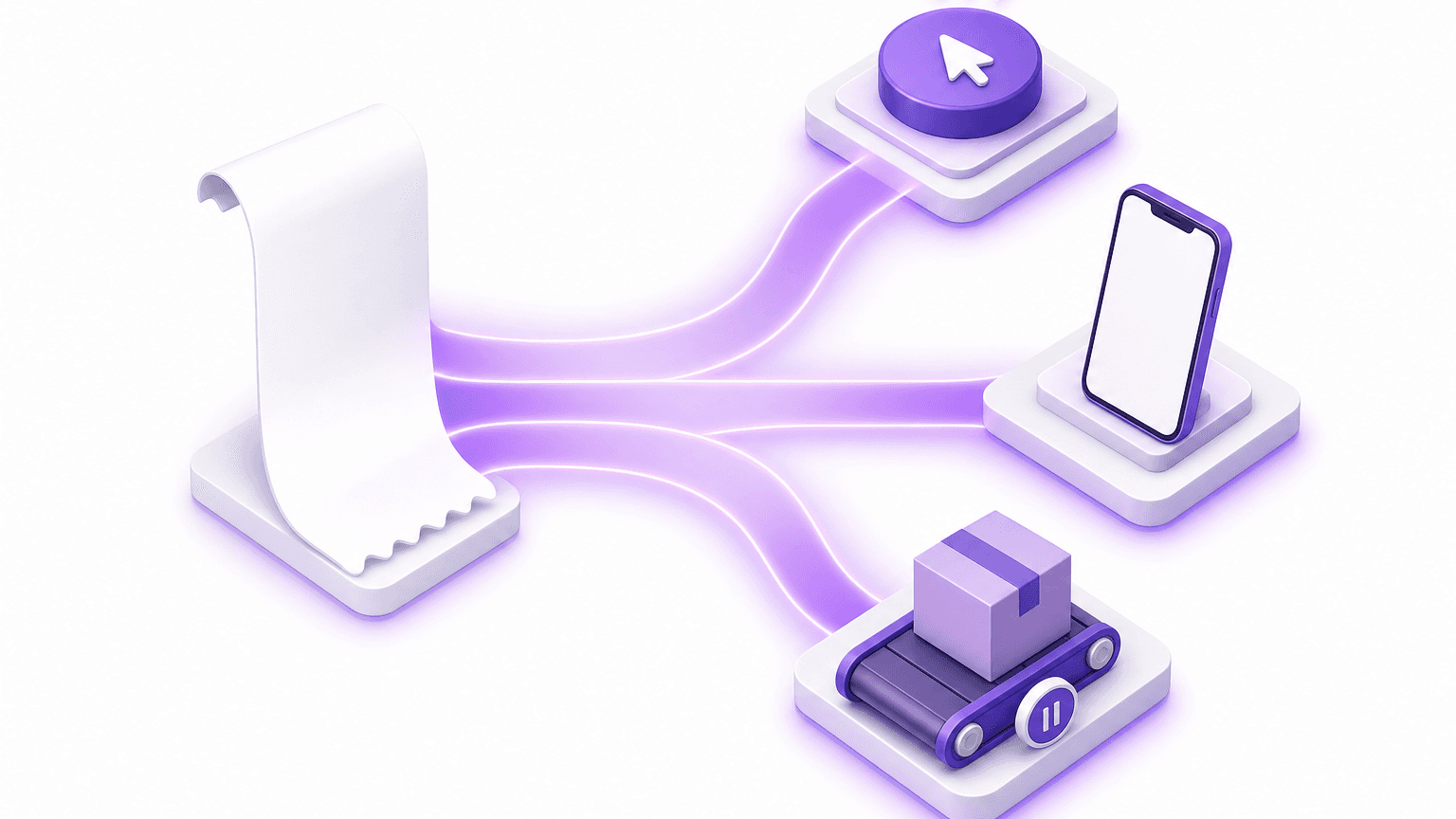
The three moments after a Shopify checkout
A Shopify order passes three points where the store can still sell: the post-purchase page, the thank-you and order status pages, and the order edit window.
Say a store sells coffee gear, and a customer pays for a grinder at 9:02 in the morning. Over the next day or two, that order passes:
The post-purchase page. Shopify shows it after checkout completes and before the Thank you page (Shopify post-purchase docs).
The thank-you page, then the order status page. The customer sees the thank-you page once, right after paying. The order status page is the one they come back to.
The order edit window. This is the time between checkout and the warehouse pick, when the order can still change.
The rest of this article follows the grinder order through each one.
Moment one: the Shopify post-purchase page
The post-purchase page is the only place a customer can accept an offer in one click on the payment they just used, and Shopify applies its tightest rules there.
Back to the grinder. The customer clicks Pay, and before the thank-you page loads, a single offer appears. Shopify builds this surface as a post-purchase extension. Its developer docs describe the extension as a beta that live stores request access to (Shopify post-purchase docs); check that page for the current access status before you plan a launch. This is the moment Reovy, Revize's sister app from Untechnickle, is built for. The shopper accepts one offer with one click, the item joins the same order, and they never re-enter payment. The offer is picked by PatternOS, Reovy's recommendation engine, which learns what sells together in the store's own orders alongside what Shopify recommends, and never offers the product the shopper just bought or that product in another colour. Nothing goes live until the merchant publishes the offer.
One platform rule shapes the whole page: only one app can run on the post-purchase page at a time (Shopify Help Center).
In plain terms: the post-purchase page fits exactly one app. Choose it once, and spend that offer on the product most buyers genuinely want next.
Who never sees the post-purchase page?
Shopify's post-purchase documentation lists payment methods whose buyers skip the page entirely. When we read Shopify's list in September 2026 it named wallet payments such as Apple Pay and Google Pay, gift cards, and third-party providers that require CVV retention (keeping the card's security code on file). The list can change, so read the current version before you build around it.
If a large share of your checkout runs through the excluded methods, those buyers never meet a moment-one offer, and that offer has no fallback. The only way to reach them is a placement they actually load.
Shopify documents these exclusions for the post-purchase page, not for the thank-you and order status pages. Place a test order with Apple Pay and confirm your thank-you page offer renders before you count on it.
Moment two: thank-you and order status page upsells
Every customer lands on the thank-you page and returns to the order status page, and Revize upsell offers on both pages add the product to the same Shopify order (Pro plan).
On Basic Shopify and higher plans, apps can customize these two pages (Shopify Help Center). One constraint shapes every thank-you page upsell: these UI extensions can show offers, but no API lets a UI extension change an order directly (Shopify thank-you and order status docs). The page can display the offer. Something else has to put the item on the order.
With Revize, that something is Shopify order editing. The accepted product goes onto the same Shopify order, and Shopify recalculates the amount due and collects only the difference in its native flow. Revize does not create a side checkout or send a manual invoice. The added item stays on fulfillment hold until payment is captured, except on cash-on-delivery orders. The full mechanism is on the post-purchase upsells setup page.
The order status page does more work than it gets credit for. After the single thank-you view, customers come back through the order status page and the Edit Order link in their confirmation email. If you enable the offer countdown, Revize ties it to the order's editing deadline rather than to an arbitrary timer, so the urgency the customer sees is real.
How to set up a thank-you page upsell in Revize
Build an offer under Upsell > Create offer, point it at the Thank-you page, the Order-status page or both, and set it to Active.
Install Revize from the Shopify App Store. Upsell offers are on the Pro plan, which has a 14-day free trial.
Open Upsell and click Create offer. New offers start as Draft, so customers see nothing yet.
Name the offer and choose the surface: Thank-you page, Order-status page, or both.
Add targeting conditions in ALL or ANY groups: order total, first-time buyer, shipping country, customer tags, or Payment method, which lets you build separate offers for prepaid and manual-payment orders. Revize re-checks conditions on the server at acceptance, so an outdated page cannot claim an offer.
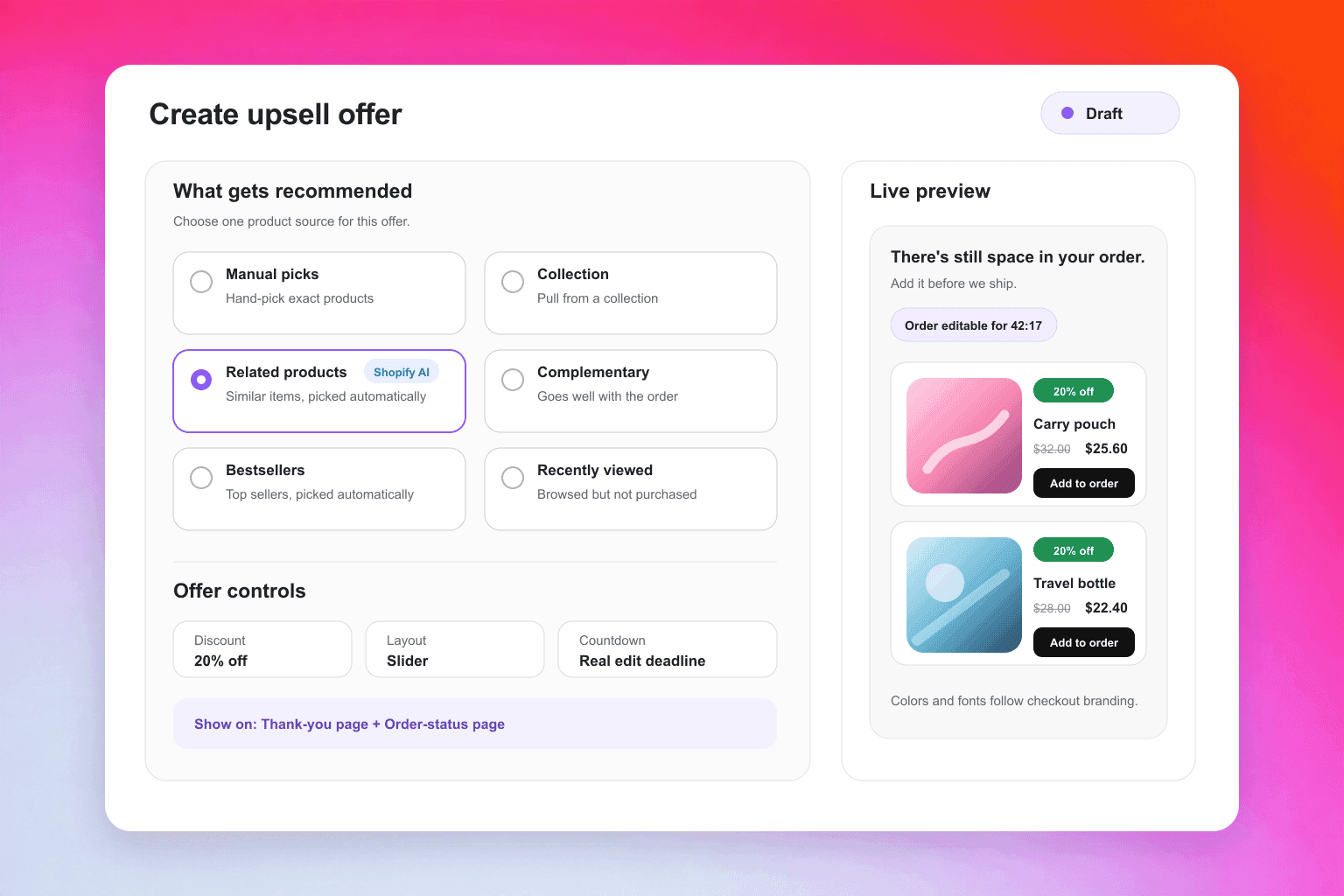
Pick one of six product sources: manual picks, a collection, Shopify related, Shopify complementary (via Search & Discovery), bestsellers, or recently viewed. Set an inventory rule, turn on Hide products already in the order, and turn on Fall back to bestsellers so the offer never shows up empty.
Optionally add an offer discount (percentage or fixed amount) with a label on the order line and strikethrough pricing. Use Exclude upsell from order discounts if the upsell line should get only its own discount.
Choose a layout (List, Slider, Grid or Spotlight), turn on the countdown and pick its style (its end point is the editing deadline), add start and end dates if the offer is seasonal, set Accepts per order, switch the status to Active and save.
Tip: Revize shows only the first offer that matches an order, reading from the top of your list down. Put your most specific offers at the top and the catch-all offer at the bottom.
Moment three: the order edit window before fulfillment
Until the merchant's edit window closes, and it is set to close before fulfillment, a customer using Revize can add products themselves, and those products ship on the same order.
At lunch, the grinder buyer decides they want a second bag of beans. They open the order status page, click Add products in the Revize portal, choose a variant and click Pay now. Shopify's checkout collects only the difference. The item is appended to the existing order: no second order, no second shipping charge, no second pick. This is a Pro-plan capability, covered in the add products documentation. For the full customer flow, see our guide to letting customers add items after checkout.
Two settings decide whether this is safe to run:
The window. Under Order Editing > Order edit window you can pick 15, 30 or 60 minutes, a custom duration of up to 48 hours, Until fulfillment, or scheduled cutoffs that match your pick runs (edit window setup).
The hold. Under Order Editing > Order processing, the recommended Hold orders mode places a Shopify fulfillment hold, so your 3PL (a third-party logistics warehouse that picks and ships your orders) waits until the window closes. The store-wide Until fulfillment window does not place a hold on its own. Our walkthrough on stopping a 3PL from picking during the edit window covers each stack.
Never let the warehouse pick an order the customer is still changing. An unpaid addition sits in Pending Payments on fulfillment hold, and Revize sends reminder emails. This is also the one placement where the customer's own intent picks the product, not the store's guess.
What Revize's dataset says about timing
Customers return to their orders within minutes, which puts the order status page and the edit window directly in their path.
In Revize's data, the median post-checkout edit arrives 4.6 minutes after the order is placed, and 80.6% of edits happen within the first hour (Revize, 2026). A customer who comes back that fast is looking at the order status page, the page that carries your order-status offer.
Some of that return traffic is already spending. Of edited orders, 8.8% add a product and 8.0% accept an upsell offer (Revize, 2026).
As an illustration only, take a hypothetical store that ships 10,000 orders a month: at 5.2%, roughly 520 orders would be edited, and a slice of those edits would be customers buying more before anything ships.
The operational point: across all stores, about one in five edits arrives after the first hour, and stores with short windows cap that share because their windows have already closed. Set the window by your pick schedule, not by habit.
Which Shopify post purchase upsell placement fits your store?
These placements do not compete, so stack them: one app on the post-purchase page, and Revize on the pages and window that every buyer reaches.
Placement | When the customer sees it | Payment exclusions Shopify documents | How payment works | Where the item goes |
|---|---|---|---|---|
Post-purchase page | After payment, before the thank-you page | Yes: some wallets and gift cards (see Shopify docs) | One click, saved payment | Same order |
Thank-you page (Revize, Pro) | Once, right after checkout | None documented; test wallet orders | Shopify collects the difference | Same order, held until paid |
Order status page (Revize, Pro) | On each return to the order | None documented; test wallet orders | Shopify collects the difference | Same order, held until paid |
Order edit window (Revize, Pro) | Whenever the customer chooses, until the window closes | None documented; test wallet orders | Pay now for the difference | Same order and shipment |
Decide by three inputs. Payment mix: if your checkout leans on wallets, moments two and three are where those buyers are. Fulfillment speed: a same-day shipper runs a short window, so the thank-you offer carries more of the load. Pick schedule: batch pickers with scheduled cutoffs give the edit window hours of selling room. Orders you never want changed can be locked separately with order tags under Settings > Order edit restrictions.

What happens when an upsold order changes later?
Because the upsold item sits on the same order, a later refund, cancellation or address change is handled in one place.
Say the grinder buyer accepts the beans offer and then moves house before the pick. In the Revize portal they can change the shipping address, lower a quantity, remove the upsold item or cancel while the window is open. When an address change raises the shipping cost, the customer pays the difference before the change is applied. Shipping and tax recalculation is on the Pro plan.
Refunds follow one setting under Order Editing > Refund options: No refund, Refund to original payment, or Refund as store credit. Store credit is Pro-only. Choose No refund with care: it blocks every edit that lowers the order value and removes the cancel button. Our cancellation guide walks through both sides.
If any tool you run puts an upsell on a second order instead, check what happens when the customer cancels one of the two, and whether both ship together.
What to do this week
Pull your checkout's payment-method mix and estimate how many buyers skip the post-purchase page.
Pick one app for the post-purchase page. Only one can run there.
Build one Revize offer for the Order-status and Thank-you pages, with a Payment method condition.
Set your edit window to match your pick times, and confirm that Hold orders is on.
Test with Shopify draft orders, plus one real Apple Pay order, before you set any Shopify post purchase upsell to Active.
Frequently Asked Questions
What is the difference between a post-purchase page and a thank-you page upsell on Shopify?
The post-purchase page appears between payment and the thank-you page and charges in one click, while thank-you page offers appear after the order is confirmed. In practice the post-purchase page suits one high-conviction impulse offer. The thank-you and order status pages suit targeted offers built on the order's contents, the customer's history or the shipping country, and they stay in front of customers who return later.
Why doesn't my post-purchase upsell show for some customers?
Payment method is the most common reason, followed by app selection and access. Shopify runs only one selected app on the post-purchase page, so if another app is selected, yours will not load. Shopify's developer docs also describe an access request for live stores. Check which app is selected in your checkout settings, then test an order in each payment method you accept.
Do Apple Pay and Google Pay customers see post-purchase offers?
They can see an offer on the thank-you or order status page, even where Shopify's post-purchase docs list their payment method among those that skip the post-purchase page. For wallet-heavy stores, the order status page matters most, because it is also where the Edit Order link in the confirmation email lands. Run a real wallet test order and confirm the offer renders on both pages.
Does a thank-you page upsell create a new order or add to the original one?
That depends on the app, and with Revize the product joins the original order. It ships in the same box on the same order number. The order is tagged revize:upsell_offer, which you can filter on in Shopify Flow or in reports. Upsell analytics count only captured revenue, so an offer accepted but never paid counts as zero.
Do customers have to re-enter their card for a thank-you page upsell?
Not on the post-purchase page; after that, the customer pays the difference through Shopify. With Revize, an added product or accepted offer leads to a Pay now step that opens Shopify's checkout for only the extra amount, where the customer sees the new total before confirming. Because Shopify, not Revize, runs that step, confirm on a test order what Shopify asks for with each payment method you accept. If a customer leaves without paying, the addition stays on fulfillment hold and Revize sends reminders.
What changed on the Shopify thank-you page in 2026?
August 26, 2026 was the deadline to upgrade the Thank you and Order status pages, and Shopify upgrades stores that missed it automatically. Upgraded pages run app blocks instead of additional scripts. If your old upsell relied on scripts, open your checkout editor and confirm an app block is rendering an offer. The Shopify upgrade guide explains what the automatic upgrade does and does not carry over.
Can customers add items to their order after checkout on Shopify?
Yes: natively staff edit the order in admin, and Revize lets the customer do it themselves. In admin, Shopify lets merchants add products and send an invoice when more payment is due (Shopify order editing). Revize also supports Add to Order links in post-purchase email flows, which turns the confirmation email into another Shopify post purchase upsell surface.
Related Articles
Quick answer: A Shopify post purchase upsell can run in 3 places: the post-purchase page before the thank-you page (one click, but Shopify's docs say buyers on some payment methods skip it), the thank-you and order status pages, and the order edit window before fulfillment. Revize's upsell and add-products features (Pro plan) cover the last two.
Why placement decides a Shopify post purchase upsell
An offer only works if the customer is standing in front of it, and each screen after checkout reaches a different set of customers.
An order is not finished when the customer clicks the payment button. Across 10 million+ Shopify orders, about 1 in 19 (5.2%) is edited after checkout (Revize, 2026), according to our Shopify order editing statistics. Customers come back to their orders, and they come back fast.
That changes the upsell question. Most advice treats post-purchase selling as one screen. In practice there are three, and each has its own rules about who sees the offer, how payment is taken and whether the extra item ships in the same box. Follow one order through all three and the right placement for your store becomes clear.
The three moments after a Shopify checkout
A Shopify order passes three points where the store can still sell: the post-purchase page, the thank-you and order status pages, and the order edit window.
Say a store sells coffee gear, and a customer pays for a grinder at 9:02 in the morning. Over the next day or two, that order passes:
The post-purchase page. Shopify shows it after checkout completes and before the Thank you page (Shopify post-purchase docs).
The thank-you page, then the order status page. The customer sees the thank-you page once, right after paying. The order status page is the one they come back to.
The order edit window. This is the time between checkout and the warehouse pick, when the order can still change.
The rest of this article follows the grinder order through each one.
Moment one: the Shopify post-purchase page
The post-purchase page is the only place a customer can accept an offer in one click on the payment they just used, and Shopify applies its tightest rules there.
Back to the grinder. The customer clicks Pay, and before the thank-you page loads, a single offer appears. Shopify builds this surface as a post-purchase extension. Its developer docs describe the extension as a beta that live stores request access to (Shopify post-purchase docs); check that page for the current access status before you plan a launch. This is the moment Reovy, Revize's sister app from Untechnickle, is built for. The shopper accepts one offer with one click, the item joins the same order, and they never re-enter payment. The offer is picked by PatternOS, Reovy's recommendation engine, which learns what sells together in the store's own orders alongside what Shopify recommends, and never offers the product the shopper just bought or that product in another colour. Nothing goes live until the merchant publishes the offer.
One platform rule shapes the whole page: only one app can run on the post-purchase page at a time (Shopify Help Center).
In plain terms: the post-purchase page fits exactly one app. Choose it once, and spend that offer on the product most buyers genuinely want next.
Who never sees the post-purchase page?
Shopify's post-purchase documentation lists payment methods whose buyers skip the page entirely. When we read Shopify's list in September 2026 it named wallet payments such as Apple Pay and Google Pay, gift cards, and third-party providers that require CVV retention (keeping the card's security code on file). The list can change, so read the current version before you build around it.
If a large share of your checkout runs through the excluded methods, those buyers never meet a moment-one offer, and that offer has no fallback. The only way to reach them is a placement they actually load.
Shopify documents these exclusions for the post-purchase page, not for the thank-you and order status pages. Place a test order with Apple Pay and confirm your thank-you page offer renders before you count on it.
Moment two: thank-you and order status page upsells
Every customer lands on the thank-you page and returns to the order status page, and Revize upsell offers on both pages add the product to the same Shopify order (Pro plan).
On Basic Shopify and higher plans, apps can customize these two pages (Shopify Help Center). One constraint shapes every thank-you page upsell: these UI extensions can show offers, but no API lets a UI extension change an order directly (Shopify thank-you and order status docs). The page can display the offer. Something else has to put the item on the order.
With Revize, that something is Shopify order editing. The accepted product goes onto the same Shopify order, and Shopify recalculates the amount due and collects only the difference in its native flow. Revize does not create a side checkout or send a manual invoice. The added item stays on fulfillment hold until payment is captured, except on cash-on-delivery orders. The full mechanism is on the post-purchase upsells setup page.
The order status page does more work than it gets credit for. After the single thank-you view, customers come back through the order status page and the Edit Order link in their confirmation email. If you enable the offer countdown, Revize ties it to the order's editing deadline rather than to an arbitrary timer, so the urgency the customer sees is real.
How to set up a thank-you page upsell in Revize
Build an offer under Upsell > Create offer, point it at the Thank-you page, the Order-status page or both, and set it to Active.
Install Revize from the Shopify App Store. Upsell offers are on the Pro plan, which has a 14-day free trial.
Open Upsell and click Create offer. New offers start as Draft, so customers see nothing yet.
Name the offer and choose the surface: Thank-you page, Order-status page, or both.
Add targeting conditions in ALL or ANY groups: order total, first-time buyer, shipping country, customer tags, or Payment method, which lets you build separate offers for prepaid and manual-payment orders. Revize re-checks conditions on the server at acceptance, so an outdated page cannot claim an offer.
Pick one of six product sources: manual picks, a collection, Shopify related, Shopify complementary (via Search & Discovery), bestsellers, or recently viewed. Set an inventory rule, turn on Hide products already in the order, and turn on Fall back to bestsellers so the offer never shows up empty.
Optionally add an offer discount (percentage or fixed amount) with a label on the order line and strikethrough pricing. Use Exclude upsell from order discounts if the upsell line should get only its own discount.
Choose a layout (List, Slider, Grid or Spotlight), turn on the countdown and pick its style (its end point is the editing deadline), add start and end dates if the offer is seasonal, set Accepts per order, switch the status to Active and save.
Tip: Revize shows only the first offer that matches an order, reading from the top of your list down. Put your most specific offers at the top and the catch-all offer at the bottom.
Moment three: the order edit window before fulfillment
Until the merchant's edit window closes, and it is set to close before fulfillment, a customer using Revize can add products themselves, and those products ship on the same order.
At lunch, the grinder buyer decides they want a second bag of beans. They open the order status page, click Add products in the Revize portal, choose a variant and click Pay now. Shopify's checkout collects only the difference. The item is appended to the existing order: no second order, no second shipping charge, no second pick. This is a Pro-plan capability, covered in the add products documentation. For the full customer flow, see our guide to letting customers add items after checkout.
Two settings decide whether this is safe to run:
The window. Under Order Editing > Order edit window you can pick 15, 30 or 60 minutes, a custom duration of up to 48 hours, Until fulfillment, or scheduled cutoffs that match your pick runs (edit window setup).
The hold. Under Order Editing > Order processing, the recommended Hold orders mode places a Shopify fulfillment hold, so your 3PL (a third-party logistics warehouse that picks and ships your orders) waits until the window closes. The store-wide Until fulfillment window does not place a hold on its own. Our walkthrough on stopping a 3PL from picking during the edit window covers each stack.
Never let the warehouse pick an order the customer is still changing. An unpaid addition sits in Pending Payments on fulfillment hold, and Revize sends reminder emails. This is also the one placement where the customer's own intent picks the product, not the store's guess.
What Revize's dataset says about timing
Customers return to their orders within minutes, which puts the order status page and the edit window directly in their path.
In Revize's data, the median post-checkout edit arrives 4.6 minutes after the order is placed, and 80.6% of edits happen within the first hour (Revize, 2026). A customer who comes back that fast is looking at the order status page, the page that carries your order-status offer.
Some of that return traffic is already spending. Of edited orders, 8.8% add a product and 8.0% accept an upsell offer (Revize, 2026).
As an illustration only, take a hypothetical store that ships 10,000 orders a month: at 5.2%, roughly 520 orders would be edited, and a slice of those edits would be customers buying more before anything ships.
The operational point: across all stores, about one in five edits arrives after the first hour, and stores with short windows cap that share because their windows have already closed. Set the window by your pick schedule, not by habit.
Which Shopify post purchase upsell placement fits your store?
These placements do not compete, so stack them: one app on the post-purchase page, and Revize on the pages and window that every buyer reaches.
Placement | When the customer sees it | Payment exclusions Shopify documents | How payment works | Where the item goes |
|---|---|---|---|---|
Post-purchase page | After payment, before the thank-you page | Yes: some wallets and gift cards (see Shopify docs) | One click, saved payment | Same order |
Thank-you page (Revize, Pro) | Once, right after checkout | None documented; test wallet orders | Shopify collects the difference | Same order, held until paid |
Order status page (Revize, Pro) | On each return to the order | None documented; test wallet orders | Shopify collects the difference | Same order, held until paid |
Order edit window (Revize, Pro) | Whenever the customer chooses, until the window closes | None documented; test wallet orders | Pay now for the difference | Same order and shipment |
Decide by three inputs. Payment mix: if your checkout leans on wallets, moments two and three are where those buyers are. Fulfillment speed: a same-day shipper runs a short window, so the thank-you offer carries more of the load. Pick schedule: batch pickers with scheduled cutoffs give the edit window hours of selling room. Orders you never want changed can be locked separately with order tags under Settings > Order edit restrictions.
What happens when an upsold order changes later?
Because the upsold item sits on the same order, a later refund, cancellation or address change is handled in one place.
Say the grinder buyer accepts the beans offer and then moves house before the pick. In the Revize portal they can change the shipping address, lower a quantity, remove the upsold item or cancel while the window is open. When an address change raises the shipping cost, the customer pays the difference before the change is applied. Shipping and tax recalculation is on the Pro plan.
Refunds follow one setting under Order Editing > Refund options: No refund, Refund to original payment, or Refund as store credit. Store credit is Pro-only. Choose No refund with care: it blocks every edit that lowers the order value and removes the cancel button. Our cancellation guide walks through both sides.
If any tool you run puts an upsell on a second order instead, check what happens when the customer cancels one of the two, and whether both ship together.
What to do this week
Pull your checkout's payment-method mix and estimate how many buyers skip the post-purchase page.
Pick one app for the post-purchase page. Only one can run there.
Build one Revize offer for the Order-status and Thank-you pages, with a Payment method condition.
Set your edit window to match your pick times, and confirm that Hold orders is on.
Test with Shopify draft orders, plus one real Apple Pay order, before you set any Shopify post purchase upsell to Active.
Frequently Asked Questions
What is the difference between a post-purchase page and a thank-you page upsell on Shopify?
The post-purchase page appears between payment and the thank-you page and charges in one click, while thank-you page offers appear after the order is confirmed. In practice the post-purchase page suits one high-conviction impulse offer. The thank-you and order status pages suit targeted offers built on the order's contents, the customer's history or the shipping country, and they stay in front of customers who return later.
Why doesn't my post-purchase upsell show for some customers?
Payment method is the most common reason, followed by app selection and access. Shopify runs only one selected app on the post-purchase page, so if another app is selected, yours will not load. Shopify's developer docs also describe an access request for live stores. Check which app is selected in your checkout settings, then test an order in each payment method you accept.
Do Apple Pay and Google Pay customers see post-purchase offers?
They can see an offer on the thank-you or order status page, even where Shopify's post-purchase docs list their payment method among those that skip the post-purchase page. For wallet-heavy stores, the order status page matters most, because it is also where the Edit Order link in the confirmation email lands. Run a real wallet test order and confirm the offer renders on both pages.
Does a thank-you page upsell create a new order or add to the original one?
That depends on the app, and with Revize the product joins the original order. It ships in the same box on the same order number. The order is tagged revize:upsell_offer, which you can filter on in Shopify Flow or in reports. Upsell analytics count only captured revenue, so an offer accepted but never paid counts as zero.
Do customers have to re-enter their card for a thank-you page upsell?
Not on the post-purchase page; after that, the customer pays the difference through Shopify. With Revize, an added product or accepted offer leads to a Pay now step that opens Shopify's checkout for only the extra amount, where the customer sees the new total before confirming. Because Shopify, not Revize, runs that step, confirm on a test order what Shopify asks for with each payment method you accept. If a customer leaves without paying, the addition stays on fulfillment hold and Revize sends reminders.
What changed on the Shopify thank-you page in 2026?
August 26, 2026 was the deadline to upgrade the Thank you and Order status pages, and Shopify upgrades stores that missed it automatically. Upgraded pages run app blocks instead of additional scripts. If your old upsell relied on scripts, open your checkout editor and confirm an app block is rendering an offer. The Shopify upgrade guide explains what the automatic upgrade does and does not carry over.
Can customers add items to their order after checkout on Shopify?
Yes: natively staff edit the order in admin, and Revize lets the customer do it themselves. In admin, Shopify lets merchants add products and send an invoice when more payment is due (Shopify order editing). Revize also supports Add to Order links in post-purchase email flows, which turns the confirmation email into another Shopify post purchase upsell surface.
Related Articles

Repensez votre boutique Shopify. Misez sur l’expérience client.

© Copyright 2024, Tous droits réservés
Repensez votre boutique Shopify. Misez sur l’expérience client.
© Copyright 2024, Tous droits réservés
Repensez votre boutique Shopify. Misez sur l’expérience client.
© Copyright 2024, Tous droits réservés
Repensez votre boutique Shopify. Misez sur l’expérience client.
© Copyright 2024, Tous droits réservés