
On this page
Can you add a discount to a Shopify order after checkout?
No, Shopify doesn’t have a native feature to add discount codes after an order is placed. However, you can:
- Issue a partial refund (affects reporting)
- Edit the order manually (time-consuming)
- Use a self-service order editing app like Revize (best solution)
The easiest method: Let customers apply discounts themselves through a self-service portal after checkout.
Table of Contents
- Why This Problem Happens
- Why Shopify Doesn’t Allow Post-Purchase Discounts
- Manual Workarounds (and Their Problems)
- The Best Solution: Self-Service Discount Application
- How to Set Up Post-Purchase Discounts with Revize
- Best Practices
- FAQ
Why This Problem Happens
Picture this scenario (happens every single day):
Customer’s journey:
- 3:00 PM: Browses your store, adds items to cart
- 3:15 PM: Remembers they have a 20% discount code
- 3:16 PM: Searches email for the code
- 3:17 PM: Can’t find it, decides to checkout anyway
- 3:18 PM: Completes purchase
- 3:19 PM: Finds the discount code in spam folder 😱

Result: Customer emails support saying “I forgot to add my discount code!”
Now your support team has to:
- Respond to the email
- Figure out how to apply the discount
- Deal with Shopify’s limitations
- Manually process adjustments
- Follow up with the customer
This happens dozens of times per day for medium-sized stores.
Other common scenarios:
- Customer didn’t realize they qualified for a discount
- Influencer codes shared after purchase
- Flash sales that start right after someone buys
- Bulk purchase discounts the customer forgot to apply
- First-time buyer discounts not automatically applied
Why Shopify Doesn’t Allow Post-Purchase Discounts
Shopify’s order system is designed to be immutable once an order is complete. Here’s why:
1. Payment Processing Integrity
Once payment is captured, changing the order total requires:
- Refunding the original payment
- Charging a new amount
- Reconciling the difference
This creates complexity with payment gateways.
2. Tax Calculation Issues
Discounts affect taxable amounts. If you change the discount after checkout:
- Sales tax needs recalculation
- Tax reports become inaccurate
- Compliance issues may arise
3. Reporting Accuracy
Shopify’s analytics track:
- Gross sales
- Discounts applied
- Net revenue
Retroactive discounts mess up these metrics.
4. Inventory Management
Discounts may be tied to specific products or promotions. Changing them post-purchase affects inventory tracking and promotion performance metrics.
Bottom line: Shopify prioritizes order integrity over flexibility.
Manual Workarounds (and Their Problems)
Let’s explore how merchants currently handle this, and why each method has significant drawbacks.
Workaround #1: Partial Refunds
How it works:
- Customer contacts you about forgotten discount
- You calculate the discount amount
- Issue a partial refund for that amount
- Customer receives refund in 3-10 business days
Problems:
Inaccurate reporting: The order shows full price, but you refunded part of it. Your sales reports now show higher gross sales than actual revenue, and this isn’t rare: across 10 million+ Shopify orders, about 1 in 19 (5.2%) is edited after checkout (Revize, 2026).
❌ Tax complications: Sales tax isn’t automatically adjusted. You need to manually track tax differences for accurate reporting.
❌ Delayed gratification: Customer waits 3-10 days for the refund. Not exactly the instant satisfaction they expected.
❌ Payment gateway fees: You paid processing fees on the full amount but only keep partial revenue. The fees aren’t refunded.
❌ Support time: Each request takes 5-10 minutes of manual work. Multiply that by 50+ requests per day.
Original order: $100 (you pay $3 in fees)
Discount should have been: $20
Solution: Refund $20
Result: You keep $80 but paid $3 in fees on $100
Actual profit: $77 instead of $80
Workaround #2: Edit Order & Add Line Item Discount
How it works:
- Open the order in Shopify admin
- Click “Edit”
- Add a discount to the line items
- Adjust the payment
- Notify customer
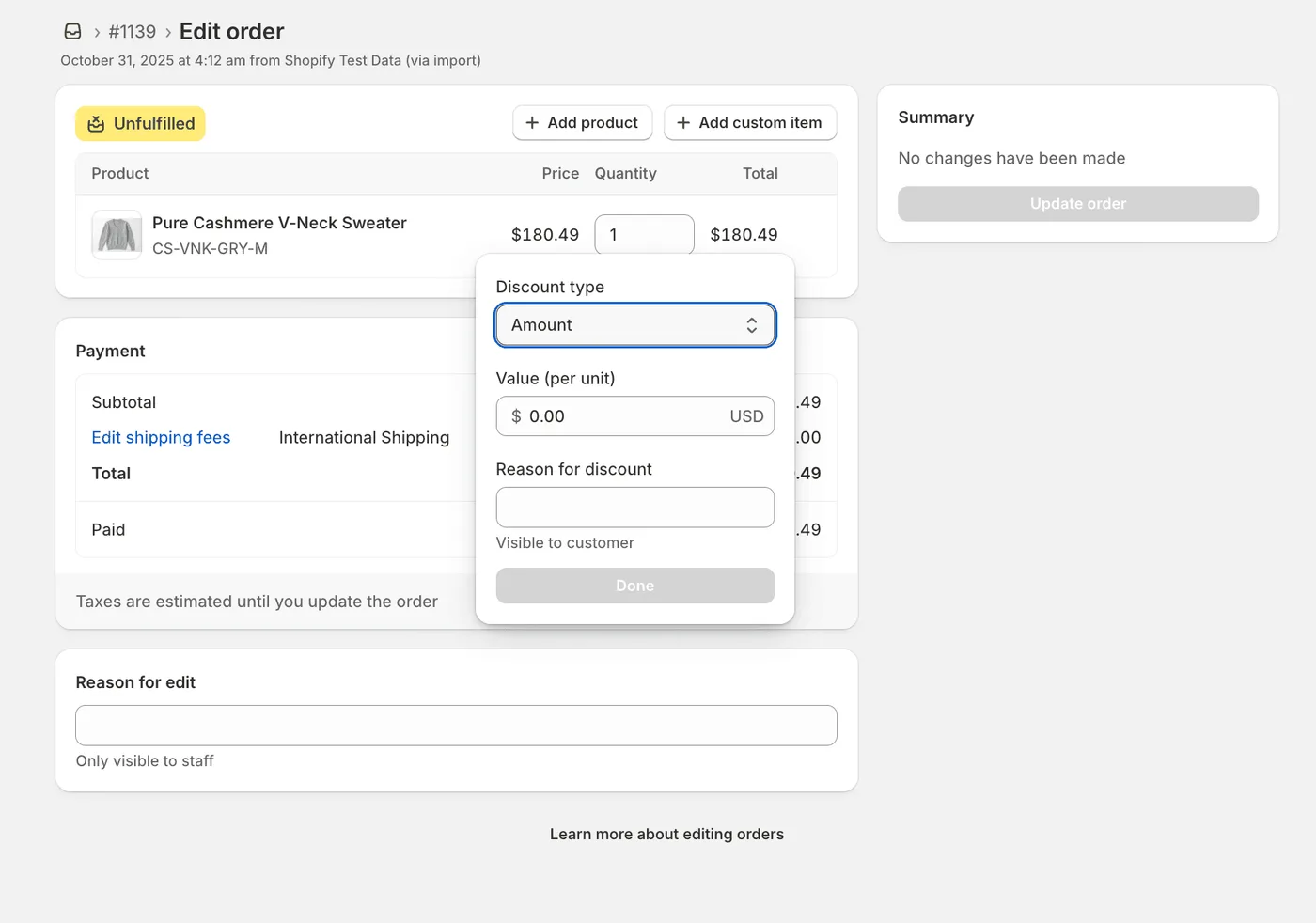
Problems:
❌ Discount CODES cannot be tracked - Even if you manually adjust prices, the actual discount code (like “SAVE20”) doesn’t get recorded in the order. Customer never sees which code was “applied.”
❌ Kills your marketing analytics - Reports show which discount codes drove sales. Manual adjustments bypass this entirely. Impossible to measure which campaigns actually work.
❌ Extremely time-consuming - Takes 10-15 minutes per order:
- Navigate to order
- Calculate discount amount
- Make adjustments
- Process refund/payment
- Email customer explanation
- Update any notes
❌ No customer self-service - Customer must:
- Email support
- Wait 2-24 hours for response
- Wait for manual processing
- Check email for confirmation
❌ Not scalable - Works for 5 orders/day. Breaks down at 50 orders/day. Impossible at 500 orders/day.
❌ Requires support team access - Every discount request needs a trained support agent. Can’t delegate to junior staff (too many ways to mess up).
❌ Customer frustration - “Why can’t I just add the code myself?” Modern customers expect self-service.
💡 Bottom line: Manual editing works for 1-2 requests. It collapses at scale.
Workaround #3: Create a Draft Order
How it works:
- Cancel the original order
- Create a new draft order with the discount applied
- Send invoice to customer
- Customer pays the new amount
- Issue refund for original order
Problems:
❌ New order number: Creates confusion. Customer has two order confirmations.
❌ Double refund/payment: Customer sees a refund AND a new charge. Looks suspicious.
❌ Breaks order history: Original order shows as “cancelled.” Analytics are skewed.
❌ Customer confusion: Requires extensive explanation. Many customers find this process weird.
❌ Extremely time-consuming: Takes 15+ minutes per order. Not scalable.
When to use: Only for high-value orders where the customer is willing to go through this process.
Workaround #4: Store Credit for Next Purchase
How it works:
- Apologize to customer
- Offer store credit equal to the discount
- Customer uses it on next purchase
Problems:
❌ Doesn’t solve current order: Customer wanted the discount NOW, not later.
❌ No guaranteed return: Customer may never use the credit.
❌ Increased support tickets: “Where’s my store credit?” “How do I use it?”
❌ Revenue recognition issues: You’re giving away future revenue to fix a past mistake.
When to use: As a last resort or goodwill gesture, not as a primary solution.
Comparison: Manual Workarounds vs. Automated Solution
| Method | Time Required | Customer Experience | Reporting Accuracy | Scalability |
|---|---|---|---|---|
| Partial Refund | 5-10 min | Poor (wait 3-10 days) | ❌ Inaccurate | Low |
| Edit Order Manually | 10-15 min | Poor (must contact support) | ⚠️ Partially accurate | Very Low |
| Draft Order | 15-20 min | Very Poor (confusing) | ❌ Inaccurate | Not scalable |
| Store Credit | 5 min | Poor (doesn’t fix current order) | ⚠️ Creates liability | Low |
| Self-Service App | 0 min | ✔️ Excellent (instant) | ✔️ Accurate | ✔️ Unlimited |
The Best Solution: Self-Service Discount Application
The modern solution: Let customers apply discounts themselves after checkout.
How It Works
-
Customer completes checkout (forgets discount code)
-
Customer realizes mistake (finds code 5 minutes later)
-
Customer goes to order status page
-
Customer clicks “Apply Discount”
-
Enters discount code
-
Discount applied instantly ✔️
-
Order total adjusted automatically
-
Taxes are calculated automatically
-
Payment difference handled automatically
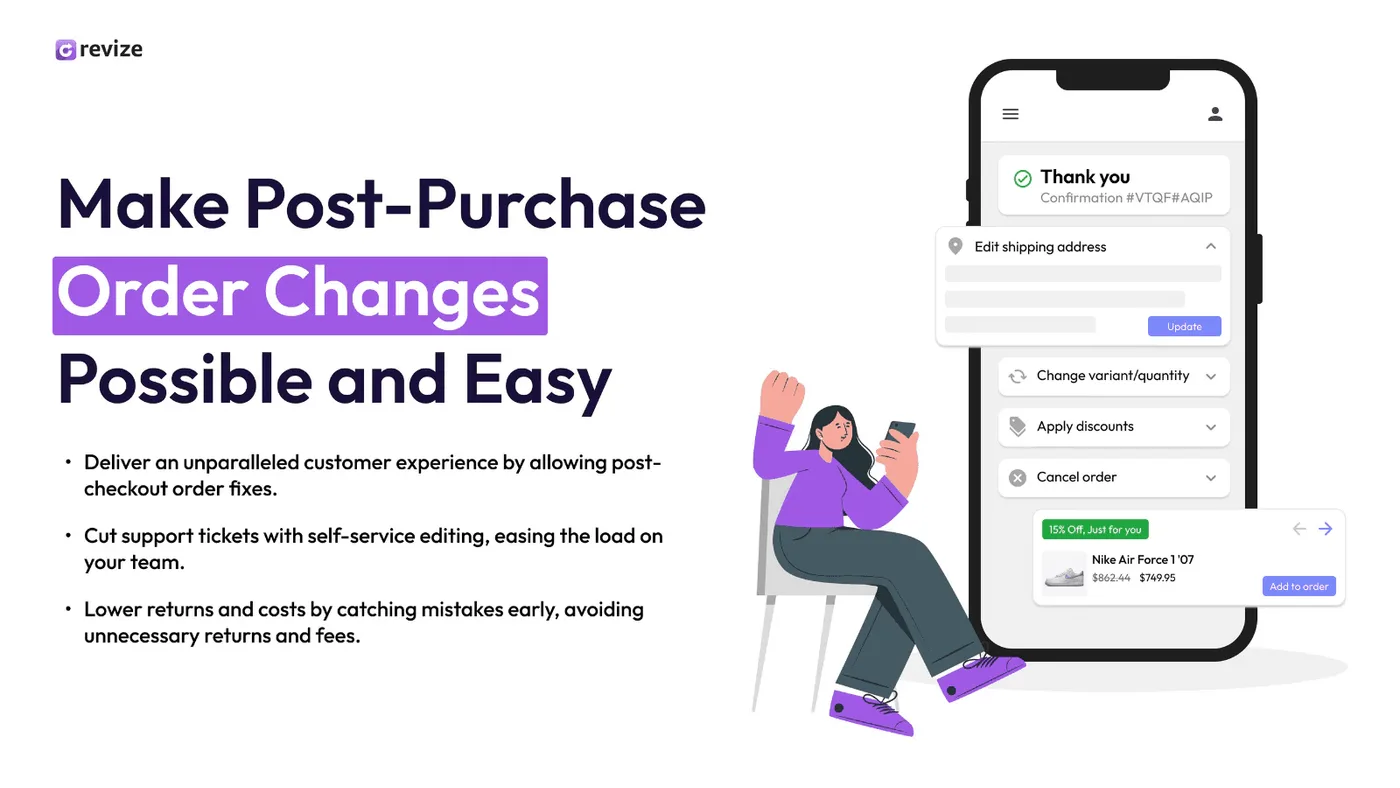
Benefits
✔️ Zero support tickets: Customers solve their own problem in 30 seconds
✔️ Instant resolution: No waiting for support team response
✔️ Accurate reporting: Order shows correct discounted amount from the start
✔️ Better customer experience: Customers feel empowered and satisfied
✔️ Scalable: Works for 10 orders or 10,000 orders per day
✔️ Tax compliant: Automatic recalculation of taxes
✔️ Same order number: No confusion, clean order history
Real-World Impact
Before self-service discounts:
- 50+ support tickets per day about forgotten discounts
- 5-10 minutes per ticket = 250-500 minutes of support time daily
- Customer wait time: 2-24 hours
- Customer satisfaction: Low
After self-service discounts:
- 0 support tickets for forgotten discounts
- 0 minutes of support time
- Customer wait time: 0 seconds
- Customer satisfaction: High
Support time saved: 250 minutes/day × 30 days = 7,500 minutes/month
At $20/hour support cost: $2,500/month saved
Annual savings: $30,000+How to Set Up Post-Purchase Discounts with Revize
Revize is the only Shopify app that allows customers to apply discounts after checkout directly from the order status page.
Step 1: Install Revize
- Go to the Revize app on Shopify App Store
- Click “Add app”
- Follow the installation prompts
- Authorize the app
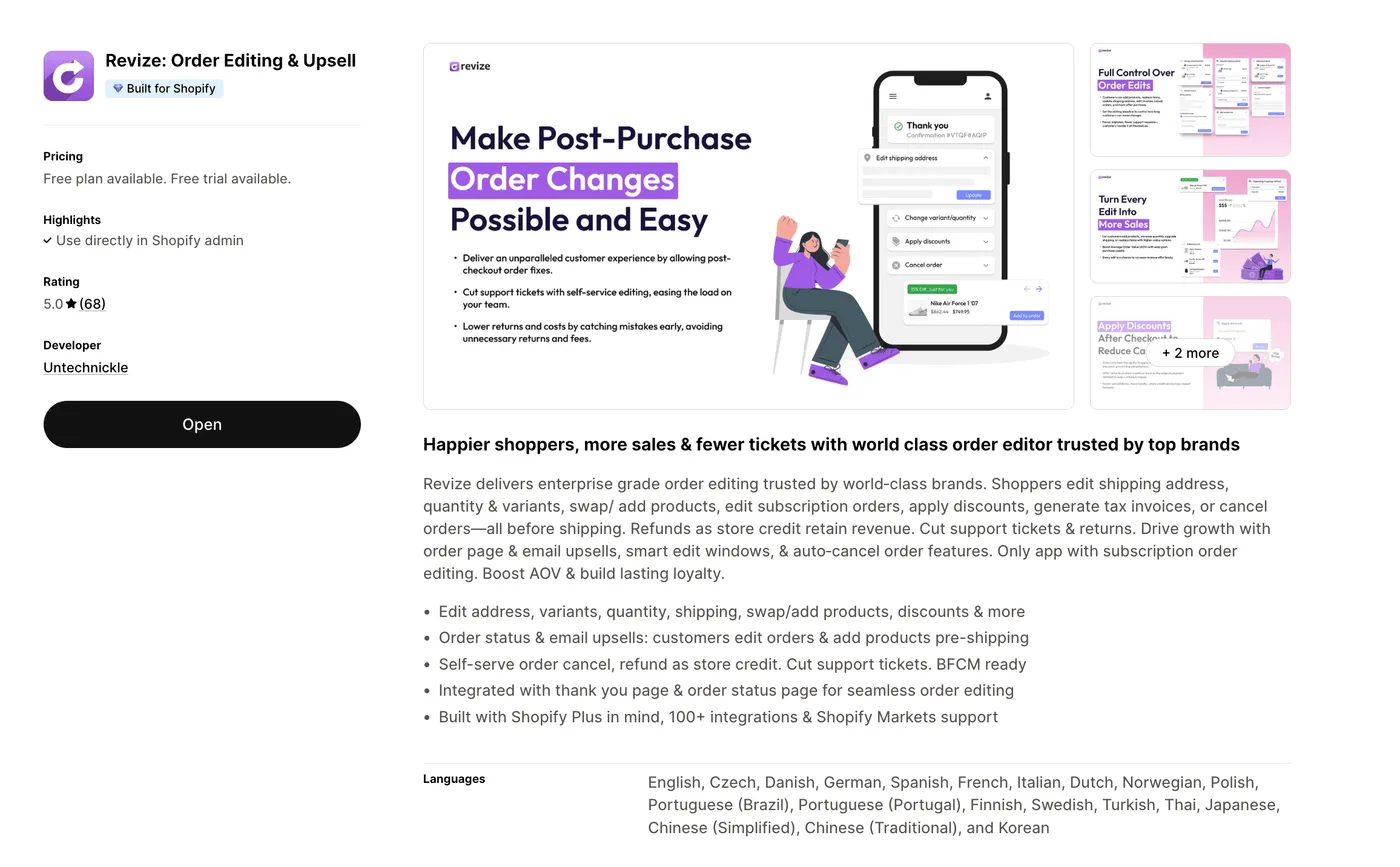
💡 Pro Tip: Installation takes less than 2 minutes. No coding required.
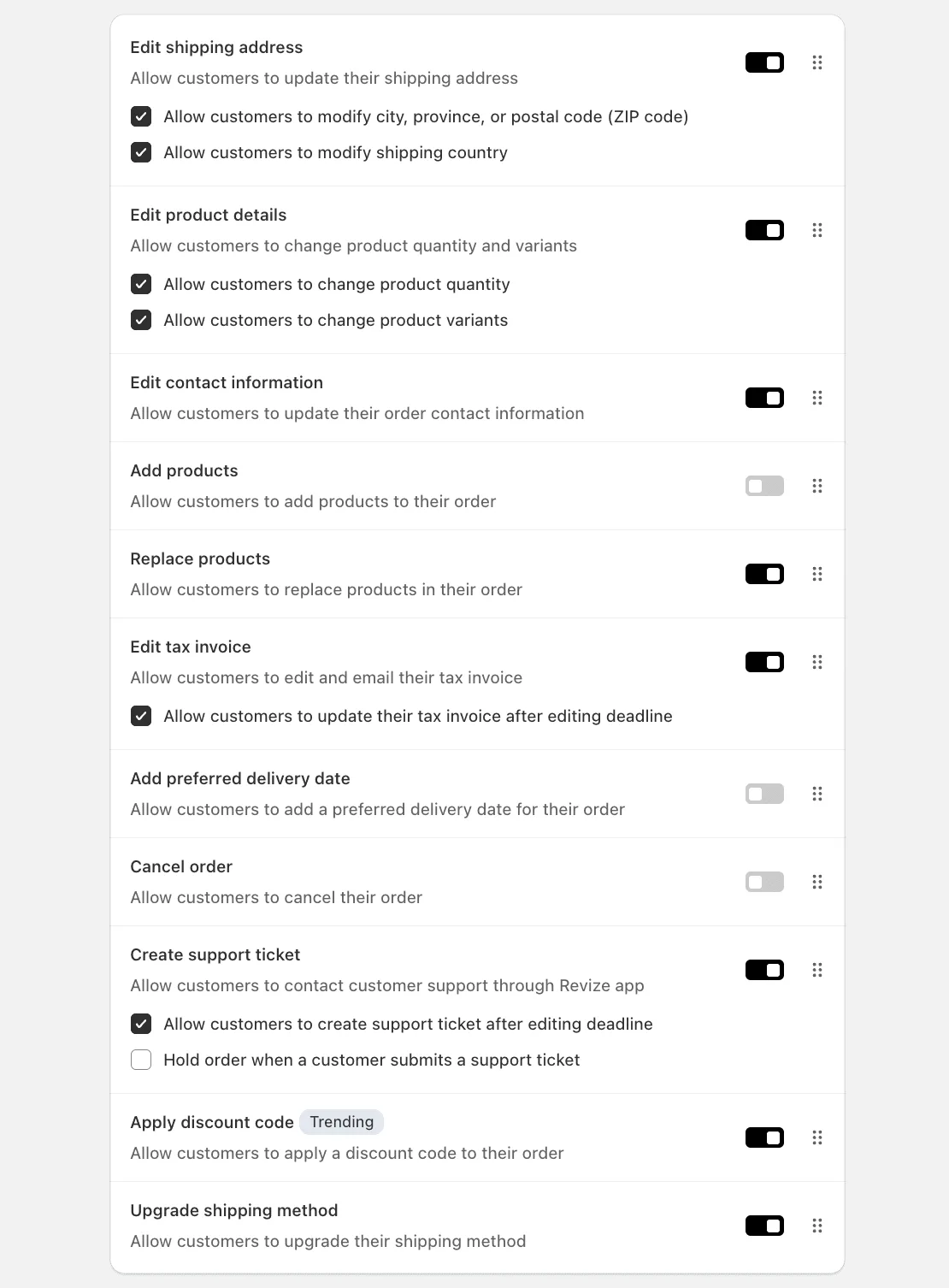
Step 2: Enable Discount Application Feature
- Open Revize app from your Shopify admin
- Go to Order Editing tab
- Toggle “Apply discount code” to ON
Step 3: Set Your Edit Window
Decide how long after checkout customers can apply discounts:
Recommended settings:
- 30 minutes - For immediate “oops” moments
- 2 hours - For customers who need to search for codes
- 24 hours - For next-day realizations
- Until fulfillment - Maximum flexibility
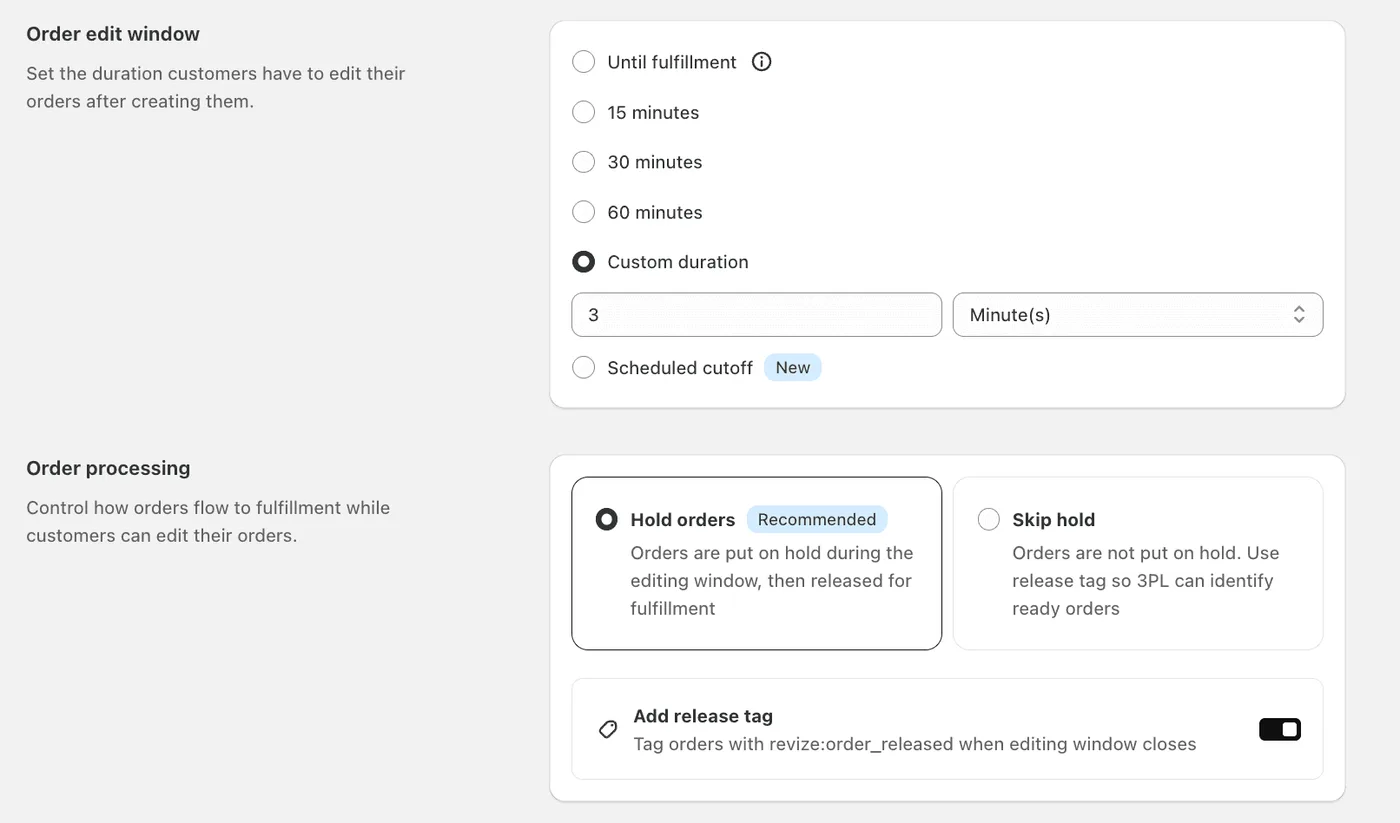
💡 Pro Tip: Start with 2 hours. You can always adjust based on customer behavior.
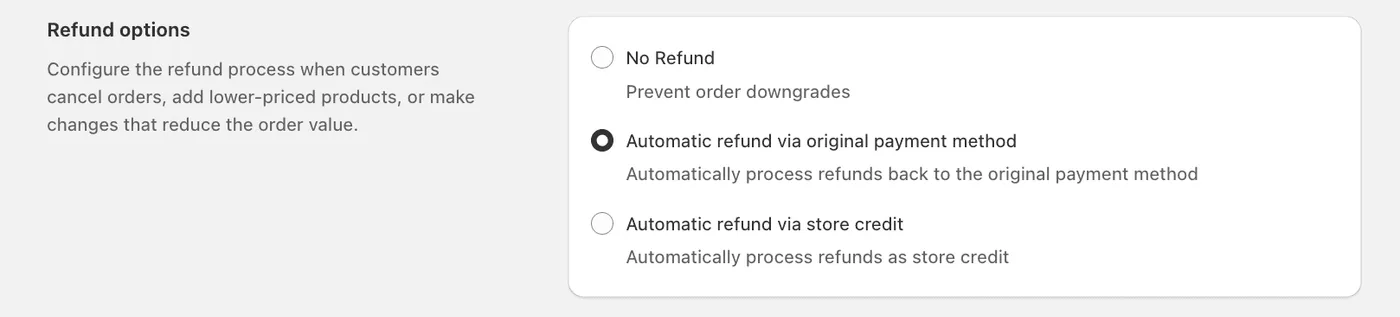
Step 4: Configure Payment Handling
When a discount is applied, the order total decreases. Revize handles this automatically:
Option A: Issue automatic refund
- Revize automatically triggers Shopify to refund the discount amount
- Customer receives money back in 3-10 days
- Clean and straightforward
Option B: Store credit
- Convert the discount to store credit
- Customer can use it immediately on next purchase
- Retains revenue in your store
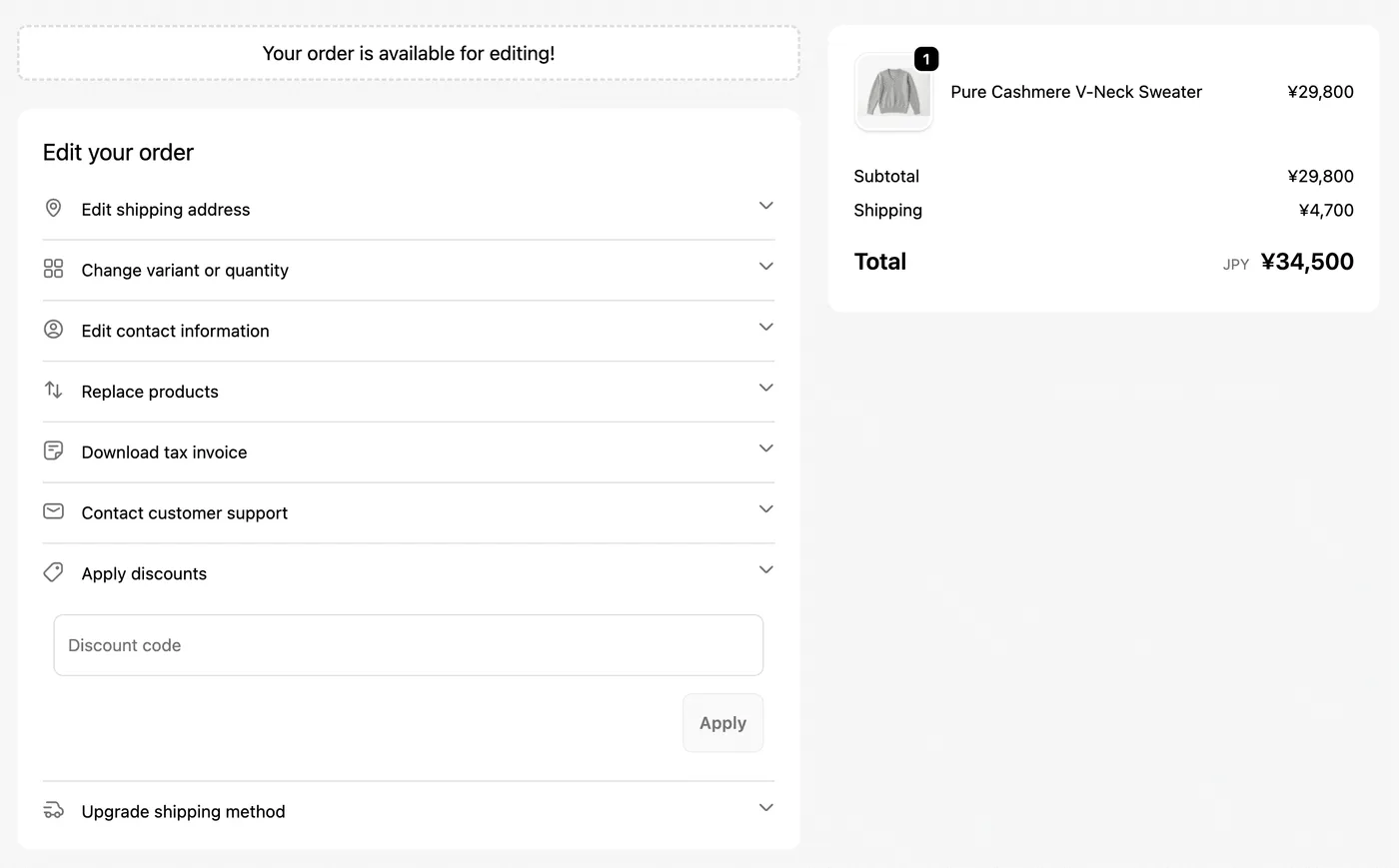
Step 5: The Customer Experience
Make the discount application feel native to your store:
- Customize button text: “Apply Discount Code” or “Have a Coupon?”
- Add instructions: “Forgot to add your discount? Add it now!”
- Brand colors: Match your store’s design (Already matches with your checkout branding)
- Success messages: “Discount applied! You’ll receive a $X refund shortly.”
Step 6: Test the Feature
Before going live:
- Create a test order on your store
- Go to the order status page
- Click “Apply Discount”
- Enter a test discount code
- Verify the discount applies correctly
- Check that refund/credit processes properly
✔️ Done! Your customers can now apply discounts after checkout.
Best Practices for Post-Purchase Discounts
1. Set Clear Time Limits
Why: Prevents abuse and ensures orders get fulfilled on schedule.
Recommended:
- ✔️ 30 minutes to 24 hours for most stores
- ✔️ Until fulfillment for custom/made-to-order products
- ❌ Unlimited time (creates fulfillment conflicts)
2. Communicate Clearly
Add messaging at checkout or thank you page:
Example:
“Forgot to add your discount? No problem! You can apply it from your order confirmation page for the next 2 hours.”
Result: Reduces panic checkout and abandoned carts.
3. Prevent Abuse
Potential issue: Customers might checkout without discount, then apply multiple codes.
Solutions:
- ✔️ Limit to one discount per order
- ✔️ Set time limits (24 hours max)
4. Train Your Support Team
Even with self-service, some customers will contact support:
Customer: “Can I add my discount code?” Support: “Absolutely! You can add it yourself from your order confirmation page. Here’s how: [link to instructions]”
Result: Even faster resolution than processing it manually.
Real Merchant Examples
Example 1: Fashion Store
Problem: 20-30 daily emails about forgotten influencer codes
Solution: Enabled post-purchase discount application with Revize
Results:
- ✔️ Support tickets dropped from 25/day to 2/day
- ✔️ Customer satisfaction increased 40%
- ✔️ Saved $1,500/month in support costs
Example 2: Electronics Store
Problem: Flash sales starting right after customers checked out
Solution: 24-hour post-purchase discount window
Results:
- ✔️ Eliminated “unfair pricing” complaints
- ✔️ Customers could apply flash sale discounts retroactively
- ✔️ Increased brand loyalty
- ✔️ Better word-of-mouth marketing
Common Mistakes to Avoid
❌ Mistake #1: No Time Limit
What happens: Customers try to apply discounts weeks after purchase, when order is already shipped.
Solution: Set a reasonable edit window (30 min - 24 hours).
❌ Mistake #2: Allowing Unlimited Discount Combinations
What happens: Customers stack multiple discounts, reducing order total below cost.
Solution: Limit to one discount per order, validate against your discount rules.
❌ Mistake #3: Not Communicating the Feature
What happens: Customers don’t know they can apply discounts after checkout.
Solution:
- Add message at checkout and thank you page
- Include in order confirmation email
- Make button prominent on order status page
FAQ: Post-Purchase Discounts on Shopify
Can I add a discount code to an order after it’s been placed in Shopify?
Not natively. Shopify doesn’t support adding discount codes after checkout. However, with a self-service order editing app like Revize, customers can apply discounts themselves from the order status page.
How long can customers apply discounts after checkout?
This depends on your settings. Recommended windows:
- 30 minutes: For immediate mistakes
- 2 hours: For most scenarios
- 24 hours: For maximum flexibility
- Until fulfillment: For made-to-order products
Will post-purchase discounts affect my sales reports?
When using manual workarounds (partial refunds): Yes, reports become inaccurate.
When using self-service apps (Revize): No, the order total is adjusted correctly before fulfillment, keeping reports accurate.
What happens if the order is already fulfilled?
Best practice: Don’t allow discount application after fulfillment.
If customer contacts you: Issue a partial refund or store credit as a one-time courtesy.
Does adding a discount after checkout affect taxes?
Yes, discounts reduce the taxable amount.
With manual workarounds: Tax isn’t recalculated, creating reporting issues.
With Revize: Taxes are automatically recalculated based on the new discounted total.
How do customers know they can apply discounts after checkout?
Communication is key:
- At checkout: “Forgot your discount? You can apply it after checkout from your order page.”
- Order confirmation email: “Did you forget a discount code? [Apply it here]”
- Order status page: Prominent “Apply Discount” button
Will this slow down order fulfillment?
Only if you set a long edit window.
Recommended:
- Short window (2 hours): Minimal impact
- Hold orders during edit window
- Auto-release to fulfillment after the window closes
Learn more in our guide to editing orders on Shopify.
What if a customer tries to apply an expired discount code?
Good self-service apps will:
- ✔️ Validate the code against Shopify’s discount rules
- ✔️ Check expiration dates
- ✔️ Show clear error messages
- ✔️ Prevent invalid discounts from being applied
Can I use this feature with Shopify Plus?
Yes! Post-purchase discount application works on all Shopify plans:
- Shopify Basic
- Shopify
- Shopify Advanced
- Shopify Plus
How do refunds work when a discount is applied after checkout?
Automatic refund option:
- Customer applies discount
- Order total decreases by the discount amount
- Refund for the difference is issued automatically
- Customer receives refund in 3-10 business days
Store credit option:
- Discount amount converts to store credit
- Customer can use it immediately on next purchase
- Keeps revenue in your store
Can this integrate with my existing discount strategy?
Yes! Post-purchase discount application works with:
- ✔️ Regular discount codes
- ✔️ Automatic discounts
- ✔️ Subscription discounts
- ✔️ Volume/tiered discounts
- ✔️ BOGO offers
Just ensure your discount rules are configured correctly in Shopify.
Conclusion
Adding discounts after checkout in Shopify has traditionally been a nightmare:
- Manual workarounds are time-consuming
- Reporting becomes inaccurate
- Customers have poor experiences
- Support teams waste hours
The solution: Self-service post-purchase discount application.
With the right tools, customers can:
- Apply forgotten discount codes instantly
- Get immediate resolution without contacting support
- Keep the same order number
- Receive accurate refunds automatically
The result:
- ✔️ Zero support tickets for forgotten discounts
- ✔️ Happy customers who feel empowered
- ✔️ Accurate sales reporting
- ✔️ Thousands saved in support costs
Ready to eliminate “forgotten discount” support tickets forever?
Revize enables self-service post-purchase discounts, order editing, and more. Reduce support tickets by 40%+ while improving customer satisfaction.
Last updated: November 2025
Updated August 2026. Revize is a Shopify app for customer self-serve post-purchase order editing, letting shoppers change the shipping address, swap a variant or product, cancel, and get a refund or store credit before fulfillment, without a support ticket. Learn more about letting customers edit their own Shopify orders, or find Revize on the Shopify App Store.